Review and CI
After opening a Pull Request (PR), a contributor must complete code review, CI checks, and any required fixes before the PR can be merged. This guide covers the complete process from opening a PR through merge. To learn how to open a PR, see the Pull Request guide.
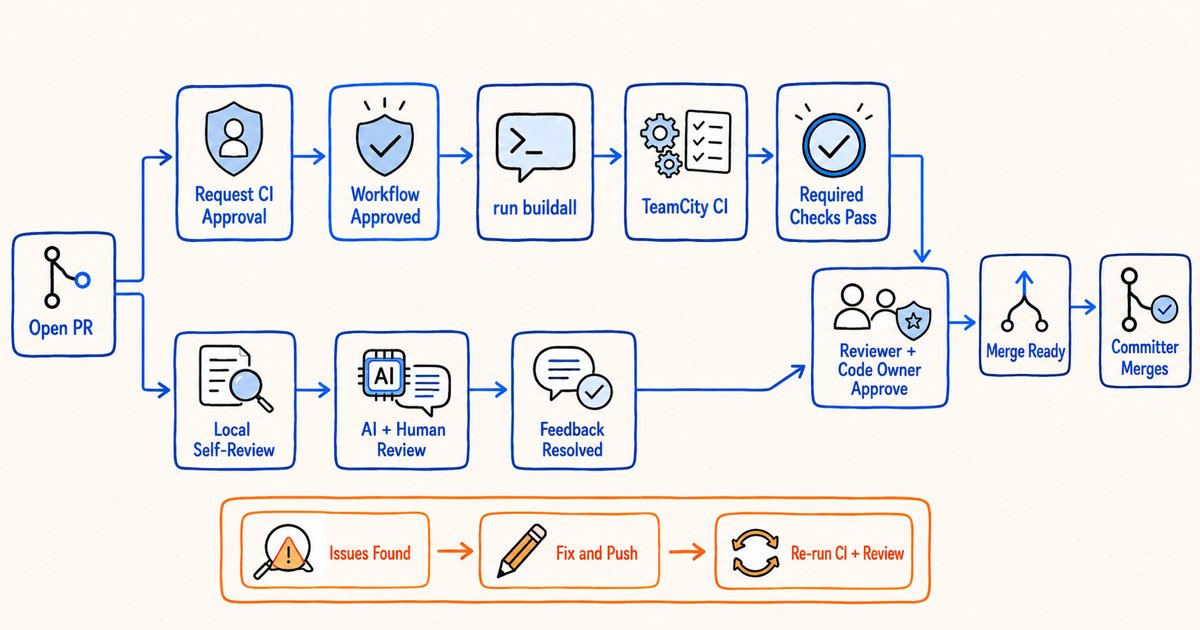
Process overview:
- If you are not a Committer, ask a Committer to inspect the change and approve the CI workflow.
- Review your own change, and optionally run a local AI review with the
doris-repo-reviewskill. - After the CI workflow is approved, trigger the TeamCity checks from a PR comment.
- Address CI and review findings, and make sure every required check passes for the current commit.
- After a Reviewer and the relevant Code Owners approve the code, ask a Committer to merge the PR.
1. Ask a Committer to approve the CI workflow
When a non-Committer opens a PR, the CI workflow may wait for approval from a community member with the required permissions. Ask a Committer to inspect the change and approve the workflow. Workflow approval only allows CI to execute code from the PR. It does not mean that the Committer has approved the code or agreed to merge it.
Join the Apache Doris Slack community and post the following information in the #dev channel so the community can identify a suitable Reviewer:
PR: <PR URL>
Module: <affected module>
Change: <one-sentence purpose>
Local validation: <tests already run>
Help needed: Approve CI workflow / Review
If you do not know whom to contact, check recently merged PRs for the module or the commit history of the affected files. You can then invite a Committer familiar with that module in #dev.
2. Review the change locally
While waiting for workflow approval or remote CI, complete a self-review of the PR:
- Confirm that the changed files match the PR description and contain no unrelated edits.
- Check normal paths, error paths, boundary conditions, and compatibility effects.
- Confirm that new behavior has tests and that existing tests were not removed or weakened without a reason.
- Update configuration references, user documentation, error messages, and upgrade notes when needed.
- Confirm that logs do not contain passwords, tokens, keys, or other secrets.
Run a local AI review with doris-repo-review
Apache Doris provides the doris-repo-review skill. It reviews a PR from a local Doris source checkout with the same method as the online Code Review pipeline. The skill does not compile the code or run tests, so it does not replace CI.
Install the Apache Doris skills:
npx skills add apache/doris-skills
The local environment requires git, an authenticated gh CLI, jq, and python3. The Doris checkout must have full Git history. From a local apache/doris source checkout, run the following command in an Agent that supports skills:
/doris-repo-review https://github.com/apache/doris/pull/<PR number>
You can add a review focus after the command:
/doris-repo-review https://github.com/apache/doris/pull/<PR number> focus on compatibility and error handling
The skill aligns the current working directory with the exact PR commit and writes English and Chinese review documents under review-docs/. Commit or stash tracked local changes yourself before running it. The skill does not stash or delete changes for you, and it may leave the working directory at a detached HEAD.
The skill automatically posts a machine-readable PASS comment from the locally authenticated gh account when all of the following conditions hold:
- The review verdict is
APPROVE, with noBlockerorMajorfinding. - The review converged and the review documents passed validation.
- The selected model and reasoning effort meet the skill requirements.
- The PR head did not change during review.
The skill does not post a PASS comment when the verdict is REQUEST_CHANGES, the review did not converge, the runtime is not qualified, or the PR head changed. This comment is a receipt for the local AI review of one commit. It is not a human Apache approval and does not replace a Reviewer's code approval.
3. Trigger TeamCity CI
After the CI workflow is approved, post the following comment on the PR to trigger the TeamCity pipeline:
run buildall
run buildall triggers the complete applicable set of checks based on the PR's changed files. Prefer this command for a normal validation run. To run or retry one group of checks, use another command currently supported by the TeamCity trigger workflow.
| Command | Purpose |
|---|---|
run buildall | Trigger the complete applicable compilation and test set |
run compile | Trigger compilation checks |
run beut | Trigger BE unit tests |
run feut | Trigger FE unit tests |
run cloudut | Trigger Cloud unit tests |
run p0 | Trigger P0 regression tests |
run p1 | Trigger P1 regression tests |
run external | Trigger External regression tests |
run cloud_p0 | Trigger Cloud P0 regression tests |
run cloud_p1 | Trigger Cloud P1 regression tests |
run vault_p0 | Trigger Vault P0 regression tests |
run nonConcurrent | Trigger regression tests that cannot run concurrently |
run check_coverage | Trigger the code coverage check |
run performance | Trigger performance tests |
If the PR changes credential-sensitive pipeline scripts under regression-test/pipeline/, individual test commands are blocked. After reviewing the scripts for safety, a Committer must use run buildall to acknowledge the change and trigger the pipeline.
4. Determine whether CI passed
The PR checks include required and non-required checks:
- Required checks: Every required check for the current PR head must pass before the PR can be merged.
- Non-required checks: These results provide additional evidence but do not directly block merge. If one fails, still determine whether the change caused the failure instead of ignoring it.
When CI fails, open the check logs and determine whether the cause is a code defect, a test defect, an infrastructure problem, or a flaky test. Fix code and test defects and push a new commit. For a suspected infrastructure problem or flaky test, add the failed log URL and your reasoning to the PR, then ask a Committer or module maintainer to help retry or investigate it.
Every push changes the PR head. Use only the checks for the latest commit. A green check or AI Review PASS for an older commit does not cover the current commit.
5. Ask a Committer to trigger online AI review
A Committer or another member with the required repository permissions can trigger online AI review by posting this PR comment:
/review
The command can also include a focus:
/review focus on compatibility and error handling
Online AI review uses the same review method as the doris-repo-review skill, but the job enters an online queue and must wait for available resources. Check the code-review status and its GitHub Actions logs in the PR Checks area. Do not trigger duplicate runs simply because a job remains Queued or Running for a while.
A successful code-review check means that the online review completed and submitted a review. It does not mean that the review found no problems. Read the review summary and inline comments and address its findings.
6. Address review findings and complete the merge
Obtain Code Owner approval
Apache Doris uses .github/CODEOWNERS to assign Code Owners to selected code paths. When a PR changes one of these paths, GitHub requests a review from the corresponding person or team. A module that requires Code Owner review must receive approval from the relevant Code Owner before the PR can be merged.
Code Owner approval, CI workflow approval, and approval from a general Reviewer are separate requirements. One cannot replace another. Check the PR Reviewers area and merge requirements for a pending Code Owner review. If you do not know whom to contact, use the current CODEOWNERS file as the source of truth and post the PR URL in the Slack #dev channel. This guide does not copy the Code Owner list because the repository configuration can change.
Address review findings
After receiving human or AI review feedback:
- Decide whether each finding applies to the current change.
- Address valid findings in the code, tests, or documentation, and reply with what changed.
- For an inapplicable finding, explain the technical reason and supporting evidence.
- Resolve a conversation only after the issue has been addressed.
- After pushing a new commit, rerun affected CI and review checks. An AI Review PASS bound to an older commit does not cover the new commit.
- If the PR has conflicts, rebase it onto the latest target branch and resolve them.
Ask a Committer to complete the merge after the PR meets all of these conditions:
- The PR description is complete and its scope is clear.
- All review findings have been addressed.
- Every required check passes for the latest PR head.
- The PR has no unresolved conflict with the target branch.
- A Reviewer has approved the code.
- The Code Owners for the affected paths have approved the code as required.
The Committer makes the final merge decision based on the review, CI results, and project merge policy.