Release Apache Doris Connectors
Doris Connectors currently include the Flink Connector and the Spark Connector. Both repositories are independent of the Doris main repository:
| Connector | Repository |
|---|---|
| Flink Connector | https://github.com/apache/doris-flink-connector |
| Spark Connector | https://github.com/apache/doris-spark-connector |
This document uses Spark Connector 1.2.0 as an example to describe the full process for Connector-type components, from Maven Staging and SVN preparation to the community vote.
Prepare for Release
First, refer to the Release Preparation document to set up the signing, SVN, and Maven environments.
Release to Maven
1. Prepare the Branch and Tag
Create a release-1.2.0 branch in the repository and check it out.
Modify the revision version in pom.xml to 1.2.0, then commit the change:
git commit -a -m "Commit for release 1.2.0"
Create and push the tag:
git tag 1.2.0
git push origin 1.2.0
2. Release to Maven Staging
The Spark Connector publishes separate releases for different Spark versions (such as 2.3, 3.1, 3.2), so each must be compiled and published individually. The following uses Spark 2.3 and Scala 2.11 as an example.
First, install and verify locally:
mvn clean install \
-Dspark.version=2.3.0 \
-Dscala.version=2.11 \
-Dspark.major.version=2.3
For related parameters, see the build commands in the
build.shscript.revisionis the version number for this release.
Publish to the Apache Staging repository:
mvn deploy \
-Papache-release \
-Dspark.version=2.3.0 \
-Dscala.version=2.11 \
-Dspark.major.version=2.3
After the command succeeds, the newly published version appears at https://repository.apache.org/#stagingRepositories:
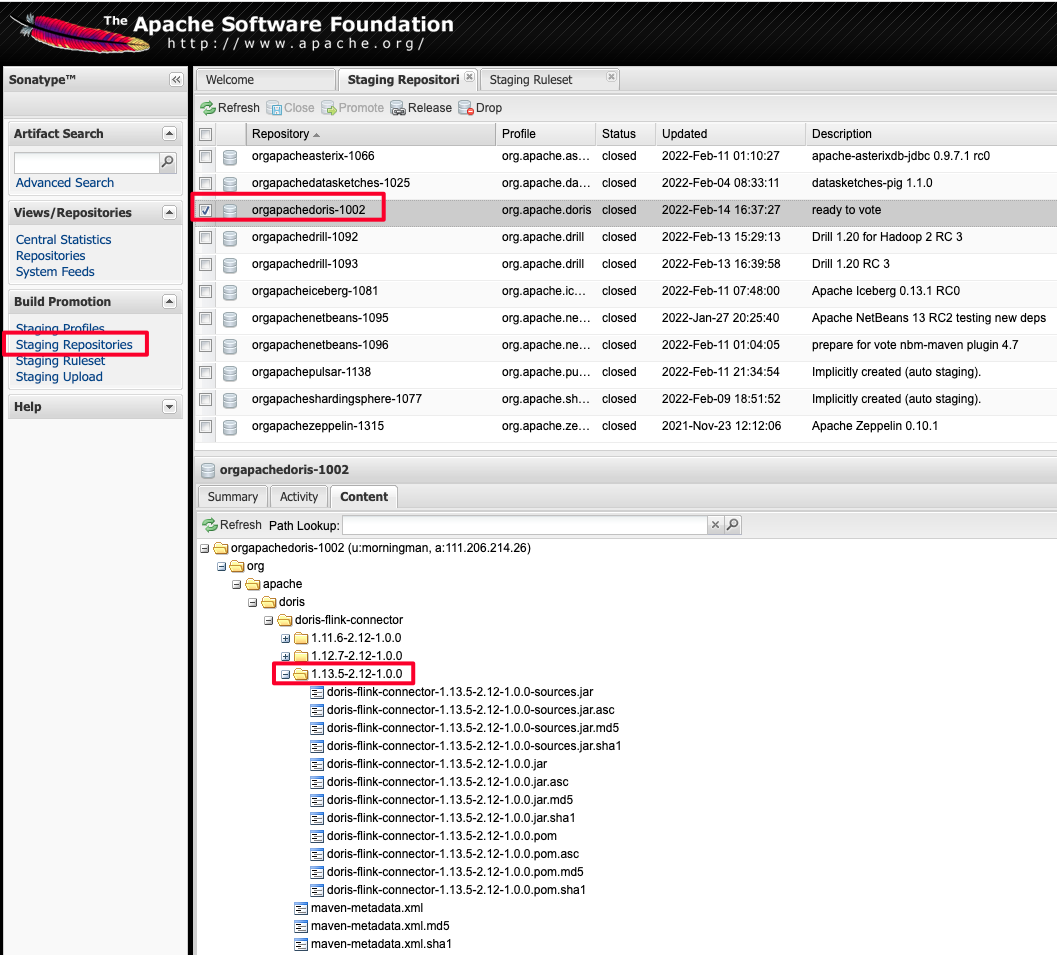
Confirm that the artifacts include the .asc signature file.
If anything is wrong, drop this staging and run the steps above again.
After verifying that everything is correct, click the close button to finish the Staging release.
3. Prepare SVN
Check out the Dev SVN repository:
svn co https://dist.apache.org/repos/dist/dev/doris/
Package the tag source code and generate the signature file and the SHA512 checksum file (the following uses 1.2.0 as an example):
git archive --format=tar release-1.2.0 --prefix=apache-doris-spark-connector-1.2.0-src/ | gzip > apache-doris-spark-connector-1.2.0-src.tar.gz

gpg -u xxx@apache.org --armor --output apache-doris-spark-connector-1.2.0-src.tar.gz.asc  --detach-sign apache-doris-spark-connector-1.2.0-src.tar.gz
sha512sum apache-doris-spark-connector-1.2.0-src.tar.gz > apache-doris-spark-connector-1.2.0-src.tar.gz.sha512
On macOS, use:
shasum -a 512 apache-doris-spark-connector-1.2.0-src.tar.gz > apache-doris-spark-connector-1.2.0-src.tar.gz.sha512
This produces three files:
| File | Purpose |
|---|---|
apache-doris-spark-connector-1.2.0-src.tar.gz | Source package |
apache-doris-spark-connector-1.2.0-src.tar.gz.asc | GPG signature file |
apache-doris-spark-connector-1.2.0-src.tar.gz.sha512 | SHA512 checksum file |
Move the three files into the SVN directory:
doris/spark-connector/1.2.0/
A complete SVN directory layout looks like:
|____0.15
| |____0.15.0-rc04
| | |____apache-doris-0.15.0-incubating-src.tar.gz.sha512
| | |____apache-doris-0.15.0-incubating-src.tar.gz.asc
| | |____apache-doris-0.15.0-incubating-src.tar.gz
|____KEYS
|____spark-connector
| |____1.2.0
| | |____apache-doris-spark-connector-1.2.0-src.tar.gz
| | |____apache-doris-spark-connector-1.2.0-src.tar.gz.asc
| | |____apache-doris-spark-connector-1.2.0-src.tar.gz.sha512
In this layout, 0.15 is the Doris main code directory, and spark-connector/1.2.0 contains the contents of this release.
For how to prepare the KEYS file, see the related section in Release Preparation.
4. Vote
Start a vote on the dev@doris.apache.org mailing list using the following template:
Hi all,

This is a call for the vote to release Apache Doris Spark Connector 1.2.0

The git tag for the release:
https://github.com/apache/doris-spark-connector/releases/tag/1.2.0

Release Notes are here:
https://github.com/apache/doris-spark-connector/issues/109

Thanks to everyone who has contributed to this release.

The release candidates:
https://dist.apache.org/repos/dist/dev/doris/spark-connector/1.2.0/

Maven 2 staging repository:
https://repository.apache.org/content/repositories/orgapachedoris-1031


KEYS file is available here:
https://downloads.apache.org/doris/KEYS

To verify and build, you can refer to following link:
https://doris.apache.org/community/release-and-verify/release-verify

The vote will be open for at least 72 hours.

[ ] +1 Approve the release
[ ] +0 No opinion
[ ] -1 Do not release this package because ...
Complete the Release
Refer to the Complete the Release document to finish the remaining release steps.
Appendix: Publish to SNAPSHOT
A Snapshot is not an Apache Release version and is used only for previewing before a release. A Snapshot version can only be published after PMC discussion and approval.
Switch to the spark connector directory (using Spark 2.3 and Scala 2.11 as an example):
cd spark-doris-connector
mvn deploy \
-Dspark.version=2.3.0 \
-Dscala.version=2.11 \
-Dspark.major.version=2.3 \
After publishing, the snapshot version is available at:
https://repository.apache.org/content/repositories/snapshots/org/apache/doris/doris-spark-connector/
FAQ / Troubleshooting
Q: mvn deploy reports gpg: signing failed: Inappropriate ioctl for device?
Run export GPG_TTY=$(tty) and try again.
Q: The .asc signature file is missing from the Staging repository. What should I do?
Check whether the mvn deploy command includes -Papache-release, and confirm that ~/.m2/settings.xml and settings-security.xml are configured correctly. If the artifacts are incomplete, drop this staging and run mvn deploy again.
Q: How do I publish multiple artifacts for different Spark versions in the same release?
For each Spark/Scala version combination, run mvn deploy separately, each time specifying a different -Dspark.version, -Dscala.version, and -Dspark.major.version. After all combinations are complete, close the staging repository together.