Release Doris SDK
The Doris SDK code repository is separate from the main Doris repository and lives at apache/doris-sdk. This document uses the release of Doris SDK v1.0.0 as an example to walk through the full flow from publishing to Maven Staging to the community vote.
Release Process Overview
| Step | Purpose | Key Artifacts |
|---|---|---|
| 1. Prepare for release | Complete the prerequisites for release (KEYS, accounts, environment, and so on) | GPG Key, Apache account |
| 2. Prepare branch | Create a release branch in the repository | 1.0.0-release branch |
| 3. Publish to Maven Staging | Generate the release tag and publish to Apache Maven Staging | Tag, Staging Repository |
| 4. Prepare SVN | Upload the source package, signature, and checksum files to SVN | tar.gz / .asc / .sha512 |
| 5. Start the vote | Start the vote on the dev@doris mailing list | Vote email |
| 6. Complete the release | Archive and announce after the vote passes | Release package |
1. Prepare for Release
See the Release Preparation document to complete the prerequisites for the release.
2. Publish to Maven
2.1 Prepare the Branch
Create a 1.0.0-release branch in the repository and switch to it:
git checkout -b 1.0.0-release
2.2 Publish to Maven Staging
Run the following commands to generate the release tag:
mvn release:clean
mvn release:prepare -DpushChanges=false
Here, -DpushChanges=false means the newly generated branch and tag are not pushed to the repository during execution.
After running mvn release:prepare, you need to provide the following three pieces of information in order:
| Input | Description | Example |
|---|---|---|
| Doris SDK version | The version to release, in the form {sdk.version} | 1.0.0 |
| Release tag name | The name of the tag generated locally | 1.0.0 |
| Next version | Used only to generate the local branch; has no actual significance | 1.0.1-SNAPSHOT |
Common issues:
-
mvn release:preparemay ask for the GPG passphrase. -
If you see the error
gpg: no valid OpenPGP data found, run the following command and retry:export GPG_TTY=$(tty)
After mvn release:prepare runs successfully, it generates a tag and a branch locally and adds two commits to the current branch:
- The first commit corresponds to the newly generated tag.
- The second commit corresponds to the next-version branch.
You can verify this with git log.
After confirming the local tag is correct, push the tag to the repository:
git push upstream --tags
Here, upstream points to the apache/doris-sdk repository.
Finally, run the perform command to publish the build artifacts to Maven Staging:
mvn release:perform
After the command succeeds, you can find the version you just published in Apache Maven Staging Repositories:
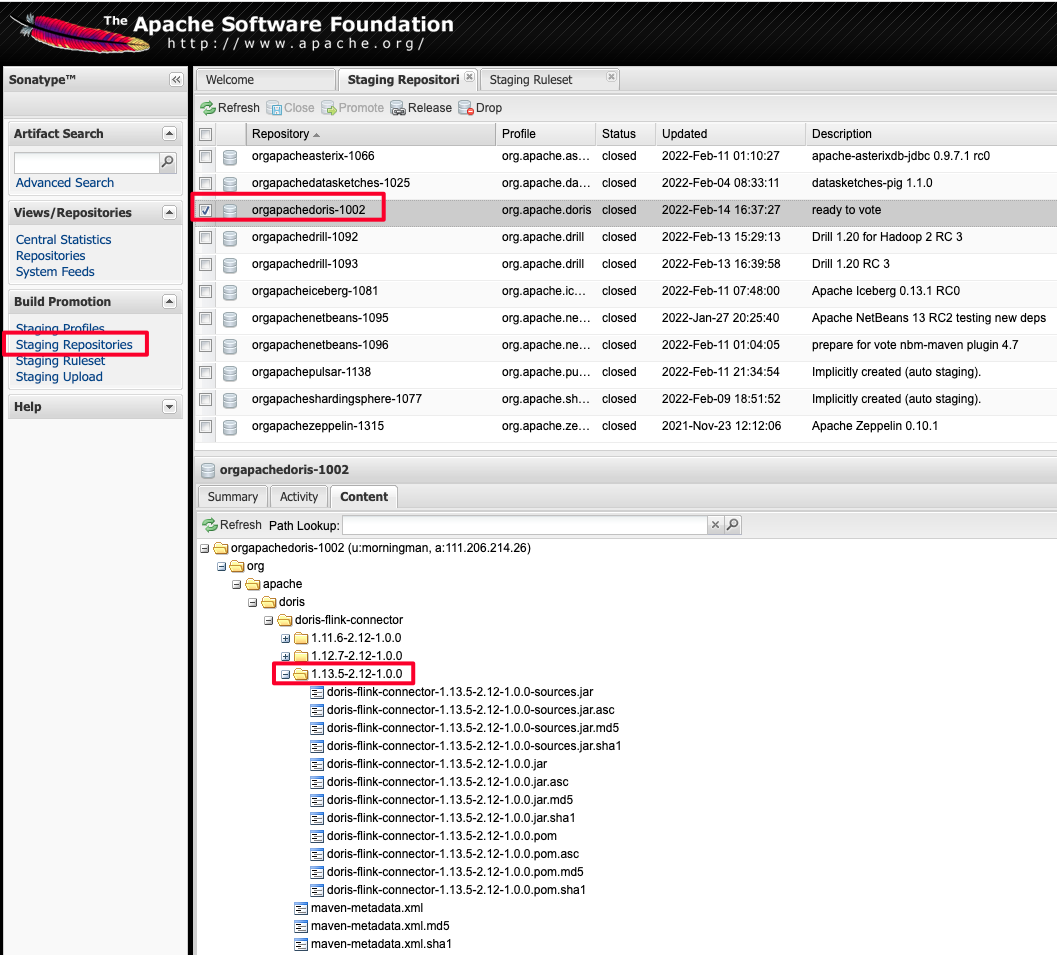
Note: the published artifacts must include the .asc signature file.
If something goes wrong, roll back in the following order:
- Delete the local tag.
- Delete the tag in the repository.
- Delete the two newly generated local commits.
dropthe staging on the Staging Repository page.- Run the steps above again.
After verification, click the close button on the page to finish the Staging release.
2.3 Prepare SVN
2.3.1 Check Out the SVN Repository
svn co https://dist.apache.org/repos/dist/dev/doris/
2.3.2 Package the Tag Source and Generate the Signature
Using 1.0.0 as an example; the operations for other tags are similar:
git archive --format=tar 1.14_2.12-1.0.0 --prefix=apache-doris-sdk-1.0.0-src/ | gzip > apache-doris-sdk-1.0.0-src.tar.gz
gpg -u xxx@apache.org --armor --output apache-doris-sdk-1.0.0-src.tar.gz.asc  --detach-sign apache-doris-sdk-1.0.0-src.tar.gz
sha512sum apache-doris-sdk-1.14_2.12-1.0.0-src.tar.gz > apache-doris-sdk-1.0.0-src.tar.gz.sha512
On macOS, use shasum instead of sha512sum:
shasum -a 512 apache-doris-sdk-1.0.0-src.tar.gz > apache-doris-sdk-1.0.0-src.tar.gz.sha512
You end up with three files:
apache-doris-sdk-1.0.0-src.tar.gz
apache-doris-sdk-1.0.0-src.tar.gz.asc
apache-doris-sdk-1.0.0-src.tar.gz.sha512
2.3.3 Upload to SVN
Move these three files to the SVN directory doris/doris-sdk/1.0.0/. The final SVN directory structure looks like:
├── 1.2.3-rc01
│   ├── apache-doris-1.2.3-src.tar.gz
│   ├── apache-doris-1.2.3-src.tar.gz.asc
│   ├── apache-doris-1.2.3-src.tar.gz.sha512
...
├── KEYS
├── doris-sdk
│   └── 1.0.0
│       ├── apache-doris-sdk-1.0.0-src.tar.gz
│       ├── apache-doris-sdk-1.0.0-src.tar.gz.asc
│       └── apache-doris-sdk-1.0.0-src.tar.gz.sha512
Here, 1.2.3-rc01 is the directory for the Doris main repository, and doris-sdk/1.0.0 contains the contents of this release.
For the steps to prepare the KEYS file, see the Release Preparation document.
2.4 Vote
Start the vote on the dev@doris.apache.org mailing list. Use the following email template:
Hi All,

This is a call for the vote to release Apache Doris-SDK 1.0.0

The git tag for the release:
https://github.com/apache/doris-sdk/releases/tag/1.0.0

Release Notes are here:
https://github.com/apache/doris-sdk/blob/1.0.0/CHANGE-LOG.txt

Thanks to everyone who has contributed to this release.

The release candidates:
https://dist.apache.org/repos/dist/dev/doris/doris-sdk/1.0.0/

KEYS file is available here:
https://downloads.apache.org/doris/KEYS

To verify and build, you can refer to following link:
https://doris.apache.org/community/release-and-verify/release-verify

The vote will be open for at least 72 hours.

[ ] +1 Approve the release
[ ] +0 No opinion
[ ] -1 Do not release this package because …
3. Complete the Release
After the vote passes, see the Complete the Release document to finish all remaining release steps.
Appendix: Publishing to SNAPSHOT
A Snapshot is not an Apache Release version; it is only used as a preview before a release. After the PMC has discussed and approved it, you can publish a Snapshot version.
Switch to the Doris SDK directory and run:
mvn deploy
After that, you can find the Snapshot version at:
https://repository.apache.org/content/repositories/snapshots/org/apache/doris/doris-sdk/
FAQ
Q1: mvn release:prepare fails with gpg: no valid OpenPGP data found
GPG is not attached to the current terminal. Run export GPG_TTY=$(tty) and retry.
Q2: The close step in the Staging phase fails with No public key
The GPG public key has not been uploaded to a keyserver. Run the following command to sync the public key to a public keyserver:
gpg --keyserver hkp://keyserver.ubuntu.com --send-keys <KEY_ID>
You can find <KEY_ID> with gpg -k.
Q3: I made a mistake. How do I roll back?
Follow these steps in order:
- Delete the local tag:
git tag -d <tag>. - Delete the remote tag:
git push upstream --delete <tag>. - Revert the two local release commits.
dropthe staging on the Staging Repositories page.- Run
mvn release:prepareandmvn release:performagain.