Flink Doris Connector
Flink Doris Connector reads from and writes to a Doris cluster through Flink, and integrates Flink CDC to conveniently complete full-database synchronization from upstream databases such as MySQL.
Main capabilities include:
- Reading Doris data: Supports parallel reads from BE, improving read efficiency.
- Writing Doris data: Batches data in Flink and then bulk imports it via Stream Load.
- Lookup Join dimension table association: Speeds up dimension table joins through batching and asynchronous queries.
- Full-database synchronization: Uses Flink CDC to perform full-database synchronization from MySQL, Oracle, PostgreSQL, and other databases, with support for automatic table creation and DDL synchronization.
Version Notes
| Connector Version | Flink Version | Doris Version | Java Version | Scala Version |
|---|---|---|---|---|
| 1.0.3 | 1.11,1.12,1.13,1.14 | 0.15+ | 8 | 2.11,2.12 |
| 1.1.1 | 1.14 | 1.0+ | 8 | 2.11,2.12 |
| 1.2.1 | 1.15 | 1.0+ | 8 | - |
| 1.3.0 | 1.16 | 1.0+ | 8 | - |
| 1.4.0 | 1.15 - 1.17 | 1.0+ | 8 | - |
| 1.5.2 | 1.15 - 1.18 | 1.0+ | 8 | - |
| 1.6.1 | 1.15 - 1.19 | 1.0+ | 8 | - |
| 24.0.1 | 1.15 - 1.20 | 1.0+ | 8 | - |
| 24.1.0 | 1.15 - 1.20 | 1.0+ | 8 | - |
| 25.0.0 | 1.15 - 1.20 | 1.0+ | 8 | - |
| 25.1.0 | 1.15 - 1.20 | 1.0+ | 8 | - |
| 26.0.0 | 1.15 - 1.20,2.0 - 2.2 | 1.0+ | 8(1.x),17(2.x) | - |
| 26.1.1 | 1.15 - 1.20,2.0 - 2.2 | 1.0+ | 8(1.x),17(2.x) | - |
Installation
Both Jar package and Maven dependency methods are supported.
Jar Package Method
You can download the Flink Doris Connector Jar package of the corresponding version from the Doris download page and copy it to Flink's classpath:
- Standalone mode: Place the Jar file under the
lib/directory. - Yarn cluster mode: Place the Jar file in the pre-deployment package.
Maven Dependency Method
Add the following dependency to the project's pom.xml:
<dependency>
    <groupId>org.apache.doris</groupId>
    <artifactId>flink-doris-connector-${flink.version}</artifactId>
    <version>${connector.version}</version>
</dependency>
For example:
<dependency>
    <groupId>org.apache.doris</groupId>
    <artifactId>flink-doris-connector-1.16</artifactId>
    <version>25.1.0</version>
</dependency>
How It Works
Read Principle
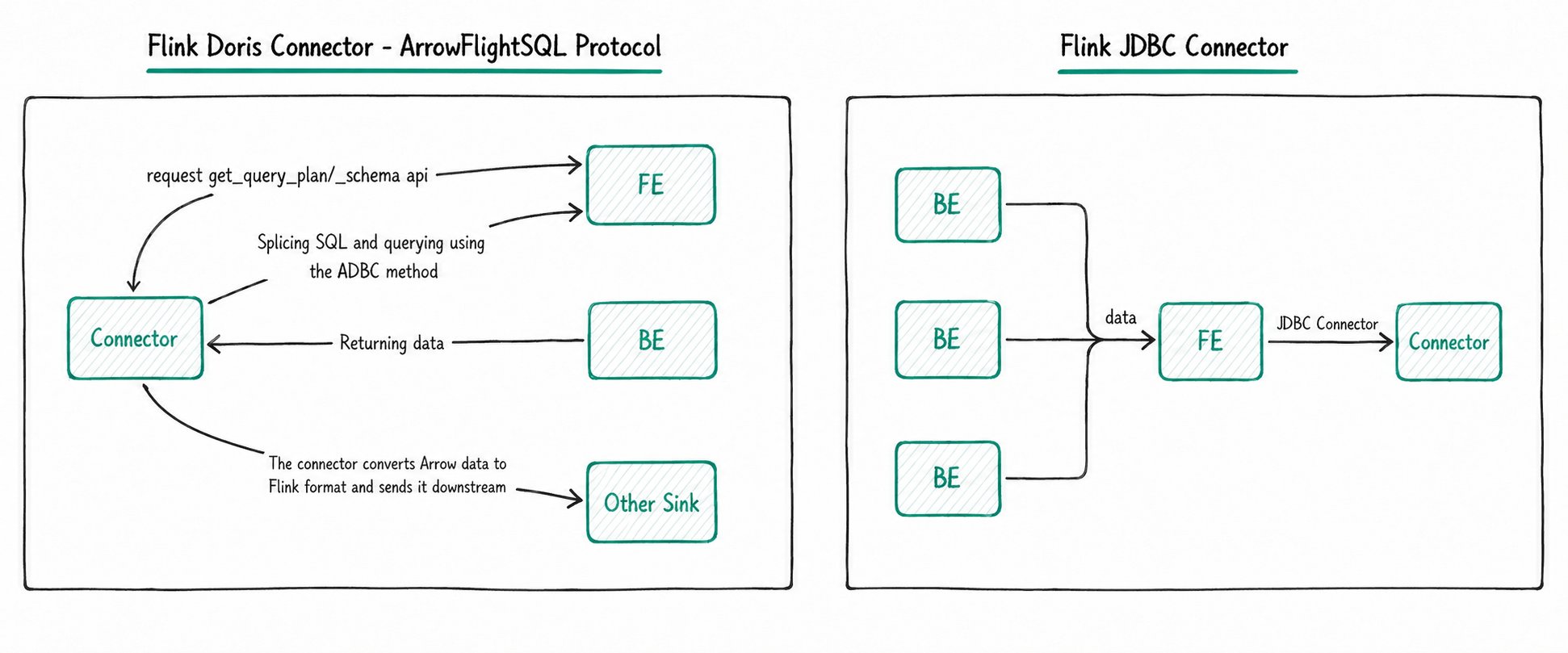
Compared to Flink JDBC Connector, Flink Doris Connector offers higher performance when reading data and is recommended:
- Flink JDBC Connector: Although Doris is compatible with the MySQL protocol, reading and writing through JDBC causes data to be read and written serially on a single FE node, creating a bottleneck that affects performance. It is not recommended.
- Flink Doris Connector: Starting from Doris 2.1, the ADBC protocol is used as the default read protocol. The read process is as follows:
- Flink Doris Connector obtains the Tablet ID information in the query plan from FE.
- Generates the query statement
SELECT * FROM tbs TABLET(id1, id2, id3). - Executes the query through FE's ADBC port.
- BE returns data directly, avoiding data flow through FE and eliminating the FE single-point bottleneck.
Write Principle
When writing data, Flink Doris Connector batches data in Flink memory and then bulk imports it into Doris via Stream Load. The Connector provides two batching modes, with streaming writes based on Flink Checkpoint as the default:
| Comparison Item | Streaming Write | Batch Write |
|---|---|---|
| Trigger condition | Depends on Flink Checkpoint, writes to Doris with each Checkpoint cycle | Periodically commits based on time and data-volume thresholds within the Connector |
| Consistency | Exactly-Once | At-Least-Once; Exactly-Once can be guaranteed with the primary key model |
| Latency | Limited by Checkpoint interval, usually higher | Independent batch processing mechanism, flexible to adjust |
| Fault tolerance and recovery | Fully consistent with Flink state recovery | Relies on external deduplication logic (such as Doris primary key deduplication) |
Quick Start
This section walks through a complete example, from deploying a Flink cluster to using FlinkSQL to read and write Doris data.
1. Deploy a Flink Cluster
Take a Standalone cluster as an example:
- Download the Flink 1.18.1 installation package.
- After extracting, place the Flink Doris Connector Jar package under
<FLINK_HOME>/lib. - Enter the
<FLINK_HOME>directory and runbin/start-cluster.shto start the Flink cluster. - Use the
jpscommand to verify that the Flink cluster started successfully.
2. Initialize the Doris Table
Run the following SQL to create Doris tables and write test data:
CREATE DATABASE test;

CREATE TABLE test.student (
    `id` INT,
    `name` VARCHAR(256),
    `age` INT
)
UNIQUE KEY(`id`)
DISTRIBUTED BY HASH(`id`) BUCKETS 1
PROPERTIES (
    "replication_allocation" = "tag.location.default: 3"
);

INSERT INTO test.student values(1, "James", 18);
INSERT INTO test.student values(2, "Emily", 28);

CREATE TABLE test.student_trans (
    `id` INT,
    `name` VARCHAR(256),
    `age` INT
)
UNIQUE KEY(`id`)
DISTRIBUTED BY HASH(`id`) BUCKETS 1
PROPERTIES (
    "replication_allocation" = "tag.location.default: 3"
);
3. Run a FlinkSQL Job
Start the FlinkSQL Client:
bin/sql-client.sh
Execute the following FlinkSQL:
CREATE TABLE Student (
    id STRING,
    name STRING,
    age INT
)
WITH (
    'connector' = 'doris',
    'fenodes' = '127.0.0.1:8030',
    'table.identifier' = 'test.student',
    'username' = 'root',
    'password' = ''
);

CREATE TABLE StudentTrans (
    id STRING,
    name STRING,
    age INT
)
WITH (
    'connector' = 'doris',
    'fenodes' = '127.0.0.1:8030',
    'table.identifier' = 'test.student_trans',
    'username' = 'root',
    'password' = '',
    'sink.label-prefix' = 'doris_label'
);

INSERT INTO StudentTrans SELECT id, concat('prefix_', name), age + 1 FROM Student;
4. Query the Result
mysql> select * from test.student_trans;
+------+--------------+------+
| id   | name         | age  |
+------+--------------+------+
|    1 | prefix_James |   19 |
|    2 | prefix_Emily |   29 |
+------+--------------+------+
2 rows in set (0.02 sec)
Use Cases
Case 1: Reading Doris Data
When Flink reads Doris data, the Doris Source is a bounded stream and does not support continuous reading via CDC. The following two read protocols are supported:
| Protocol | Description | Recommended Version |
|---|---|---|
| Thrift | Reads data by calling BE's thrift interface | Compatible with all versions |
| ArrowFlightSQL | Reads large batches of data at high speed via the Arrow Flight SQL protocol, based on Doris 2.1 | Connector 24.0.0+ |
- For details on the Thrift flow, see Reading data through the Thrift interface.
- For details on ArrowFlightSQL usage, see High-speed data transmission link based on Arrow Flight SQL. After Doris 2.1, the ArrowFlightSQL method is recommended.
FlinkSQL Read (Thrift Method)
CREATE TABLE student (
    id INT,
    name STRING,
    age INT
)
WITH (
    'connector' = 'doris',
    'fenodes' = '127.0.0.1:8030',  -- FE host:HttpPort
    'table.identifier' = 'test.student',
    'username' = 'root',
    'password' = ''
);

SELECT * FROM student;
FlinkSQL Read (ArrowFlightSQL Method)
CREATE TABLE student (
    id INT,
    name STRING,
    age INT
)
WITH (
    'connector' = 'doris',
    'fenodes' = '{fe.conf:http_port}',
    'table.identifier' = 'test.student',
    'source.use-flight-sql' = 'true',
    'source.flight-sql-port' = '{fe.conf:arrow_flight_sql_port}',
    'username' = 'root',
    'password' = ''
);

SELECT * FROM student;
Reading via DataStream API
When reading data via the DataStream API, you must add the dependency to the project's POM file in advance. See the Installation section.
final StreamExecutionEnvironment env = StreamExecutionEnvironment.getExecutionEnvironment();
DorisOptions option = DorisOptions.builder()
        .setFenodes("127.0.0.1:8030")
        .setTableIdentifier("test.student")
        .setUsername("root")
        .setPassword("")
        .build();

DorisReadOptions readOptions = DorisReadOptions.builder().build();
DorisSource<List<?>> dorisSource = DorisSource.<List<?>>builder()
        .setDorisOptions(option)
        .setDorisReadOptions(readOptions)
        .setDeserializer(new SimpleListDeserializationSchema())
        .build();

env.fromSource(dorisSource, WatermarkStrategy.noWatermarks(), "doris source").print();
env.execute("Doris Source Test");
Case 2: Writing Doris Data
Flink writes to Doris through Stream Load and supports two modes: streaming write and batch write.
Batch write is supported after Connector 1.5.0. Batch write does not depend on Checkpoint; it caches data in memory and controls the write timing based on batching parameters. Streaming write requires Checkpoint to be enabled and continuously writes upstream data to Doris throughout the entire Checkpoint period without keeping data cached in memory all the time.
FlinkSQL Write
Use Flink's Datagen to simulate data continuously produced by upstream:
-- Enable checkpoint
SET 'execution.checkpointing.interval' = '30s';

CREATE TABLE student_source (
    id INT,
    name STRING,
    age INT
) WITH (
    'connector' = 'datagen',
    'rows-per-second' = '1',
    'fields.name.length' = '20',
    'fields.id.min' = '1',
    'fields.id.max' = '100000',
    'fields.age.min' = '3',
    'fields.age.max' = '30'
);

-- doris sink
CREATE TABLE student_sink (
    id INT,
    name STRING,
    age INT
)
WITH (
    'connector' = 'doris',
    'fenodes' = '10.16.10.6:28737',
    'table.identifier' = 'test.student',
    'username' = 'root',
    'password' = 'password',
    'sink.label-prefix' = 'doris_label'
    -- 'sink.enable.batch-mode' = 'true'  Add this configuration to use batch write
);

INSERT INTO student_sink SELECT * FROM student_source;
Writing via DataStream API
When writing via the DataStream API, you can use different serialization methods to write upstream data to Doris tables.
The Connector internally includes HttpClient version 4.5.13. If your project references HttpClient separately, ensure the versions are consistent.
Plain String Format
When the upstream is in csv or json data format, you can use SimpleStringSerializer directly to serialize the data.
StreamExecutionEnvironment env = StreamExecutionEnvironment.getExecutionEnvironment();
env.enableCheckpointing(30000);
DorisSink.Builder<String> builder = DorisSink.builder();

DorisOptions dorisOptions = DorisOptions.builder()
        .setFenodes("10.16.10.6:28737")
        .setTableIdentifier("test.student")
        .setUsername("root")
        .setPassword("")
        .build();

Properties properties = new Properties();
// When upstream is json data, the following configuration is required
properties.setProperty("read_json_by_line", "true");
properties.setProperty("format", "json");

// When upstream is csv, the following configuration is required
// properties.setProperty("format", "csv");
// properties.setProperty("column_separator", ",");

DorisExecutionOptions executionOptions = DorisExecutionOptions.builder()
        .setLabelPrefix("label-doris")
        .setDeletable(false)
        // .setBatchMode(true)  Enable batch write
        .setStreamLoadProp(properties)
        .build();

builder.setDorisReadOptions(DorisReadOptions.builder().build())
        .setDorisExecutionOptions(executionOptions)
        .setSerializer(new SimpleStringSerializer())
        .setDorisOptions(dorisOptions);

List<String> data = new ArrayList<>();
data.add("{\"id\":3,\"name\":\"Michael\",\"age\":28}");
data.add("{\"id\":4,\"name\":\"David\",\"age\":38}");

env.fromCollection(data).sinkTo(builder.build());
env.execute("doris test");
RowData Format
RowData is a Flink internal format. If the upstream passes data in RowData format, you must use RowDataSerializer to serialize the data.
StreamExecutionEnvironment env = StreamExecutionEnvironment.getExecutionEnvironment();
env.enableCheckpointing(10000);
env.setParallelism(1);

DorisSink.Builder<RowData> builder = DorisSink.builder();

Properties properties = new Properties();
properties.setProperty("column_separator", ",");
properties.setProperty("line_delimiter", "\n");
properties.setProperty("format", "csv");
// When upstream is json, the following configuration is required
// properties.setProperty("read_json_by_line", "true");
// properties.setProperty("format", "json");
DorisOptions.Builder dorisBuilder = DorisOptions.builder();
dorisBuilder
        .setFenodes("10.16.10.6:28737")
        .setTableIdentifier("test.student")
        .setUsername("root")
        .setPassword("");
DorisExecutionOptions.Builder executionBuilder = DorisExecutionOptions.builder();
executionBuilder.setLabelPrefix(UUID.randomUUID().toString()).setDeletable(false).setStreamLoadProp(properties);

// flink rowdata's schema
String[] fields = {"id", "name", "age"};
DataType[] types = {DataTypes.INT(), DataTypes.VARCHAR(256), DataTypes.INT()};

builder.setDorisExecutionOptions(executionBuilder.build())
        .setSerializer(
                RowDataSerializer.builder() // serialize according to rowdata
                        .setType(LoadConstants.CSV)
                        .setFieldDelimiter(",")
                        .setFieldNames(fields)
                        .setFieldType(types)
                        .build())
        .setDorisOptions(dorisBuilder.build());

// mock rowdata source
DataStream<RowData> source =
        env.fromElements("")
                .flatMap(
                        new FlatMapFunction<String, RowData>() {
                            @Override
                            public void flatMap(String s, Collector<RowData> out)
                                    throws Exception {
                                GenericRowData genericRowData = new GenericRowData(3);
                                genericRowData.setField(0, 1);
                                genericRowData.setField(1, StringData.fromString("Michael"));
                                genericRowData.setField(2, 18);
                                out.collect(genericRowData);

                                GenericRowData genericRowData2 = new GenericRowData(3);
                                genericRowData2.setField(0, 2);
                                genericRowData2.setField(1, StringData.fromString("David"));
                                genericRowData2.setField(2, 38);
                                out.collect(genericRowData2);
                            }
                        });

source.sinkTo(builder.build());
env.execute("doris test");
Debezium Format
For data in Debezium format from upstream (such as Flink CDC or Debezium-format data in Kafka), use JsonDebeziumSchemaSerializer for serialization.
// Enable checkpoint
env.enableCheckpointing(10000);

Properties props = new Properties();
props.setProperty("format", "json");
props.setProperty("read_json_by_line", "true");
DorisOptions dorisOptions = DorisOptions.builder()
        .setFenodes("127.0.0.1:8030")
        .setTableIdentifier("test.student")
        .setUsername("root")
        .setPassword("").build();

DorisExecutionOptions.Builder executionBuilder = DorisExecutionOptions.builder();
executionBuilder.setLabelPrefix("label-prefix")
        .setStreamLoadProp(props)
        .setDeletable(true);

DorisSink.Builder<String> builder = DorisSink.builder();
builder.setDorisReadOptions(DorisReadOptions.builder().build())
        .setDorisExecutionOptions(executionBuilder.build())
        .setDorisOptions(dorisOptions)
        .setSerializer(JsonDebeziumSchemaSerializer.builder().setDorisOptions(dorisOptions).build());

env.fromSource(mySqlSource, WatermarkStrategy.noWatermarks(), "MySQL Source")
        .sinkTo(builder.build());
Multi-Table Write Format
DorisSink supports synchronizing multiple tables with a single Sink. You need to pass the data along with the database and table information to the Sink, and use RecordWithMetaSerializer for serialization.
StreamExecutionEnvironment env = StreamExecutionEnvironment.getExecutionEnvironment();
env.setParallelism(1);
DorisSink.Builder<RecordWithMeta> builder = DorisSink.builder();
Properties properties = new Properties();
properties.setProperty("column_separator", ",");
properties.setProperty("line_delimiter", "\n");
properties.setProperty("format", "csv");
DorisOptions.Builder dorisBuilder = DorisOptions.builder();
dorisBuilder
        .setFenodes("10.16.10.6:28737")
        .setTableIdentifier("")
        .setUsername("root")
        .setPassword("");

DorisExecutionOptions.Builder executionBuilder = DorisExecutionOptions.builder();

executionBuilder
        .setLabelPrefix("label-doris")
        .setStreamLoadProp(properties)
        .setDeletable(false)
        .setBatchMode(true);

builder.setDorisReadOptions(DorisReadOptions.builder().build())
        .setDorisExecutionOptions(executionBuilder.build())
        .setDorisOptions(dorisBuilder.build())
        .setSerializer(new RecordWithMetaSerializer());

RecordWithMeta record = new RecordWithMeta("test", "student_1", "1,David,18");
RecordWithMeta record1 = new RecordWithMeta("test", "student_2", "1,Jack,28");
env.fromCollection(Arrays.asList(record, record1)).sinkTo(builder.build());
Case 3: Lookup Join Dimension Table Association
Lookup Join can optimize the performance of dimension table joins in Flink. When using Flink JDBC Connector for dimension table joins, you may encounter the following problems:
- Flink JDBC Connector uses synchronous query mode: each time upstream data (such as Kafka) sends a record, the Doris dimension table is queried immediately, leading to high query latency in high-concurrency scenarios.
- Queries executed via JDBC are usually point lookups one record at a time, while Doris recommends batch queries for better query efficiency.
Using Lookup Join in Flink Doris Connector has the following advantages:
- Caches upstream data in batches, avoiding the high latency and database pressure caused by per-record queries.
- Executes association queries asynchronously, increasing data throughput and reducing the Doris query load.
CREATE TABLE fact_table (
    `id` BIGINT,
    `name` STRING,
    `city` STRING,
    `process_time` as proctime()
) WITH (
    'connector' = 'kafka',
    ...
);

create table dim_city(
    `city` STRING,
    `level` INT,
    `province` STRING,
    `country` STRING
) WITH (
    'connector' = 'doris',
    'fenodes' = '127.0.0.1:8030',
    'jdbc-url' = 'jdbc:mysql://127.0.0.1:9030',
    'table.identifier' = 'dim.dim_city',
    'username' = 'root',
    'password' = '',
    'lookup.cache.max-rows' = '100000',
    'lookup.cache.ttl' = '300s'
);

SELECT a.id, a.name, a.city, c.province, c.country, c.level
FROM fact_table a
LEFT JOIN dim_city FOR SYSTEM_TIME AS OF a.process_time AS c
ON a.city = c.city
Case 4: Full-Database CDC Synchronization
Flink Doris Connector integrates Flink CDC to easily synchronize relational databases such as MySQL into Doris, supporting automatic table creation, Schema Change, and so on. The currently supported databases include: MySQL, Oracle, PostgreSQL, SQLServer, MongoDB, and DB2.
- When using full-database synchronization, you need to add the corresponding Flink CDC dependency (Fat Jar) under
$FLINK_HOME/lib, such asflink-sql-connector-mysql-cdc-${version}.jarorflink-sql-connector-oracle-cdc-${version}.jar. Flink CDC is incompatible with previous versions starting from 3.1. Download addresses: Flink CDC 3.x, Flink CDC 2.x. - After Connector 24.0.0, the dependent Flink CDC version must be 3.1 or above. Download address. If you need to use Flink CDC to synchronize MySQL and Oracle, you also need to add the relevant JDBC drivers under
$FLINK_HOME/lib.
After the Flink cluster is started, you can run the corresponding command according to the data source type.
MySQL Full-Database Synchronization
<FLINK_HOME>bin/flink run \
    -Dexecution.checkpointing.interval=10s \
    -Dparallelism.default=1 \
    -c org.apache.doris.flink.tools.cdc.CdcTools \
    lib/flink-doris-connector-1.16-24.0.1.jar \
    mysql-sync-database \
    --database test_db \
    --mysql-conf hostname=127.0.0.1 \
    --mysql-conf port=3306 \
    --mysql-conf username=root \
    --mysql-conf password=123456 \
    --mysql-conf database-name=mysql_db \
    --including-tables "tbl1|test.*" \
    --sink-conf fenodes=127.0.0.1:8030 \
    --sink-conf username=root \
    --sink-conf password=123456 \
    --sink-conf jdbc-url=jdbc:mysql://127.0.0.1:9030 \
    --sink-conf sink.label-prefix=label \
    --table-conf replication_num=1
Oracle Full-Database Synchronization
<FLINK_HOME>bin/flink run \
    -Dexecution.checkpointing.interval=10s \
    -Dparallelism.default=1 \
    -c org.apache.doris.flink.tools.cdc.CdcTools \
    ./lib/flink-doris-connector-1.16-24.0.1.jar \
    oracle-sync-database \
    --database test_db \
    --oracle-conf hostname=127.0.0.1 \
    --oracle-conf port=1521 \
    --oracle-conf username=admin \
    --oracle-conf password="password" \
    --oracle-conf database-name=XE \
    --oracle-conf schema-name=ADMIN \
    --including-tables "tbl1|tbl2" \
    --sink-conf fenodes=127.0.0.1:8030 \
    --sink-conf username=root \
    --sink-conf password=\
    --sink-conf jdbc-url=jdbc:mysql://127.0.0.1:9030 \
    --sink-conf sink.label-prefix=label \
    --table-conf replication_num=1
PostgreSQL Full-Database Synchronization
<FLINK_HOME>/bin/flink run \
    -Dexecution.checkpointing.interval=10s \
    -Dparallelism.default=1 \
    -c org.apache.doris.flink.tools.cdc.CdcTools \
    ./lib/flink-doris-connector-1.16-24.0.1.jar \
    postgres-sync-database \
    --database db1 \
    --postgres-conf hostname=127.0.0.1 \
    --postgres-conf port=5432 \
    --postgres-conf username=postgres \
    --postgres-conf password="123456" \
    --postgres-conf database-name=postgres \
    --postgres-conf schema-name=public \
    --postgres-conf slot.name=test \
    --postgres-conf decoding.plugin.name=pgoutput \
    --including-tables "tbl1|tbl2" \
    --sink-conf fenodes=127.0.0.1:8030 \
    --sink-conf username=root \
    --sink-conf password=\
    --sink-conf jdbc-url=jdbc:mysql://127.0.0.1:9030 \
    --sink-conf sink.label-prefix=label \
    --table-conf replication_num=1
SQLServer Full-Database Synchronization
<FLINK_HOME>/bin/flink run \
    -Dexecution.checkpointing.interval=10s \
    -Dparallelism.default=1 \
    -c org.apache.doris.flink.tools.cdc.CdcTools \
    ./lib/flink-doris-connector-1.16-24.0.1.jar \
    sqlserver-sync-database \
    --database db1 \
    --sqlserver-conf hostname=127.0.0.1 \
    --sqlserver-conf port=1433 \
    --sqlserver-conf username=sa \
    --sqlserver-conf password="123456" \
    --sqlserver-conf database-name=CDC_DB \
    --sqlserver-conf schema-name=dbo \
    --including-tables "tbl1|tbl2" \
    --sink-conf fenodes=127.0.0.1:8030 \
    --sink-conf username=root \
    --sink-conf password=\
    --sink-conf jdbc-url=jdbc:mysql://127.0.0.1:9030 \
    --sink-conf sink.label-prefix=label \
    --table-conf replication_num=1
DB2 Full-Database Synchronization
<FLINK_HOME>bin/flink run \
    -Dexecution.checkpointing.interval=10s \
    -Dparallelism.default=1 \
    -c org.apache.doris.flink.tools.cdc.CdcTools \
    lib/flink-doris-connector-1.16-24.0.1.jar \
    db2-sync-database \
    --database db2_test \
    --db2-conf hostname=127.0.0.1 \
    --db2-conf port=50000 \
    --db2-conf username=db2inst1 \
    --db2-conf password=doris123456 \
    --db2-conf database-name=testdb \
    --db2-conf schema-name=DB2INST1 \
    --including-tables "FULL_TYPES|CUSTOMERS" \
    --single-sink true \
    --use-new-schema-change true \
    --sink-conf fenodes=127.0.0.1:8030 \
    --sink-conf username=root \
    --sink-conf password=123456 \
    --sink-conf jdbc-url=jdbc:mysql://127.0.0.1:9030 \
    --sink-conf sink.label-prefix=label \
    --table-conf replication_num=1
MongoDB Full-Database Synchronization
<FLINK_HOME>/bin/flink run \
    -Dexecution.checkpointing.interval=10s \
    -Dparallelism.default=1 \
    -c org.apache.doris.flink.tools.cdc.CdcTools \
    ./lib/flink-doris-connector-1.18-24.0.1.jar \
    mongodb-sync-database \
    --database doris_db \
    --schema-change-mode debezium_structure \
    --mongodb-conf hosts=127.0.0.1:27017 \
    --mongodb-conf username=flinkuser \
    --mongodb-conf password=flinkpwd \
    --mongodb-conf database=test \
    --mongodb-conf scan.startup.mode=initial \
    --mongodb-conf schema.sample-percent=0.2 \
    --including-tables "tbl1|tbl2" \
    --sink-conf fenodes=127.0.0.1:8030 \
    --sink-conf username=root \
    --sink-conf password= \
    --sink-conf jdbc-url=jdbc:mysql://127.0.0.1:9030 \
    --sink-conf sink.label-prefix=label \
    --sink-conf sink.enable-2pc=false \
    --table-conf replication_num=1
AWS Aurora MySQL Full-Database Synchronization
<FLINK_HOME>bin/flink run \
    -Dexecution.checkpointing.interval=10s \
    -Dparallelism.default=1 \
    -c org.apache.doris.flink.tools.cdc.CdcTools \
    lib/flink-doris-connector-1.18-25.0.0.jar \
    mysql-sync-database \
    --database testwd \
    --mysql-conf hostname=xxx.us-east-1.rds.amazonaws.com \
    --mysql-conf port=3306 \
    --mysql-conf username=admin \
    --mysql-conf password=123456 \
    --mysql-conf database-name=test \
    --mysql-conf server-time-zone=UTC \
    --including-tables "student" \
    --sink-conf fenodes=127.0.0.1:8030 \
    --sink-conf username=root \
    --sink-conf password= \
    --sink-conf jdbc-url=jdbc:mysql://127.0.0.1:9030 \
    --sink-conf sink.label-prefix=label \
    --table-conf replication_num=1
AWS RDS MySQL Full-Database Synchronization
<FLINK_HOME>bin/flink run \
    -Dexecution.checkpointing.interval=10s \
    -Dparallelism.default=1 \
    -c org.apache.doris.flink.tools.cdc.CdcTools \
    lib/flink-doris-connector-1.18-25.0.0.jar \
    mysql-sync-database \
    --database testwd \
    --mysql-conf hostname=xxx.ap-southeast-1.rds.amazonaws.com \
    --mysql-conf port=3306 \
    --mysql-conf username=admin \
    --mysql-conf password=123456 \
    --mysql-conf database-name=test \
    --mysql-conf server-time-zone=UTC \
    --including-tables "student" \
    --sink-conf fenodes=127.0.0.1:8030 \
    --sink-conf username=root \
    --sink-conf password= \
    --sink-conf jdbc-url=jdbc:mysql://127.0.0.1:9030 \
    --sink-conf sink.label-prefix=label \
    --table-conf replication_num=1
Configuration Reference
General Configuration
| Key | Default Value | Required | Comment |
|---|---|---|---|
| fenodes | -- | Y | Doris FE http address, supports multiple addresses separated by commas |
| benodes | -- | N | Doris BE http address, supports multiple addresses separated by commas |
| jdbc-url | -- | N | jdbc connection information, for example: jdbc:mysql://127.0.0.1:9030 |
| table.identifier | -- | Y | Doris table name, for example: db.tbl |
| username | -- | Y | Username for accessing Doris |
| password | -- | Y | Password for accessing Doris |
| auto-redirect | TRUE | N | Whether to redirect Stream Load requests. When enabled, Stream Load writes through FE without explicitly fetching BE information |
| doris.request.retries | 3 | N | Number of retries for sending requests to Doris |
| doris.request.connect.timeout | 30s | N | Connection timeout for sending requests to Doris |
| doris.request.read.timeout | 30s | N | Read timeout for sending requests to Doris |
Source Configuration
| Key | Default Value | Required | Comment |
|---|---|---|---|
| doris.request.query.timeout | 21600s | N | Timeout for querying Doris. The default value is 6 hours. |
| doris.request.tablet.size | 1 | N | The number of Doris Tablets corresponding to one Partition. The smaller this value is set, the more Partitions will be generated, increasing parallelism on the Flink side, but also placing more pressure on Doris. |
| doris.batch.size | 4064 | N | The maximum number of rows read from BE at a time. Increasing this value can reduce the number of connections established between Flink and Doris, thereby reducing the additional time overhead caused by network latency. |
| doris.exec.mem.limit | 8192mb | N | Memory limit for a single query. The default is 8GB, in bytes. |
| source.use-flight-sql | TRUE | N | Whether to use Arrow Flight SQL for reading |
| source.flight-sql-port | - | N | When using Arrow Flight SQL for reading, the FE's arrow_flight_sql_port |
DataStream-Specific Configuration
| Key | Default Value | Required | Comment |
|---|---|---|---|
| doris.read.field | -- | N | List of column names to read from the Doris table, separated by commas |
| doris.filter.query | -- | N | An expression to filter the data being read; this expression is passed through to Doris, which uses it to filter data at the source. For example, age=18. |
Sink Configuration
| Key | Default Value | Required | Comment |
|---|---|---|---|
| sink.label-prefix | -- | Y | The label prefix used for Stream Load imports. In 2pc scenarios, it must be globally unique to guarantee the EOS semantics of Flink. |
| sink.properties.* | -- | N | Stream Load import parameters. For example: 'sink.properties.column_separator' = ', ' defines the column separator; 'sink.properties.escape_delimiters' = 'true' indicates that special characters are used as separators, and \x01 will be converted to the binary 0x01; for JSON-format imports: 'sink.properties.format' = 'json', 'sink.properties.read_json_by_line' = 'true'. For detailed parameters, see Stream Load. Group Commit mode: 'sink.properties.group_commit' = 'sync_mode' sets group commit to synchronous mode. Flink Connector supports configuring group commit for imports starting from 1.6.2. For detailed usage and limitations, see Group Commit. Since 26.1.0, gz compression is enabled by default for Stream Load; it can be disabled by setting 'sink.properties.compress_type' = ''. |
| sink.enable-delete | TRUE | N | Whether to enable deletion. This option requires the Doris table to have batch deletion enabled (enabled by default in Doris 0.15+) and only supports the Unique model. |
| sink.enable-2pc | TRUE | N | Whether to enable two-phase commit (2pc). The default is true, which guarantees Exactly-Once semantics. For information on two-phase commit, see Stream Load 2PC. |
| sink.buffer-size | 1MB | N | Buffer size for the write data cache, in bytes. Modifying this is not recommended; the default configuration is sufficient. |
| sink.buffer-count | 3 | N | Number of write data cache buffers. Modifying this is not recommended; the default configuration is sufficient. |
| sink.max-retries | 3 | N | The maximum number of retries after a Commit failure. The default is 3. |
| sink.enable.batch-mode | FALSE | N | Whether to use batch mode to write to Doris. When enabled, the write timing does not depend on Checkpoint and is controlled by the sink.buffer-flush.max-rows, sink.buffer-flush.max-bytes, and sink.buffer-flush.interval parameters. Once enabled, Exactly-Once semantics is no longer guaranteed. The Unique model can be used to achieve idempotency. |
| sink.flush.queue-size | 2 | N | In batch mode, the size of the cache queue. |
| sink.buffer-flush.max-rows | 500000 | N | In batch mode, the maximum number of rows written in a single batch. |
| sink.buffer-flush.max-bytes | 100MB | N | In batch mode, the maximum number of bytes written in a single batch. |
| sink.buffer-flush.interval | 10s | N | In batch mode, the interval for asynchronous cache flushing. |
| sink.ignore.update-before | TRUE | N | Whether to ignore update-before events. The default is to ignore them. |
Lookup Join Configuration
| Key | Default Value | Required | Comment |
|---|---|---|---|
| lookup.cache.max-rows | -1 | N | The maximum number of rows cached by lookup. The default value is -1, meaning caching is disabled. |
| lookup.cache.ttl | 10s | N | The maximum cache time for lookup. The default is 10s. |
| lookup.max-retries | 1 | N | The number of retries after a lookup query failure. |
| lookup.jdbc.async | FALSE | N | Whether to enable asynchronous lookup. The default is false. |
| lookup.jdbc.read.batch.size | 128 | N | In asynchronous lookup, the maximum batch size per query. |
| lookup.jdbc.read.batch.queue-size | 256 | N | In asynchronous lookup, the size of the intermediate buffer queue. |
| lookup.jdbc.read.thread-size | 3 | N | The number of jdbc threads for lookup in each task. |
Full-Database Synchronization Configuration
Syntax
<FLINK_HOME>bin/flink run \
    -c org.apache.doris.flink.tools.cdc.CdcTools \
    lib/flink-doris-connector-1.16-1.6.1.jar \
    <mysql-sync-database|oracle-sync-database|postgres-sync-database|sqlserver-sync-database|mongodb-sync-database> \
    --database <doris-database-name> \
    [--job-name <flink-job-name>] \
    [--table-prefix <doris-table-prefix>] \
    [--table-suffix <doris-table-suffix>] \
    [--including-tables <mysql-table-name|name-regular-expr>] \
    [--excluding-tables <mysql-table-name|name-regular-expr>] \
    --mysql-conf <mysql-cdc-source-conf> [--mysql-conf <mysql-cdc-source-conf> ...] \
    --oracle-conf <oracle-cdc-source-conf> [--oracle-conf <oracle-cdc-source-conf> ...] \
    --postgres-conf <postgres-cdc-source-conf> [--postgres-conf <postgres-cdc-source-conf> ...] \
    --sqlserver-conf <sqlserver-cdc-source-conf> [--sqlserver-conf <sqlserver-cdc-source-conf> ...] \
    --sink-conf <doris-sink-conf> [--table-conf <doris-sink-conf> ...] \
    [--table-conf <doris-table-conf> [--table-conf <doris-table-conf> ...]]
Configuration Items
| Key | Comment |
|---|---|
| --job-name | The Flink job name, optional. |
| --database | The name of the database to synchronize to Doris. |
| --table-prefix | The Doris table prefix, for example --table-prefix ods_. |
| --table-suffix | Same as above, the Doris table suffix. |
| --including-tables | The MySQL tables to synchronize. Multiple tables can be separated with |, and regular expressions are supported. For example: --including-tables table1. |
| --excluding-tables | Tables that do not need to be synchronized. Same usage as above. |
| --mysql-conf | MySQL CDCSource configuration, for example --mysql-conf hostname=127.0.0.1. For all configurations, see MySQL CDC. hostname/username/password/database-name are required. When the synchronized library/table contains tables without primary keys, you must set scan.incremental.snapshot.chunk.key-column and can only choose a single non-null field. For example: scan.incremental.snapshot.chunk.key-column=database.table:column,database.table1:column.... Different library/table columns are separated by commas. |
| --oracle-conf | Oracle CDCSource configuration, for example --oracle-conf hostname=127.0.0.1. For all configurations, see Oracle CDC. hostname/username/password/database-name/schema-name are required. |
| --postgres-conf | Postgres CDCSource configuration, for example --postgres-conf hostname=127.0.0.1. For all configurations, see Postgres CDC. hostname/username/password/database-name/schema-name/slot.name are required. |
| --sqlserver-conf | SQLServer CDCSource configuration, for example --sqlserver-conf hostname=127.0.0.1. For all configurations, see SQLServer CDC. hostname/username/password/database-name/schema-name are required. |
| --db2-conf | DB2 CDCSource configuration, for example --db2-conf hostname=127.0.0.1. For all configurations, see DB2 CDC. hostname/username/password/database-name/schema-name are required. |
| --mongodb-conf | MongoDB CDCSource configuration, for example --mongodb-conf hosts=127.0.0.1:27017. For all configurations, see Mongo CDC. hosts/username/password/database are required. --mongodb-conf schema.sample-percent is the configuration for automatically sampling MongoDB data to create Doris tables; the default is 0.2. |
| --sink-conf | All configurations for Doris Sink. For the complete list of configuration items, see Sink Configuration. |
| --table-conf | Configuration items for the Doris table, that is, the content contained in properties (with the exception of table-buckets, which is not a properties attribute). For example --table-conf replication_num=1; --table-conf table-buckets="tbl1:10,tbl2:20,a.*:30,b.*:40,.*:50" specifies the number of buckets for different tables in regular-expression order. If no match is found, BUCKETS AUTO is used to create the table. |
| --schema-change-mode | The mode for parsing schema changes. Two parsing modes are supported: debezium_structure and sql_parser. The default is debezium_structure. debezium_structure parses the data structure used when synchronizing CDC data from upstream and determines DDL change operations by parsing this structure. sql_parser determines DDL change operations by parsing the DDL statements when synchronizing CDC data from upstream, so it is more accurate. Usage example: --schema-change-mode debezium_structure. Supported after Connector 24.0.0. |
| --single-sink | Whether to use a single Sink to synchronize all tables. When enabled, newly created tables in upstream are also automatically detected, and tables are automatically created. |
| --multi-to-one-origin | When writing multiple upstream tables into the same table, the configuration of the source tables. For example --multi-to-one-origin "a_.*|b_.*". For details, see #208. |
| --multi-to-one-target | Used together with --multi-to-one-origin, the configuration of the target tables. For example --multi-to-one-target "a|b". |
| --create-table-only | Whether to synchronize only the table structure. |
Data Type Mapping
Doris to Flink
| Doris Type | Flink Type |
|---|---|
| NULL_TYPE | NULL |
| BOOLEAN | BOOLEAN |
| TINYINT | TINYINT |
| SMALLINT | SMALLINT |
| INT | INT |
| BIGINT | BIGINT |
| FLOAT | FLOAT |
| DOUBLE | DOUBLE |
| DATE | DATE |
| DATETIME | TIMESTAMP |
| DECIMAL | DECIMAL |
| CHAR | STRING |
| LARGEINT | STRING |
| VARCHAR | STRING |
| STRING | STRING |
| DECIMALV2 | DECIMAL |
| ARRAY | ARRAY |
| MAP | STRING |
| JSON | STRING |
| VARIANT | STRING |
| IPV4 | STRING |
| IPV6 | STRING |
Flink to Doris
| Flink Type | Doris Type |
|---|---|
| BOOLEAN | BOOLEAN |
| TINYINT | TINYINT |
| SMALLINT | SMALLINT |
| INTEGER | INTEGER |
| BIGINT | BIGINT |
| FLOAT | FLOAT |
| DOUBLE | DOUBLE |
| DECIMAL | DECIMAL |
| CHAR | CHAR |
| VARCHAR | VARCHAR/STRING |
| STRING | STRING |
| DATE | DATE |
| TIMESTAMP | DATETIME |
| TIMESTAMP_LTZ | DATETIME |
| ARRAY | ARRAY |
| MAP | MAP/JSON |
| ROW | STRUCT/JSON |
Monitoring Metrics
Flink provides various Metrics for monitoring Flink cluster metrics. The following are the new monitoring metrics added by Flink Doris Connector:
| Name | Metric Type | Description |
|---|---|---|
| totalFlushLoadBytes | Counter | The total number of bytes that have been flushed and imported. |
| flushTotalNumberRows | Counter | The total number of rows that have been imported and processed. |
| totalFlushLoadedRows | Counter | The total number of rows that have been successfully imported. |
| totalFlushTimeMs | Counter | The total time elapsed for successfully completing the imports. |
| totalFlushSucceededNumber | Counter | The number of successful imports. |
| totalFlushFailedNumber | Counter | The number of failed imports. |
| totalFlushFilteredRows | Counter | The total number of rows whose data quality is unqualified. |
| totalFlushUnselectedRows | Counter | The total number of rows filtered out by the where condition. |
| beginTxnTimeMs | Histogram | The time taken to request FE to begin a transaction, in milliseconds. |
| putDataTimeMs | Histogram | The time taken to request FE to obtain the import data execution plan. |
| readDataTimeMs | Histogram | The time taken to read data. |
| writeDataTimeMs | Histogram | The time taken to perform the data write operation. |
| commitAndPublishTimeMs | Histogram | The time taken to request FE to commit and publish the transaction. |
| loadTimeMs | Histogram | The time taken to complete the import. |
Best Practices
Quickly Ingesting MySQL Data via CDC in FlinkSQL
-- Enable checkpoint
SET 'execution.checkpointing.interval' = '10s';

CREATE TABLE cdc_mysql_source (
    id int,
    name VARCHAR,
    PRIMARY KEY (id) NOT ENFORCED
) WITH (
    'connector' = 'mysql-cdc',
    'hostname' = '127.0.0.1',
    'port' = '3306',
    'username' = 'root',
    'password' = 'password',
    'database-name' = 'database',
    'table-name' = 'table'
);

-- Supports synchronizing insert/update/delete events
CREATE TABLE doris_sink (
    id INT,
    name STRING
)
WITH (
    'connector' = 'doris',
    'fenodes' = '127.0.0.1:8030',
    'table.identifier' = 'database.table',
    'username' = 'root',
    'password' = '',
    'sink.properties.format' = 'json',
    'sink.properties.read_json_by_line' = 'true',
    'sink.enable-delete' = 'true',  -- Synchronize delete events
    'sink.label-prefix' = 'doris_label'
);

insert into doris_sink select id, name from cdc_mysql_source;
Performing Partial Column Updates with Flink
CREATE TABLE doris_sink (
    id INT,
    name STRING,
    bank STRING,
    age int
)
WITH (
    'connector' = 'doris',
    'fenodes' = '127.0.0.1:8030',
    'table.identifier' = 'database.table',
    'username' = 'root',
    'password' = '',
    'sink.properties.format' = 'json',
    'sink.properties.read_json_by_line' = 'true',
    'sink.properties.columns' = 'id,name,bank,age', -- Columns to update
    'sink.properties.partial_columns' = 'true' -- Enable partial column update
);
Importing Bitmap Data with Flink
CREATE TABLE bitmap_sink (
    dt int,
    page string,
    user_id int
)
WITH (
    'connector' = 'doris',
    'fenodes' = '127.0.0.1:8030',
    'table.identifier' = 'test.bitmap_test',
    'username' = 'root',
    'password' = '',
    'sink.label-prefix' = 'doris_label',
    'sink.properties.columns' = 'dt,page,user_id,user_id=to_bitmap(user_id)'
)
Updating Key Columns with Flink CDC
In business databases, an ID is typically used as the primary key of a table. For example, the Student table uses the ID (id) as its primary key. As the business evolves, however, the ID corresponding to a piece of data may change. In this scenario, using Flink CDC + Doris Connector to synchronize data automatically updates the data in the Doris primary key column.
Principle
The underlying collection tool of Flink CDC is Debezium. Internally, Debezium uses the op field to identify the corresponding operation: the values of the op field are c, u, d, and r, corresponding to create, update, delete, and read, respectively. For updates to the primary key column, Flink CDC sends DELETE and INSERT events to downstream. After the data is synchronized to Doris, the data in the primary key column is automatically updated.
Usage
The Flink program can refer to the CDC synchronization example above. After the job is successfully submitted, run an Update statement on the primary key column on the MySQL side (for example, update student set id = '1002' where id = '1001') to modify the data in Doris.
Deleting Data Based on a Specified Column with Flink
Messages in Kafka often use a specific field to mark the operation type, for example {"op_type":"delete",data:{...}}. For this kind of data, you may want to delete records where op_type=delete.
By default, DorisSink distinguishes event types based on RowKind. In the CDC case, the event type can be obtained directly, and the hidden column __DORIS_DELETE_SIGN__ is assigned a value to achieve deletion. For Kafka, the application logic must determine the value, which is then explicitly passed in for the hidden column.
-- For example, upstream data: {"op_type":"delete",data:{"id":1,"name":"zhangsan"}}
CREATE TABLE KAFKA_SOURCE(
    data STRING,
    op_type STRING
) WITH (
    'connector' = 'kafka',
    ...
);

CREATE TABLE DORIS_SINK(
    id INT,
    name STRING,
    __DORIS_DELETE_SIGN__ INT
) WITH (
    'connector' = 'doris',
    'fenodes' = '127.0.0.1:8030',
    'table.identifier' = 'db.table',
    'username' = 'root',
    'password' = '',
    'sink.enable-delete' = 'false',        -- false means do not get the event type from RowKind
    'sink.properties.columns' = 'id, name, __DORIS_DELETE_SIGN__'  -- Explicitly specify the import columns of Stream Load
);

INSERT INTO DORIS_SINK
SELECT json_value(data, '$.id') as id,
    json_value(data, '$.name') as name,
    if(op_type = 'delete', 1, 0) as __DORIS_DELETE_SIGN__
from KAFKA_SOURCE;
Synchronizing DDL Statements with Flink CDC
When synchronizing upstream data sources such as MySQL, Schema Change operations need to be performed in Doris in sync whenever fields are added or removed in upstream.
For this scenario, you typically need to write a DataStream API program and use the JsonDebeziumSchemaSerializer provided by DorisSink for serialization. Schema Change is then performed automatically.
In the full-database synchronization tool provided by Connector, no additional configuration is required; upstream DDL is automatically synchronized and Schema Change operations are performed in Doris.
FAQ
1. errCode = 2, detailMessage = Label [label_0_1] has already been used, relate to txn [19650]
In Exactly-Once scenarios, when a Flink Job restarts, it must start from the latest Checkpoint/Savepoint, otherwise the above error is reported. When Exactly-Once is not required, you can also resolve this by disabling 2PC commit (sink.enable-2pc=false) or by using a different sink.label-prefix.
2. errCode = 2, detailMessage = transaction [19650] not found
This occurs during the Commit phase. The transaction ID recorded in the Checkpoint has expired on the FE side. Committing again at this point will result in the above error. In this case, you cannot start from the Checkpoint. You can extend the expiration time by modifying the streaming_label_keep_max_second configuration in fe.conf (default 12 hours). After Doris 2.0, this is also limited by the label_num_threshold configuration in fe.conf (default 2000), which can be increased or set to -1 (-1 means only the time limit applies).
3. errCode = 2, detailMessage = current running txns on db 10006 is 100, larger than limit 100
This occurs when concurrent imports for the same database exceed 100. You can resolve this by adjusting the max_running_txn_num_per_db parameter in fe.conf. For details, see max_running_txn_num_per_db. In addition, frequently changing the label and restarting a job can also cause this error. In 2pc scenarios (Duplicate/Aggregate models), each job's label must be unique, and only when restarting from Checkpoint will the Flink job actively abort the previous txns that have been precommitted successfully but not yet committed. Frequently changing the label and restarting will cause a large number of successfully precommitted txns to be unable to abort, occupying transactions. Under the Unique model, you can also disable 2pc to achieve idempotent writes.
4. tablet writer write failed, tablet_id=190958, txn_id=3505530, err=-235
This usually occurs before Connector 1.1.0 and is caused by writes being too frequent, leading to too many versions. You can reduce the Stream Load frequency by setting the sink.batch.size and sink.batch.interval parameters. After Connector 1.1.0, the default write timing is controlled by Checkpoint, and you can reduce the write frequency by increasing the Checkpoint interval.
5. Flink import has dirty data, how to skip it?
When Flink imports data, if there is dirty data (such as field format or length issues), Stream Load reports an error, and Flink retries continuously. To skip this, you can disable Stream Load's strict mode (strict_mode=false, max_filter_ratio=1) or filter the data before the Sink operator.
6. The network between the Flink machine and the BE machine is not connected. How should it be configured?
When Flink initiates a write to Doris, Doris redirects to BE for writing. The address returned at this point is the internal IP of the BE (that is, the IP seen via show backends). If Flink and Doris cannot communicate, an error is reported. In this case, you can configure the BE's external IP in benodes.
7. stream load error: HTTP/1.1 307 Temporary Redirect
Flink first sends a request to FE. After receiving 307, it sends the request to the redirected BE. When FE is in FullGC, under heavy load, or experiencing network latency, HttpClient by default sends data after a certain time (3 seconds) without receiving a response. Since the request body is an InputStream by default, when a 307 response is received, the data cannot be replayed and an error is reported directly. There are three ways to resolve this:
- Upgrade to Connector 25.1.0 or above, where the default time has been extended.
- Set
auto-redirect=falseto send requests directly to BE (not applicable in some cloud scenarios). - The primary key model can enable batch mode.