High-Concurrency Load Optimization (Group Commit)
In high-frequency, small-batch write scenarios, traditional load methods have the following problems:
- Each load creates an independent transaction, and each one has to go through SQL parsing and execution-plan generation on the FE, which hurts overall performance.
- Each load generates a new version, causing the version count to grow rapidly and increasing the pressure of background Compaction.
To solve these problems, Doris introduces the Group Commit mechanism. Group Commit is not a new load method; it is an optimized extension of existing load methods, and mainly targets:
- The
INSERT INTO tbl VALUES(...)statement - Stream Load
By merging multiple small-batch loads into a single large transaction commit in the background, Group Commit significantly improves the performance of high-concurrency, small-batch writes. Combining Group Commit with PreparedStatement yields even higher performance gains.
Applicable Scenarios and Selection
| Scenario | Recommended mode | Description |
|---|---|---|
| High-concurrency writes that require immediate visibility | sync_mode | Multiple loads are merged into a single transaction and the call returns after commit. |
| Latency-sensitive, high-frequency writes | async_mode | Data is first written to the WAL and the call returns immediately; the commit happens asynchronously in the background. |
| Group Commit not needed | off_mode | Disables Group Commit and uses the regular load path. |
Group Commit Modes
Group Commit writes have three modes:
-
Off mode (
off_mode)Disables Group Commit.
-
Sync mode (
sync_mode)Doris merges multiple loads into a single transaction commit based on load and on the table's
group_commit_intervalproperty, and each load returns after the transaction commits. This mode fits high-concurrency write scenarios that require data to be visible immediately after the load completes. -
Async mode (
async_mode)Doris first writes the data to the WAL (
Write Ahead Log), and the load returns immediately. Doris then commits the data asynchronously based on load and on the table'sgroup_commit_intervalproperty, and the data becomes visible after the commit. To prevent the WAL from taking up too much disk space, when a single load brings in a large amount of data, Doris automatically switches tosync_mode. This mode fits latency-sensitive and high-frequency write scenarios.You can check the number of WAL files through the FE HTTP interface; see here for details. You can also search for the keyword
walin the BE metrics.
Quick Start
The following examples all use this table schema:
CREATE TABLE `dt` (
    `id` int(11) NOT NULL,
    `name` varchar(50) NULL,
    `score` int(11) NULL
) ENGINE=OLAP
DUPLICATE KEY(`id`)
DISTRIBUTED BY HASH(`id`) BUCKETS 1
PROPERTIES (
    "replication_num" = "1"
);
Table Property Configuration
The group_commit_mode table property is supported starting from version 4.1.0.
You can set a default Group Commit mode at the table level. When a Stream Load does not set the group_commit HTTP Header, the mode in the table property is used.
1. Configure on table creation:
CREATE TABLE `dt` (
    `id` int(11) NOT NULL,
    `name` varchar(50) NULL,
    `score` int(11) NULL
) ENGINE=OLAP
DUPLICATE KEY(`id`)
DISTRIBUTED BY HASH(`id`) BUCKETS 1
PROPERTIES (
    "replication_num" = "1",
    "group_commit_mode" = "async_mode"
);
2. Modify the table property:
# Change to sync mode
ALTER TABLE dt SET ("group_commit_mode" = "sync_mode");

# Disable Group Commit
ALTER TABLE dt SET ("group_commit_mode" = "off_mode");
3. View the table property:
SHOW CREATE TABLE displays the group_commit_mode property (unless the value is off_mode):
mysql> SHOW CREATE TABLE dt;
+-------+----------------------------------------------------------------------------------------------------------------------------------------------------------------------------------------------------------------------+
| Table | Create Table                                                                                                                                                                                                       |
+-------+----------------------------------------------------------------------------------------------------------------------------------------------------------------------------------------------------------------------+
| dt    | CREATE TABLE `dt` (
  `id` int(11) NOT NULL,
  `name` varchar(50) NULL,
  `score` int(11) NULL
) ENGINE=OLAP
DUPLICATE KEY(`id`)
DISTRIBUTED BY HASH(`id`) BUCKETS 1
PROPERTIES (
    "group_commit_mode" = "async_mode"
) |
+-------+----------------------------------------------------------------------------------------------------------------------------------------------------------------------------------------------------------------------+
1 row in set (0.00 sec)
4. Priority:
| Load method | Priority (high to low) |
|---|---|
| Stream Load | group_commit HTTP Header > table property group_commit_mode |
| INSERT INTO VALUES | session variable group_commit > table property group_commit_mode |
Usage
INSERT INTO VALUES
Enable Group Commit by setting the session variable group_commit. The session variable takes priority over the table property.
Async mode:
# Set the session variable to enable group commit (default is off_mode), using async mode
mysql> set group_commit = async_mode;

# The returned label starts with group_commit, which tells you that group commit is in use
mysql> insert into dt values(1, 'Bob', 90), (2, 'Alice', 99);
Query OK, 2 rows affected (0.05 sec)
{'label':'group_commit_a145ce07f1c972fc-bd2c54597052a9ad', 'status':'PREPARE', 'txnId':'181508'}

# This label and txn_id match the previous one, indicating that the inserts are batched into the same load task
mysql> insert into dt(id, name) values(3, 'John');
Query OK, 1 row affected (0.01 sec)
{'label':'group_commit_a145ce07f1c972fc-bd2c54597052a9ad', 'status':'PREPARE', 'txnId':'181508'}

# The data is not immediately queryable
mysql> select * from dt;
Empty set (0.01 sec)

# After 10 seconds, the data is queryable. The data visibility delay is controlled by the table property group_commit_interval.
mysql> select * from dt;
+------+-------+-------+
| id   | name  | score |
+------+-------+-------+
|    1 | Bob   |    90 |
|    2 | Alice |    99 |
|    3 | John  |  NULL |
+------+-------+-------+
3 rows in set (0.02 sec)
Sync mode:
# Set the session variable to enable group commit (default is off_mode), using sync mode
mysql> set group_commit = sync_mode;

# The returned label starts with group_commit, which tells you that group commit is in use. The load takes at least the value of the table property group_commit_interval.
mysql> insert into dt values(4, 'Bob', 90), (5, 'Alice', 99);
Query OK, 2 rows affected (10.06 sec)
{'label':'group_commit_d84ab96c09b60587_ec455a33cb0e9e87', 'status':'PREPARE', 'txnId':'3007', 'query_id':'fc6b94085d704a94-a69bfc9a202e66e2'}

# The data is queryable immediately
mysql> select * from dt;
+------+-------+-------+
| id   | name  | score |
+------+-------+-------+
|    1 | Bob   |    90 |
|    2 | Alice |    99 |
|    3 | John  |  NULL |
|    4 | Bob   |    90 |
|    5 | Alice |    99 |
+------+-------+-------+
5 rows in set (0.03 sec)
Off mode:
mysql> set group_commit = off_mode;
Using JDBC (PreparedStatement)
When you write data using JDBC insert into values, to reduce the overhead of SQL parsing and plan generation, Doris supports the MySQL protocol PreparedStatement feature on the FE side. With PreparedStatement, the SQL and its load plan are cached in a session-level memory cache, and subsequent loads use the cached object directly, which lowers FE CPU usage.
1. Set the JDBC URL and enable PreparedStatement on the server side:
url = jdbc:mysql://127.0.0.1:9030/db?useServerPrepStmts=true&useLocalSessionState=true&rewriteBatchedStatements=true&cachePrepStmts=true&prepStmtCacheSqlLimit=99999&prepStmtCacheSize=500
2. Configure the group_commit session variable in one of two ways:
-
Set it via the JDBC URL by adding
sessionVariables=group_commit=async_mode:url = jdbc:mysql://127.0.0.1:9030/db?useServerPrepStmts=true&useLocalSessionState=true&rewriteBatchedStatements=true&cachePrepStmts=true&prepStmtCacheSqlLimit=99999&prepStmtCacheSize=500&sessionVariables=group_commit=async_mode,enable_nereids_planner=false -
Set it by executing a SQL statement:
try (Statement statement = conn.createStatement()) {
    statement.execute("SET group_commit = async_mode;");
}
3. Use PreparedStatement for batch writes:
private static final String JDBC_DRIVER = "com.mysql.jdbc.Driver";
private static final String URL_PATTERN = "jdbc:mysql://%s:%d/%s?useServerPrepStmts=true&useLocalSessionState=true&rewriteBatchedStatements=true&cachePrepStmts=true&prepStmtCacheSqlLimit=99999&prepStmtCacheSize=50&sessionVariables=group_commit=async_mode";
private static final String HOST = "127.0.0.1";
private static final int PORT = 9030;
private static final String DB = "db";
private static final String TBL = "dt";
private static final String USER = "root";
private static final String PASSWD = "";
private static final int INSERT_BATCH_SIZE = 10;

private static void groupCommitInsertBatch() throws Exception {
    Class.forName(JDBC_DRIVER);
    // add rewriteBatchedStatements=true and cachePrepStmts=true in JDBC url
    // set session variables by sessionVariables=group_commit=async_mode in JDBC url
    try (Connection conn = DriverManager.getConnection(
            String.format(URL_PATTERN, HOST, PORT, DB), USER, PASSWD)) {

        String query = "insert into " + TBL + " values(?, ?, ?)";
        try (PreparedStatement stmt = conn.prepareStatement(query)) {
            for (int j = 0; j < 5; j++) {
                // 10 rows per insert
                for (int i = 0; i < INSERT_BATCH_SIZE; i++) {
                    stmt.setInt(1, i);
                    stmt.setString(2, "name" + i);
                    stmt.setInt(3, i + 10);
                    stmt.addBatch();
                }
                int[] result = stmt.executeBatch();
            }
        }
    } catch (Exception e) {
        e.printStackTrace();
    }
}
Because high-frequency INSERT INTO statements print a large amount of audit log, which has some impact on final performance, audit logging for prepared statements is disabled by default. You can control whether to print audit log for prepared statements by setting a session variable.
# Set the session variable to enable audit logging for prepared statements. The default value is false, which disables audit logging for prepared statements.
set enable_prepared_stmt_audit_log=true;
For more details on JDBC usage, see Synchronizing Data with INSERT.
Batching with the Golang Client
Golang has limited support for prepared statements, so you can batch on the client side manually to improve Group Commit performance. The following is an example program:
package main

import (
	"database/sql"
	"fmt"
	"math/rand"
	"strings"
	"sync"
	"sync/atomic"
	"time"

	_ "github.com/go-sql-driver/mysql"
)

const (
	host     = "127.0.0.1"
	port     = 9030
	db       = "test"
	user     = "root"
	password = ""
	table    = "async_lineitem"
)

var (
	threadCount = 20
	batchSize   = 100
)

var totalInsertedRows int64
var rowsInsertedLastSecond int64

func main() {
	dbDSN := fmt.Sprintf("%s:%s@tcp(%s:%d)/%s?parseTime=true", user, password, host, port, db)
	db, err := sql.Open("mysql", dbDSN)
	if err != nil {
		fmt.Printf("Error opening database: %s\n", err)
		return
	}
	defer db.Close()

	var wg sync.WaitGroup
	for i := 0; i < threadCount; i++ {
		wg.Add(1)
		go func() {
			defer wg.Done()
			groupCommitInsertBatch(db)
		}()
	}

	go logInsertStatistics()

	wg.Wait()
}

func groupCommitInsertBatch(db *sql.DB) {
	for {
		valueStrings := make([]string, 0, batchSize)
		valueArgs := make([]interface{}, 0, batchSize*16)
		for i := 0; i < batchSize; i++ {
		    valueStrings = append(valueStrings, "(?, ?, ?, ?, ?, ?, ?, ?, ?, ?, ?, ?, ?, ?, ?, ?)")
			valueArgs = append(valueArgs, rand.Intn(1000))
			valueArgs = append(valueArgs, rand.Intn(1000))
			valueArgs = append(valueArgs, rand.Intn(1000))
			valueArgs = append(valueArgs, rand.Intn(1000))
			valueArgs = append(valueArgs, sql.NullFloat64{Float64: 1.0, Valid: true})
			valueArgs = append(valueArgs, sql.NullFloat64{Float64: 1.0, Valid: true})
			valueArgs = append(valueArgs, sql.NullFloat64{Float64: 1.0, Valid: true})
			valueArgs = append(valueArgs, sql.NullFloat64{Float64: 1.0, Valid: true})
			valueArgs = append(valueArgs, "N")
			valueArgs = append(valueArgs, "O")
			valueArgs = append(valueArgs, time.Now())
			valueArgs = append(valueArgs, time.Now())
			valueArgs = append(valueArgs, time.Now())
			valueArgs = append(valueArgs, "DELIVER IN PERSON")
			valueArgs = append(valueArgs, "SHIP")
			valueArgs = append(valueArgs, "N/A")
		}
		stmt := fmt.Sprintf("INSERT INTO %s VALUES %s",
			table, strings.Join(valueStrings, ","))
		_, err := db.Exec(stmt, valueArgs...)
		if err != nil {
			fmt.Printf("Error executing batch: %s\n", err)
			return
		}
		atomic.AddInt64(&rowsInsertedLastSecond, int64(batchSize))
		atomic.AddInt64(&totalInsertedRows, int64(batchSize))
	}
}

func logInsertStatistics() {
	for {
		time.Sleep(1 * time.Second)
		fmt.Printf("Total inserted rows: %d\n", totalInsertedRows)
		fmt.Printf("Rows inserted in the last second: %d\n", rowsInsertedLastSecond)
		rowsInsertedLastSecond = 0
	}
}
Stream Load
When loading data through Stream Load, you can enable Group Commit by setting the group_commit parameter in the HTTP Header.
If the group_commit Header is not set and group_commit_mode is configured in the table properties, the mode in the table property is used automatically.
Assume the contents of data.csv are:
6,Amy,60
7,Ross,98
Async mode:
# Add the "group_commit:async_mode" header during load

curl --location-trusted -u {user}:{passwd} -T data.csv -H "group_commit:async_mode"  -H "column_separator:,"  http://{fe_host}:{http_port}/api/db/dt/_stream_load
{
    "TxnId": 7009,
    "Label": "group_commit_c84d2099208436ab_96e33fda01eddba8",
    "Comment": "",
    "GroupCommit": true,
    "Status": "Success",
    "Message": "OK",
    "NumberTotalRows": 2,
    "NumberLoadedRows": 2,
    "NumberFilteredRows": 0,
    "NumberUnselectedRows": 0,
    "LoadBytes": 19,
    "LoadTimeMs": 35,
    "StreamLoadPutTimeMs": 5,
    "ReadDataTimeMs": 0,
    "WriteDataTimeMs": 26
}

# The returned GroupCommit is true, which means the load entered the group commit path
# The returned Label starts with group_commit and is the label associated with the load that actually consumes the data
Sync mode:
# Add the "group_commit:sync_mode" header during load

curl --location-trusted -u {user}:{passwd} -T data.csv -H "group_commit:sync_mode"  -H "column_separator:,"  http://{fe_host}:{http_port}/api/db/dt/_stream_load
{
    "TxnId": 3009,
    "Label": "group_commit_d941bf17f6efcc80_ccf4afdde9881293",
    "Comment": "",
    "GroupCommit": true,
    "Status": "Success",
    "Message": "OK",
    "NumberTotalRows": 2,
    "NumberLoadedRows": 2,
    "NumberFilteredRows": 0,
    "NumberUnselectedRows": 0,
    "LoadBytes": 19,
    "LoadTimeMs": 10044,
    "StreamLoadPutTimeMs": 4,
    "ReadDataTimeMs": 0,
    "WriteDataTimeMs": 10038
}

# The returned GroupCommit is true, which means the load entered the group commit path
# The returned Label starts with group_commit and is the label associated with the load that actually consumes the data
For more details on Stream Load syntax and best practices, see Stream Load.
Auto-Commit Conditions
Data is auto-committed when either the time interval (default 10 seconds) or the data size (default 64 MB) condition is met. These two parameters work together; tune them based on the actual scenario.
Adjusting the Commit Interval
The default commit interval is 10 seconds. You can adjust it by modifying the table configuration:
# Change the commit interval to 2 seconds
ALTER TABLE dt SET ("group_commit_interval_ms" = "2000");
Tuning suggestions:
| Example value | Pros | Cons |
|---|---|---|
| Shorter interval (such as 2 seconds) | Lower data visibility delay, suitable for scenarios that require higher real-time visibility | More frequent commits, faster version-count growth, and higher background Compaction pressure |
| Longer interval (such as 30 seconds) | Larger commit batches, slower version-count growth, lower system overhead | Higher data visibility delay |
Set the value based on how much visibility delay your business can tolerate. If the system is under heavy load, you can increase the interval as appropriate.
Adjusting the Commit Data Size
The default commit data size for Group Commit is 64 MB. You can adjust it by modifying the table configuration:
# Change the commit data size to 128MB
ALTER TABLE dt SET ("group_commit_data_bytes" = "134217728");
Tuning suggestions:
| Example value | Pros | Cons |
|---|---|---|
| Smaller threshold (such as 32 MB) | Lower memory footprint, suitable for resource-constrained environments | Smaller commit batches, throughput may be limited |
| Larger threshold (such as 256 MB) | Higher batch-commit efficiency and higher system throughput | Higher memory footprint |
Choose a value that balances memory resources against data reliability requirements. If memory is sufficient and you want higher throughput, you can increase the value to 128 MB or larger.
Related System Configuration
BE Configuration
group_commit_wal_path
-
Description: The directory where Group Commit stores WAL files.
-
Default value: A directory named
walis created under each directory configured instorage_root_path. Configuration example:group_commit_wal_path=/data1/storage/wal;/data2/storage/wal;/data3/storage/wal
Stream Load forwarding in compute-storage decoupled mode
In compute-storage decoupled mode, if Stream Load requests are randomly distributed by a load balancer, requests for the same table land on different BE nodes and Group Commit cannot batch them effectively. With BE forwarding enabled, the BE that receives a request forwards it to the target BE for that table, so all requests for the same table converge on a single BE.
| Configuration | Location | Default | Description |
|---|---|---|---|
enable_group_commit_streamload_be_forward | FE | false | Whether to enable Stream Load BE forwarding. Only takes effect in decoupled mode and when the request uses Group Commit |
enable_group_commit_streamload_be_forward | BE | false | Whether requests to the BE endpoint /api/{db}/{table}/_stream_load_forward are allowed. Added in Doris 4.0.8 in the 4.0 series, and in Doris 4.1.4 in the 4.1 series |
The configuration must be set to true on both FE and BE.
Starting from Doris 4.0.8 in the 4.0 series, and Doris 4.1.4 in the 4.1 series, the BE _stream_load_forward endpoint is restricted in two ways:
- The endpoint is gated by the BE configuration
enable_group_commit_streamload_be_forward. When it isfalse(the default), requests return403 ForbiddenwithStream load forward is disabled. - Once the configuration is enabled, requests to the endpoint must also pass authentication and hold the global
LOADprivilege.
If the feature was only enabled on FE before the upgrade, forwarding fails after the upgrade. Add enable_group_commit_streamload_be_forward=true to every be.conf and make sure the load account holds the LOAD privilege.
Forwarding to a Follower FE
Supported since version 4.1.4.
In addition to the BE forwarding described above, FE can forward Stream Load requests that use Group Commit to Follower FEs in a round-robin fashion, spreading the batching load across multiple FEs.
| Configuration | Location | Default | Description |
|---|---|---|---|
enable_forward_group_commit_stream_load_to_follower | FE | false | Whether to forward Group Commit Stream Load requests to Follower FEs in a round-robin fashion |
Note: this forwarding is not supported when the target table has light_schema_change set to false; such requests fail with an error.
WAL Count Limit
Supported since version 4.1.4.
Group Commit in async_mode writes data to the WAL first and replays it asynchronously. If WAL replay keeps failing, WAL files accumulate and can fill up the disk. Starting from version 4.1.4, the BE configuration group_commit_max_wal_num_per_table limits the number of WAL files per table.
| Configuration | Location | Default | Description |
|---|---|---|---|
group_commit_max_wal_num_per_table | BE | 10 | Maximum number of Group Commit WAL files allowed for a single table. 0 means no limit. Supports dynamic modification |
Once the limit is exceeded, async_mode Group Commit loads for that table are rejected with an EXCEEDED_LIMIT error, such as:
Too many group commit async WALs for table <table_name>
This error means that WAL replay has run into a problem (for example, a schema change or a disk failure). Investigate and restore WAL replay rather than simply raising the limit.
Limitations
Group Commit Fallback Scenarios
| Load method | Conditions that fall back to non-Group Commit |
|---|---|
INSERT INTO VALUES | Using transactional writes (Begin; INSERT INTO VALUES; COMMIT)Specifying a label ( INSERT INTO dt WITH LABEL {label} VALUES)VALUES contains an expression ( INSERT INTO dt VALUES (1 + 100))Column-update writes Tables that do not support lightweight schema change |
Stream Load | Using two-phase commit Specifying a label ( -H "label:my_label")Column-update writes Tables that do not support lightweight schema change |
Unique Model
- Group Commit does not guarantee commit order. Use a Sequence column to ensure data consistency.
WAL Limitations
Since 4.1.5, WAL replay treats an incomplete trailing length or payload as the end of the file. A complete data block can still be replayed when its trailing checksum field was not fully written. An unfinished trailing record is not recovered as a complete record. Missing or corrupt WAL files still cannot guarantee data integrity.
async_modewrites data to the WAL, deletes it on success, and recovers from the WAL on failure.- WAL files are stored as a single replica. If the corresponding disk is damaged or the file is deleted accidentally, data may be lost.
- When taking a BE node offline, use the
DECOMMISSIONcommand to prevent data loss. async_modeautomatically switches tosync_modein the following cases:- The single load contains too much data (more than 80% of the space of a single WAL directory)
- Chunked Stream Load with an unknown data size
- Insufficient available disk space
- During a heavyweight Schema Change, Group Commit writes are rejected and the client needs to retry.
Performance
The write performance of group commit (using async_mode) under high-concurrency, small-data-volume scenarios was tested with Stream Load and JDBC.
Stream Load Log Scenario Test
Machine configuration:
- 1 FE: Alibaba Cloud, 8-core CPU, 16 GB memory, 1 x 100 GB ESSD PL1 cloud disk
- 3 BEs: Alibaba Cloud, 16-core CPU, 64 GB memory, 1 x 1 TB ESSD PL1 cloud disk
- 1 test client: Alibaba Cloud, 16-core CPU, 64 GB memory, 1 x 100 GB ESSD PL1 cloud disk
- Test version: Doris-3.0.1
Dataset:
httplogsdataset, 31 GB and 247 million rows in total
Test tool:
Test method:
- Compare
non-group_commitmode andgroup_commitasync_mode, with different per-concurrency data sizes and concurrency levels, loading247249096rows.
Test results:
| Load method | Per-concurrency data size | Concurrency | Time (seconds) | Load rate (rows/second) | Load throughput (MB/second) |
|---|---|---|---|---|---|
group_commit | 10 KB | 10 | 2204 | 112,181 | 14.8 |
group_commit | 10 KB | 30 | 2176 | 113,625 | 15.0 |
group_commit | 100 KB | 10 | 283 | 873,671 | 115.1 |
group_commit | 100 KB | 30 | 244 | 1,013,315 | 133.5 |
group_commit | 500 KB | 10 | 125 | 1,977,992 | 260.6 |
group_commit | 500 KB | 30 | 122 | 2,026,631 | 267.1 |
group_commit | 1 MB | 10 | 119 | 2,077,723 | 273.8 |
group_commit | 1 MB | 30 | 119 | 2,077,723 | 273.8 |
group_commit | 10 MB | 10 | 118 | 2,095,331 | 276.1 |
non-group_commit | 1 MB | 10 | 1883 | 131,305 | 17.3 |
non-group_commit | 10 MB | 10 | 294 | 840,983 | 105.4 |
non-group_commit | 10 MB | 30 | 118 | 2,095,331 | 276.1 |
In the group_commit tests above, the BE CPU usage stays between 10% and 40%.
The results show that group_commit mode effectively improves load performance for concurrent small-data-volume loads, while reducing the version count and lowering the pressure of background data merging.
JDBC
Machine configuration:
- 1 FE: Alibaba Cloud, 8-core CPU, 16 GB memory, 1 x 100 GB ESSD PL1 cloud disk
- 1 BE: Alibaba Cloud, 16-core CPU, 64 GB memory, 1 x 500 GB ESSD PL1 cloud disk
- 1 test client: Alibaba Cloud, 16-core CPU, 64 GB memory, 1 x 100 GB ESSD PL1 cloud disk
- Test version: Doris-3.0.1
- Audit logging for prepared statements is disabled to improve performance
Dataset:
- TPC-H sf10
lineitemtable dataset, 30 files, about 22 GB and 180 million rows in total
Test tool:
Test method:
- Write data through
txtfilereadertomysqlwriter, with different concurrency levels and rows perINSERT.
Test results:
| Rows per insert | Concurrency | Load rate (rows/second) | Load throughput (MB/second) |
|---|---|---|---|
| 100 | 10 | 160,758 | 17.21 |
| 100 | 20 | 210,476 | 22.19 |
| 100 | 30 | 214,323 | 22.92 |
In the tests above, the FE CPU usage stays around 60-70% and the BE CPU usage stays around 10-20%.
INSERT INTO Sync Mode, Small Batches
Machine configuration:
- 1 FE: Alibaba Cloud, 16-core CPU, 64 GB memory, 1 x 500 GB ESSD PL1 cloud disk
- 5 BEs: Alibaba Cloud, 16-core CPU, 64 GB memory, 1 x 1 TB ESSD PL1 cloud disk
- 1 test client: Alibaba Cloud, 16-core CPU, 64 GB memory, 1 x 100 GB ESSD PL1 cloud disk
- Test version: Doris-3.0.1
Dataset:
-
TPC-H sf10
lineitemtable dataset. -
The CREATE TABLE statement is:
CREATE TABLE IF NOT EXISTS lineitem (
  L_ORDERKEY    INTEGER NOT NULL,
  L_PARTKEY     INTEGER NOT NULL,
  L_SUPPKEY     INTEGER NOT NULL,
  L_LINENUMBER  INTEGER NOT NULL,
  L_QUANTITY    DECIMAL(15,2) NOT NULL,
  L_EXTENDEDPRICE  DECIMAL(15,2) NOT NULL,
  L_DISCOUNT    DECIMAL(15,2) NOT NULL,
  L_TAX         DECIMAL(15,2) NOT NULL,
  L_RETURNFLAG  CHAR(1) NOT NULL,
  L_LINESTATUS  CHAR(1) NOT NULL,
  L_SHIPDATE    DATE NOT NULL,
  L_COMMITDATE  DATE NOT NULL,
  L_RECEIPTDATE DATE NOT NULL,
  L_SHIPINSTRUCT CHAR(25) NOT NULL,
  L_SHIPMODE     CHAR(10) NOT NULL,
  L_COMMENT      VARCHAR(44) NOT NULL
)
DUPLICATE KEY(L_ORDERKEY, L_PARTKEY, L_SUPPKEY, L_LINENUMBER)
DISTRIBUTED BY HASH(L_ORDERKEY) BUCKETS 32
PROPERTIES (
  "replication_num" = "3"
);
Test tool:
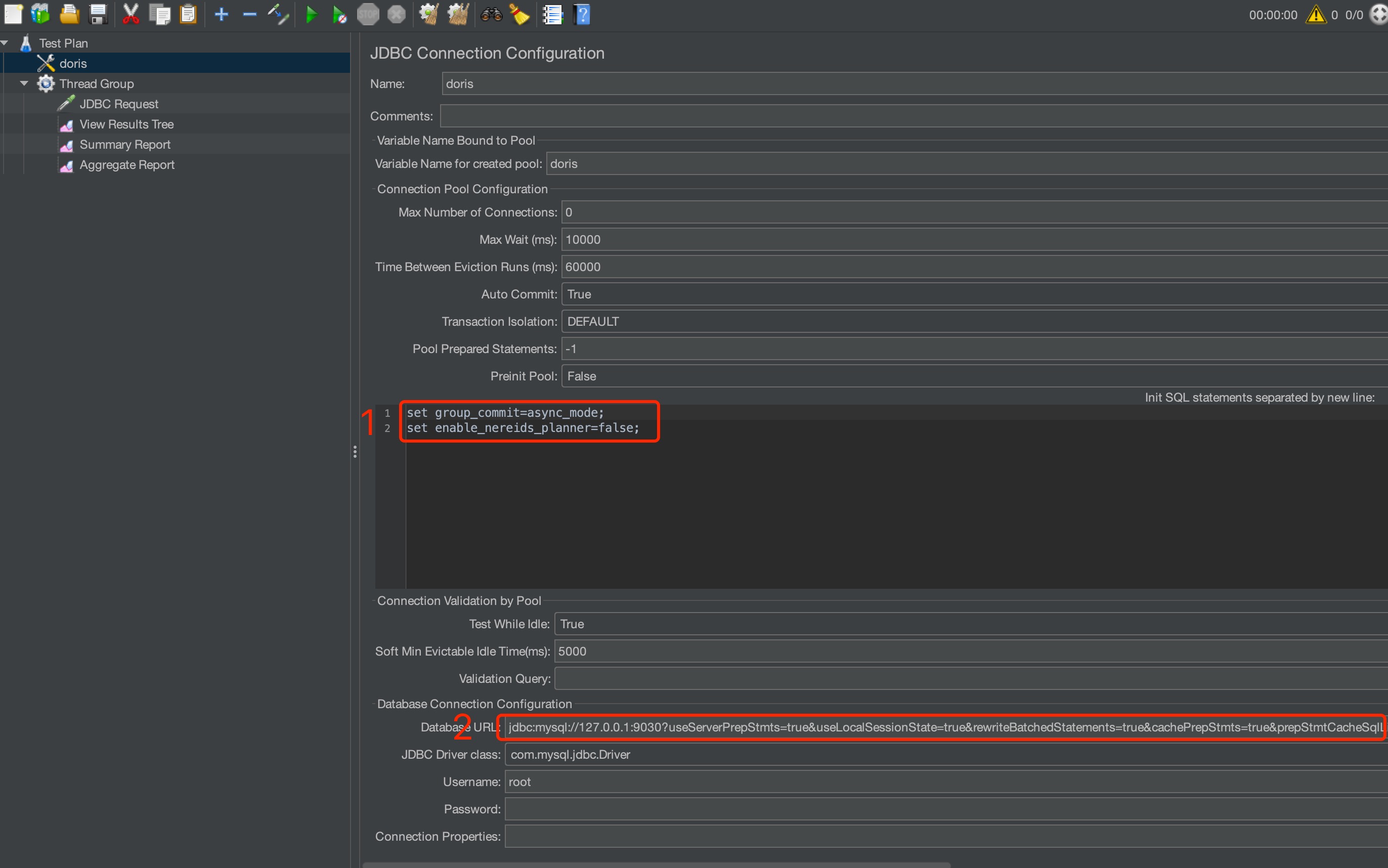
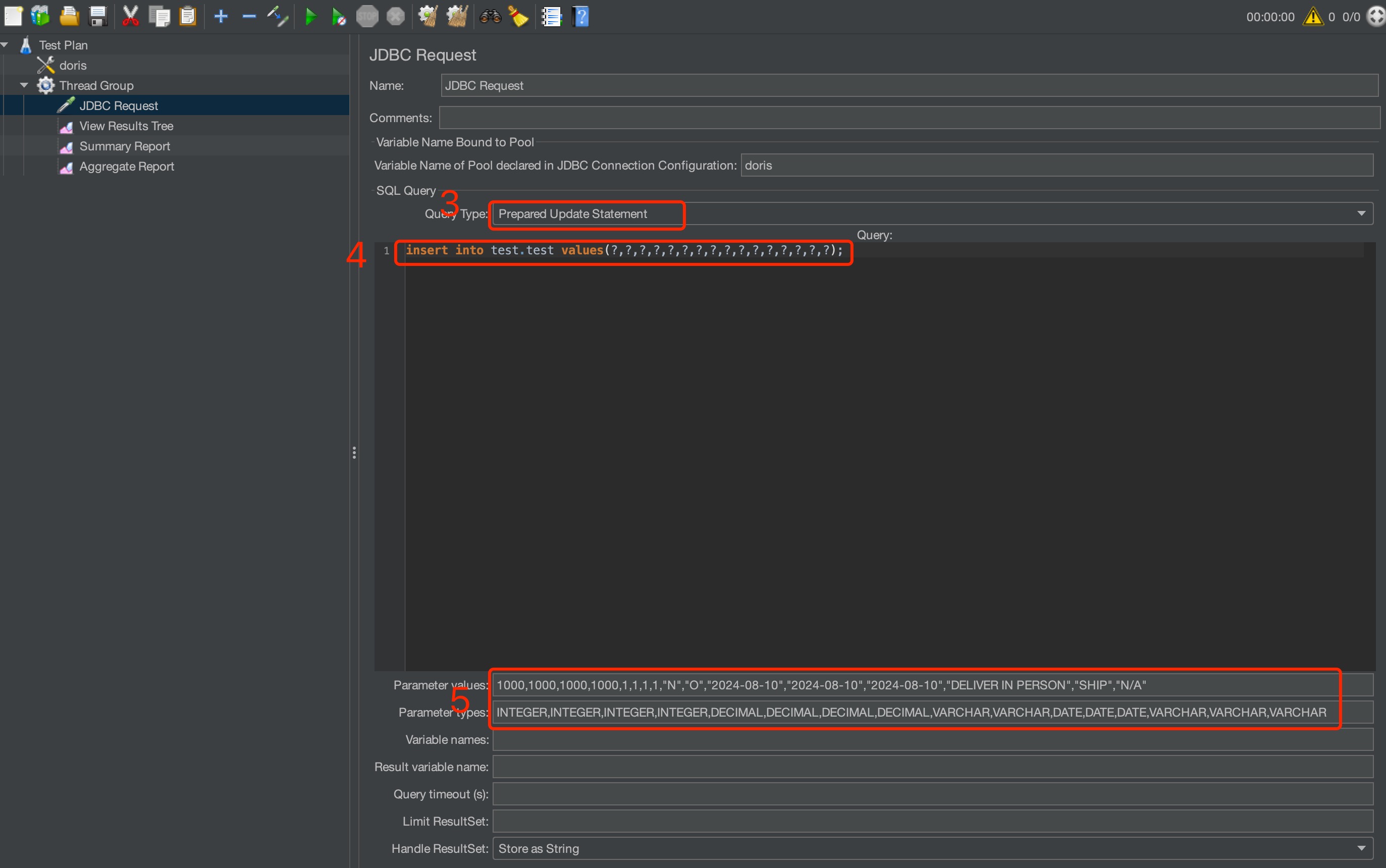
The Jmeter parameters to set are shown below:
-
Set the init statements before the test:
set group_commit=async_modeandset enable_nereids_planner=false. -
Enable JDBC PreparedStatement. The full URL is:
jdbc:mysql://127.0.0.1:9030?useServerPrepStmts=true&useLocalSessionState=true&rewriteBatchedStatements=true&cachePrepStmts=true&prepStmtCacheSqlLimit=99999&prepStmtCacheSize=50&sessionVariables=group_commit=async_mode,enable_nereids_planner=false`. -
Set the load type to prepared update statement.
-
Set the load statement.
-
Set the values to load each time. Make sure the values match the load value types one by one.
Test method:
- Write data to
DoristhroughJmeter. Each concurrency writes 1 row perINSERT INTO.
Test results (units in rows/second):
The tests below cover 30, 100, and 500 concurrency.
30 concurrency, sync mode, 5 BEs with 3 replicas:
| Group commit interval | 10ms | 20ms | 50ms | 100ms |
|---|---|---|---|---|
enable_nereids_planner=true | 891.8 | 701.1 | 400.0 | 237.5 |
enable_nereids_planner=false | 885.8 | 688.1 | 398.7 | 232.9 |
100 concurrency, sync mode, 5 BEs with 3 replicas:
| Group commit interval | 10ms | 20ms | 50ms | 100ms |
|---|---|---|---|---|
enable_nereids_planner=true | 2427.8 | 2068.9 | 1259.4 | 764.9 |
enable_nereids_planner=false | 2320.4 | 1899.3 | 1206.2 | 749.7 |
500 concurrency, sync mode, 5 BEs with 3 replicas:
| Group commit interval | 10ms | 20ms | 50ms | 100ms |
|---|---|---|---|---|
enable_nereids_planner=true | 5567.5 | 5713.2 | 4681.0 | 3131.2 |
enable_nereids_planner=false | 4471.6 | 5042.5 | 4932.2 | 3641.1 |
INSERT INTO Sync Mode, Large Batches
Machine configuration:
- 1 FE: Alibaba Cloud, 16-core CPU, 64 GB memory, 1 x 500 GB ESSD PL1 cloud disk
- 5 BEs: Alibaba Cloud, 16-core CPU, 64 GB memory, 1 x 1 TB ESSD PL1 cloud disk. Note: the tests used 1, 3, and 5 BEs respectively.
- 1 test client: Alibaba Cloud, 16-core CPU, 64 GB memory, 1 x 100 GB ESSD PL1 cloud disk
- Test version: Doris-3.0.1
Dataset:
-
TPC-H sf10
lineitemtable dataset. -
The CREATE TABLE statement is:
CREATE TABLE IF NOT EXISTS lineitem (
  L_ORDERKEY    INTEGER NOT NULL,
  L_PARTKEY     INTEGER NOT NULL,
  L_SUPPKEY     INTEGER NOT NULL,
  L_LINENUMBER  INTEGER NOT NULL,
  L_QUANTITY    DECIMAL(15,2) NOT NULL,
  L_EXTENDEDPRICE  DECIMAL(15,2) NOT NULL,
  L_DISCOUNT    DECIMAL(15,2) NOT NULL,
  L_TAX         DECIMAL(15,2) NOT NULL,
  L_RETURNFLAG  CHAR(1) NOT NULL,
  L_LINESTATUS  CHAR(1) NOT NULL,
  L_SHIPDATE    DATE NOT NULL,
  L_COMMITDATE  DATE NOT NULL,
  L_RECEIPTDATE DATE NOT NULL,
  L_SHIPINSTRUCT CHAR(25) NOT NULL,
  L_SHIPMODE     CHAR(10) NOT NULL,
  L_COMMENT      VARCHAR(44) NOT NULL
)
DUPLICATE KEY(L_ORDERKEY, L_PARTKEY, L_SUPPKEY, L_LINENUMBER)
DISTRIBUTED BY HASH(L_ORDERKEY) BUCKETS 32
PROPERTIES (
  "replication_num" = "3"
);
Test tool:
Test method:
- Write data to
DoristhroughJmeter. Each concurrency writes 1000 rows perINSERT INTO.
Test results (units in rows/second):
The tests below cover 30, 100, and 500 concurrency.
30 concurrency, sync mode, 5 BEs with 3 replicas:
| Group commit interval | 10ms | 20ms | 50ms | 100ms |
|---|---|---|---|---|
enable_nereids_planner=true | 9.1K | 11.1K | 11.4K | 11.1K |
enable_nereids_planner=false | 157.8K | 159.9K | 154.1K | 120.4K |
100 concurrency, sync mode, 5 BEs with 3 replicas:
| Group commit interval | 10ms | 20ms | 50ms | 100ms |
|---|---|---|---|---|
enable_nereids_planner=true | 10.0K | 9.2K | 8.9K | 8.9K |
enable_nereids_planner=false | 130.4K | 131.0K | 130.4K | 124.1K |
500 concurrency, sync mode, 5 BEs with 3 replicas:
| Group commit interval | 10ms | 20ms | 50ms | 100ms |
|---|---|---|---|---|
enable_nereids_planner=true | 2.5K | 2.5K | 2.3K | 2.1K |
enable_nereids_planner=false | 94.2K | 95.1K | 94.4K | 94.8K |
FAQ
Q1: How do I confirm whether my load uses Group Commit?
- INSERT INTO VALUES: the
labelin the returned result starts withgroup_commit_, and multiple loads may share the samelabelandtxnId. - Stream Load: in the returned JSON, the
GroupCommitfield istrueand theLabelstarts withgroup_commit_.
Q2: After enabling async_mode, how soon can the data be queried?
- Data visibility delay is determined jointly by the table properties
group_commit_interval_ms(default 10 seconds) andgroup_commit_data_bytes(default 64 MB). The commit happens as soon as either condition is met.
Q3: When does async_mode automatically fall back to sync_mode?
- The single load contains more than 80% of the space of a single WAL directory.
- Chunked Stream Load with an unknown data size.
- Insufficient available disk space.
Q4: Why does my INSERT INTO VALUES not go through Group Commit?
- Check whether you are inside an explicit transaction, whether a label is specified, whether the VALUES contain an expression, whether it is a column-update write, or whether the table does not support lightweight schema change. For details, see Group Commit Fallback Scenarios.
Q5: Is there a risk of data loss when using async_mode?
- WAL files are stored as a single replica. If the corresponding disk is damaged or the file is deleted accidentally, data may be lost. When taking a BE node offline, always use the
DECOMMISSIONcommand to prevent data loss.
Q6: What should I watch out for when using Group Commit with the Unique model?
- Group Commit does not guarantee commit order. Use a Sequence column to ensure data consistency.