
Doris Catalog
This feature is supported since version 4.0.2.
This is an experimental feature.
Use Cases
Perform cross-cluster federated analysis across multiple Doris clusters.
Unlike connecting to other Doris clusters through JDBC Catalog, this solution enables efficient federated analysis across multiple Doris clusters through Arrow Flight or Virtual Cluster mode.
Configure Catalog
Syntax
CREATE CATALOG [IF NOT EXISTS] catalog_name PROPERTIES (
    'type' = 'doris', -- required
    'fe_http_hosts' = 'http://<fe-host1>:<fe-http-port>,<fe-host2>:<fe-http-port>', -- required
    'fe_arrow_hosts' = '<fe-host1>:<fe-arrow-flight-port>,<fe-host2>:<fe-arrow-flight-port>', -- required
    'fe_thrift_hosts' = '<fe-host1>:<fe-thrift-port>,<fe-host2>:<fe-thrift-port>', -- required
    'use_arrow_flight' = 'true/false', -- required
    'user' = '', -- required
    'password' = '', -- required
    {QueryProperties},
    {HttpClientProperties},
    {CommonProperties}
);
-
fe_http_hostsList of FE HTTP service endpoints for the remote Doris cluster.
-
fe_arrow_hostsList of FE Arrow Flight service endpoints for the remote Doris cluster.
-
fe_thrift_hostsList of FE Thrift service endpoints for the remote Doris cluster.
In version 4.0.2, please fill in the Master FE address. This issue will be fixed in subsequent versions.
-
use_arrow_flightWhether to access the remote Doris cluster via Arrow Flight, or send the execution plan to the remote Doris cluster as if the remote table were an internal table.
-
{QueryProperties}Optional properties.
Parameter Name Description Default enable_parallel_result_sinkWhen enabled, local Doris BE nodes will pull data in parallel from various BE nodes of the remote Doris cluster. (For Arrow Flight mode) true query_retry_countMaximum number of retries for failed query requests sent to the remote Doris. (Does not include failures that may occur during asynchronous execution after the request is accepted) 3 query_timeout_secTimeout for sending queries to the remote Doris. (Does not include asynchronous execution time after the request is accepted) 15 compatibleUsed to attempt compatibility with metadata format when accessing a remote Doris with a version lower than the local cluster. No need to enable when cluster versions are consistent. false -
{HttpClientProperties}HttpClientProperties section is used to configure HTTP Client related parameters. This client is used to send HTTP requests to synchronize metadata from the remote cluster. These are all optional parameters.
Parameter Name Description Default metadata_http_ssl_enabledWhether to enable SSL/TLS encrypted communication for HTTP metadata synchronization. false metadata_sync_retry_countMaximum number of retries for failed HTTP requests. 3 metadata_max_idle_connectionsMaximum number of idle connections for HTTP metadata synchronization client. 5 metadata_keep_alive_duration_secIdle connection keep-alive duration for HTTP metadata synchronization client. 300 metadata_connect_timeout_secTCP connection timeout for HTTP metadata synchronization client. 10 metadata_read_timeout_secSocket read timeout for HTTP metadata synchronization client. 10 metadata_write_timeout_secSocket write timeout for HTTP metadata synchronization client. 10 metadata_call_timeout_secTotal HTTP request timeout for HTTP metadata synchronization client. 10 -
{CommonProperties}The CommonProperties section is used to fill in common properties. Please refer to the [Common Properties] section in the Data Catalog Overview.
Access Modes
Arrow Flight Mode
Supported since version 4.0.2.
When the use_arrow_flight property is set to true, it is in Arrow Flight mode.
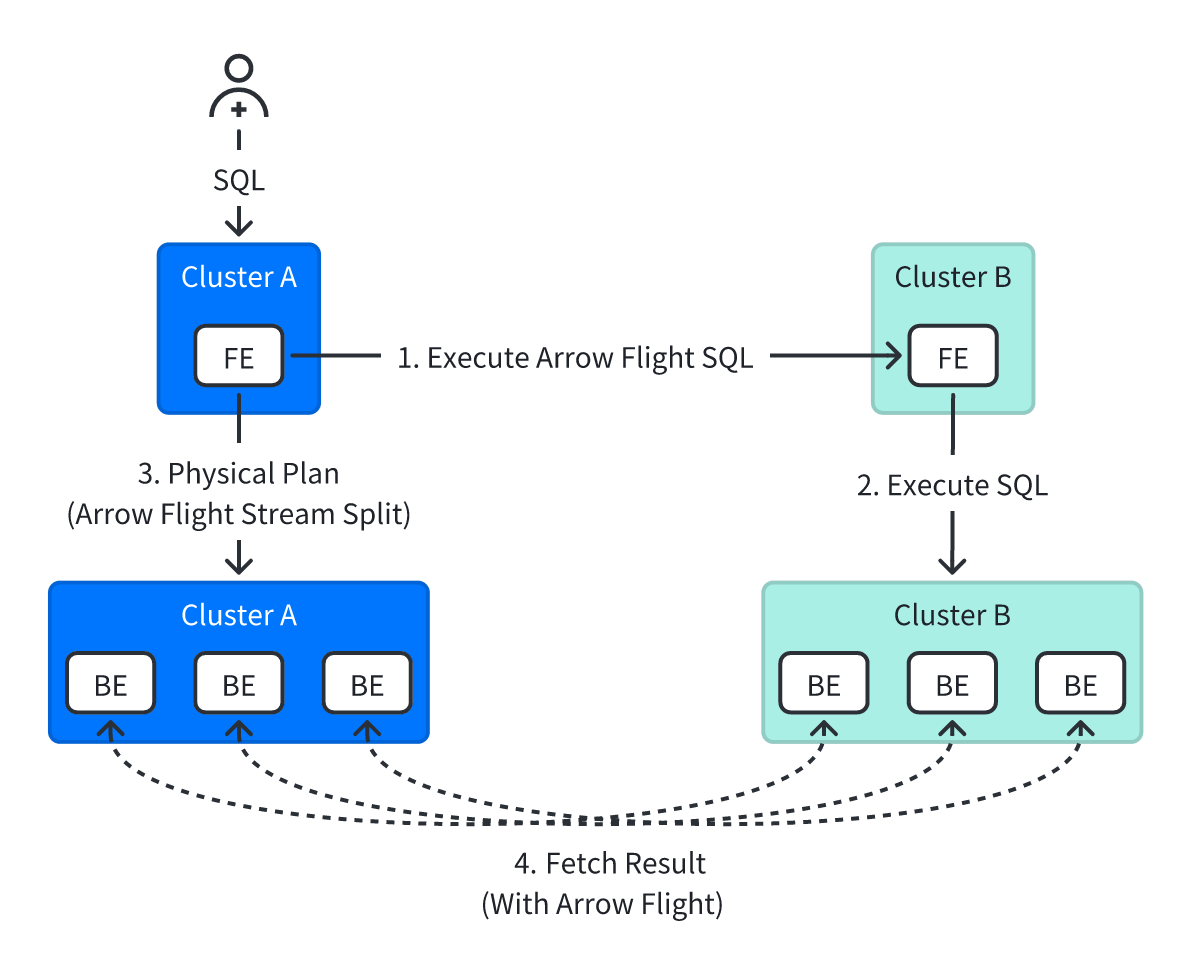
In this mode, during cross-cluster queries, FEs synchronize metadata such as Schema through HTTP protocol, and then BE nodes of the local cluster access the Remote Doris cluster through the Arrow Flight interface.
Advantages: Almost no overhead for FE, as the execution plan only generates query SQL to be sent to the remote cluster.
Disadvantages: May not be able to leverage various optimization features of Doris internal tables, such as aggregate pushdown, limited predicate pushdown, etc.
Virtual Cluster Mode
Supported since version 4.0.3.
When the use_arrow_flight property is set to false, it is in Virtual Cluster mode.
This mode currently only supports Doris clusters deployed in storage-compute coupled mode.
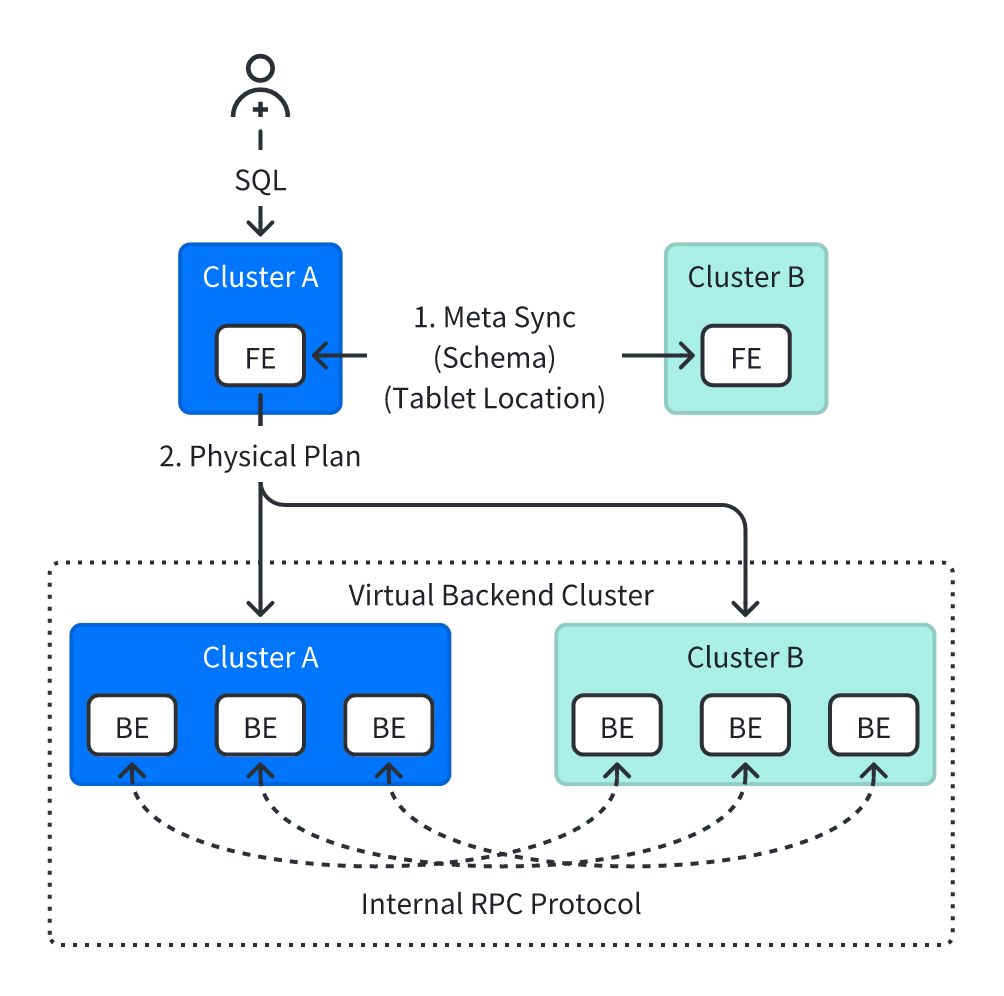
In this mode, during cross-cluster queries, Backend nodes in the Remote Doris cluster are treated as virtual nodes for query planning.
FEs synchronize metadata such as Schema through HTTP protocol. BEs directly transfer data through internal communication protocols.
Advantages: Can basically leverage all optimization features of Doris internal table queries. Query execution flow is consistent with single-cluster internal flow.
Disadvantages: For large remote tables, all information of the remote table (partition information, replica information) will be retrieved. FE memory overhead will increase, requiring expansion of FE memory. When cluster versions are inconsistent, such as higher version querying lower version, query failures may occur.
Since version 4.1, Virtual Cluster mode supports insert loading functionality.
Column Type Mapping
Arrow Flight Mode
The column types and table types supported in this mode depend on the support capabilities of Arrow Flight SQL. Currently, the following capabilities and limitations exist:
- Supports all primitive types.
- Supports all nested types (Array, Map, Struct).
- Does not support hll, bitmap, variant types.
- Supports all table models (Duplicate, Aggregate, and Unique tables).
Virtual Cluster Mode
In Virtual Cluster mode, all column types and all table models (Duplicate, Aggregate, and Unique tables) are supported.
Query Operations
After configuring the Catalog, you can query table data in the Catalog using the following methods:
-- 1. switch to catalog, use database and query
SWITCH doris_ctl;
USE doris_db;
SELECT * FROM doris_tbl LIMIT 10;

-- 2. use doris database directly
USE doris_ctl.doris_db;
SELECT * FROM doris_tbl LIMIT 10;

-- 3. use full qualified name to query
SELECT * FROM doris_ctl.doris_db.doris_tbl LIMIT 10;
Query Optimization
Arrow Flight Mode
In this mode, Doris will try to push down predicates or function conditions and concatenate them into the generated SQL.
You can view the generated SQL statement through EXPLAIN SQL.
...
|   0:VREMOTE_DORIS_SCAN_NODE(68)                                                                                                                   |
|      TABLE: test.test_time                                                                                                                        |
|      QUERY: SELECT /*+ SET_VAR(enable_parallel_result_sink=true) */ `timestamp` FROM test.test_time WHERE (timestamp > '2025-11-03 00:00:00.000') |
|      PREDICATES: (timestamp[#0] > '2025-11-03 00:00:00.000')
...
Virtual Cluster Mode
In this mode, what you see in the execution plan is still VOlapScanNode.
Various optimizations of Doris for internal table queries can continue to be utilized, such as Join Runtime Filter.
MySQL [(none)]> explain select * from demo.inner_table a join edoris.external.example_tbl_duplicate b on (a.log_type = b.log_type) where error_code=2;
+-------------------------------------------------------------------------------------------------------------------------------------------+
| Explain String(Nereids Planner) |
+-------------------------------------------------------------------------------------------------------------------------------------------+
| PLAN FRAGMENT 0 |
| OUTPUT EXPRS: |
| log_type[#16] |
| reason[#17] |
| log_time[#18] |
| log_type[#19] |
| error_code[#20] |
| error_msg[#21] |
| op_id[#22] |
| op_time[#23] |
| PARTITION: HASH_PARTITIONED: log_type[#6] |
| |
| HAS_COLO_PLAN_NODE: false |
| |
| VRESULT SINK |
| MYSQL_PROTOCOL |
| |
| 3:VHASH JOIN(200) |
| | join op: INNER JOIN(BROADCAST)[] |
| | equal join conjunct: (log_type[#6] = log_type[#1]) |
| | cardinality=3 |
| | vec output tuple id: 3 |
| | output tuple id: 3 |
| | vIntermediate tuple ids: 2 |
| | hash output slot ids: 0 1 2 3 4 5 6 7 |
| | runtime filters: RF000[min_max] <- log_type[#1](1/1/1048576), RF001[in_or_bloom] <- log_type[#1](1/1/1048576) |
| | final projections: log_type[#8], reason[#9], log_time[#10], log_type[#11], error_code[#12], error_msg[#13], op_id[#14], op_time[#15] |
| | final project output tuple id: 3 |
| | distribute expr lists: log_type[#6] |
| | distribute expr lists: |
| | |
| |----1:VEXCHANGE |
| | offset: 0 |
| | distribute expr lists: log_type[#1] |
| | |
| 2:VOlapScanNode(187) |
| TABLE: demo.inner_table(inner_table), PREAGGREGATION: ON |
| partitions=1/1 (inner_table) |
| tablets=1/1, tabletList=1762832514491 |
| cardinality=3, avgRowSize=901.6666, numNodes=1 |
| pushAggOp=NONE |
| runtime filters: RF000[min_max] -> log_type[#6], RF001[in_or_bloom] -> log_type[#6] |
| |
| PLAN FRAGMENT 1 |
| |
| PARTITION: HASH_PARTITIONED: log_type[#1] |
| |
| HAS_COLO_PLAN_NODE: false |
| |
| STREAM DATA SINK |
| EXCHANGE ID: 01 |
| UNPARTITIONED |
| |
| 0:VOlapScanNode(188) |
| TABLE: external.example_tbl_duplicate(example_tbl_duplicate), PREAGGREGATION: ON |
| PREDICATES: (error_code[#2] = 2) |
| partitions=1/1 (example_tbl_duplicate) |
| tablets=1/1, tabletList=1762481736238 |
| cardinality=1, avgRowSize=7425.0, numNodes=1 |
| pushAggOp=NONE
Write Operations
Supported since version 4.1.
After configuring the Catalog, you can import data into tables in the Catalog in Virtual Cluster mode using the following insert methods:
-- 1. switch to catalog, use database and insert
SWITCH doris_ctl;
USE doris_db;
insert into doris_tbl values (1,2);

-- 2. use doris database directly
USE doris_ctl.doris_db;
insert into doris_tbl values (1,2);

-- 3. use full qualified name to insert
insert into doris_ctl.doris_db.doris_tbl values (1,2);
Supported Import Forms
-- 1. insert into values
insert into doris_ctl.doris_db.doris_tbl values (1,2);

-- 2. insert into select
insert into doris_ctl.doris_db.doris_tbl select * from doris_db.doris_tbl;

-- 3. insert overwrite
insert overwrite table doris_ctl.doris_db.doris_tbl select * from doris_db.doris_tbl;
Unsupported Import Capabilities
After configuring the Catalog, the following import capabilities are currently not supported:
