Unique Key Model
The Unique Key Model keeps Key columns unique: when you insert or update a row, the new data overwrites any existing row with the same Key, so the table always holds the latest version. Use it when your data is updated by primary key.
When to Use
The Unique Key Model fits three main scenarios:
- High-frequency data updates: Real-time synchronization of dimension tables from upstream OLTP databases, which requires efficient UPSERT operations.
- Efficient data deduplication: In ad delivery, customer relationship management (CRM), and similar systems, records are deduplicated by user ID.
- Partial column updates: For profile tagging where dynamic tags change frequently, or order scenarios where the transaction status changes, you can update only the affected columns.
Create a Unique Key Table
Declare the primary key with the UNIQUE KEY keyword. Merge-on-write is on by default and is right for almost all workloads, so you don't need any extra property:
CREATE TABLE IF NOT EXISTS example_tbl_unique
(
    user_id         LARGEINT        NOT NULL,
    user_name       VARCHAR(50)     NOT NULL,
    city            VARCHAR(20),
    age             SMALLINT,
    sex             TINYINT
)
UNIQUE KEY(user_id, user_name)
DISTRIBUTED BY HASH(user_id) BUCKETS 10;
Each row is identified by (user_id, user_name). Writing a row whose Key already exists overwrites it; a row with a new Key is inserted.
Upsert Data
Doris upserts by Key no matter which load method you use: rows with an existing Key are updated, and rows with a new Key are inserted. Doris uses the Key columns for both sorting and deduplication. The example below uses INSERT; Stream Load, Broker Load, and Routine Load work the same way.
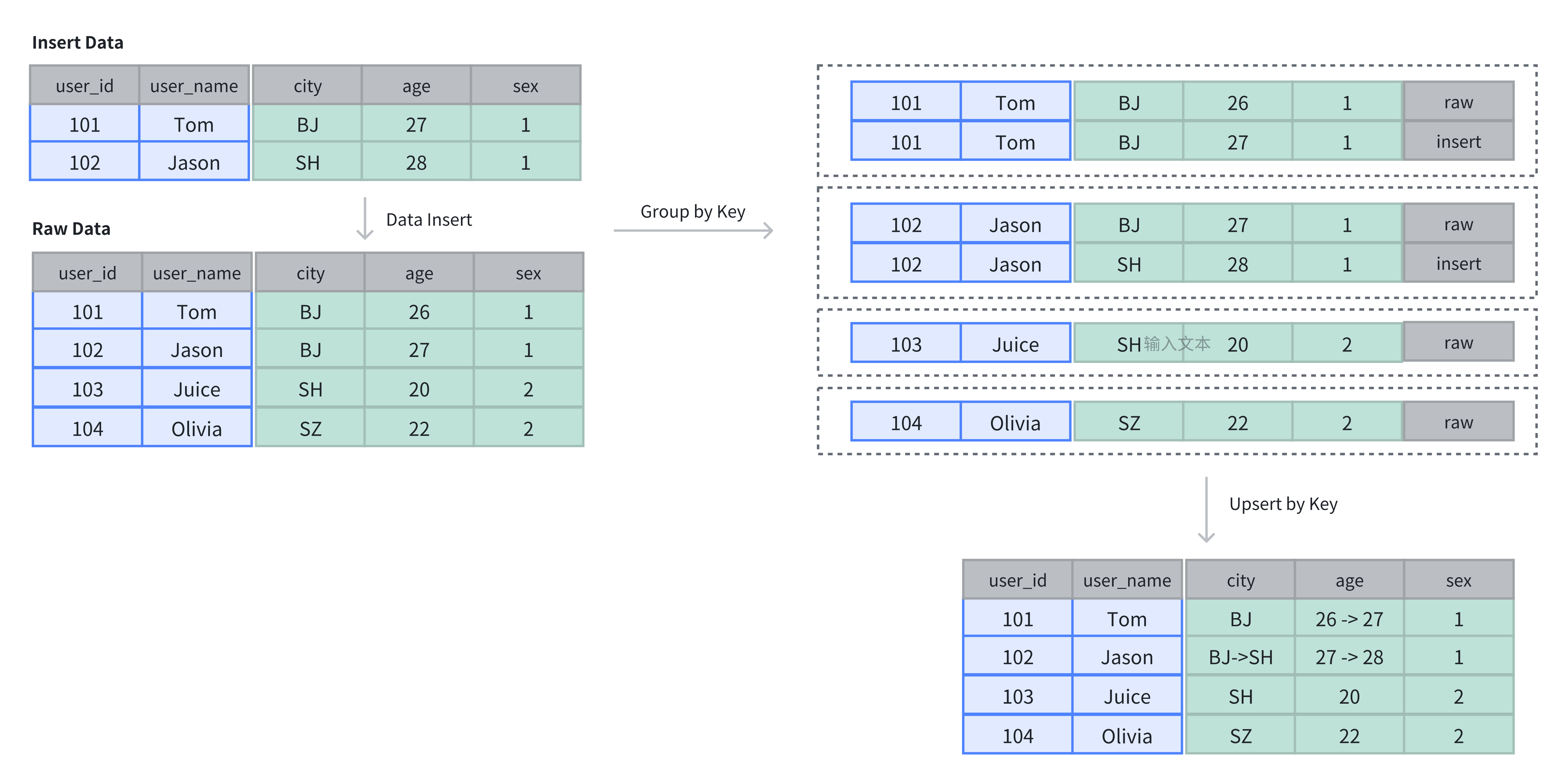
In the following example, the original table has 4 rows. Re-inserting 2 rows with existing Keys updates them in place:
-- Insert original data
INSERT INTO example_tbl_unique VALUES
(101, 'Tom', 'BJ', 26, 1),
(102, 'Jason', 'BJ', 27, 1),
(103, 'Juice', 'SH', 20, 2),
(104, 'Olivia', 'SZ', 22, 2);

-- Re-insert the same Keys with new values
INSERT INTO example_tbl_unique VALUES
(101, 'Tom', 'BJ', 27, 1),
(102, 'Jason', 'SH', 28, 1);

-- Query the updated data
SELECT * FROM example_tbl_unique;
+---------+-----------+------+------+------+
| user_id | user_name | city | age  | sex  |
+---------+-----------+------+------+------+
| 101     | Tom       | BJ   |   27 |    1 |
| 102     | Jason     | SH   |   28 |    1 |
| 104     | Olivia    | SZ   |   22 |    2 |
| 103     | Juice     | SH   |   20 |    2 |
+---------+-----------+------+------+------+
With a whole-row upsert, if your INSERT INTO lists only some columns, Doris fills the rest with NULL or default values.
Update Only Some Columns
To change a few fields without rewriting the whole row, use partial column update. It needs merge-on-write (the default) and is turned on with a parameter. See Partial Column Update.
Choose an Implementation
The Unique Key Model has two storage implementations: merge-on-write (the default, recommended for most workloads) and merge-on-read (suited to write-heavy, read-light pipelines). The implementation is fixed at table creation and cannot be changed later through schema change.
For how each one works, their performance trade-offs, and how to enable merge-on-read, see Merge-on-Write.
Notes
When using the Unique Key Model, note the following limitations:
- The implementation cannot be changed: merge-on-write or merge-on-read can only be set at table creation and cannot be modified through schema change.
- Whole-row UPSERT fills in default values: even if
INSERT INTOspecifies only some columns, Doris fills the unspecified columns with NULL or default values. - Partial column updates require merge-on-write: to update only some columns, use merge-on-write and turn on partial column update with a parameter. See Partial Column Update.
- Partition keys must be a subset of Key columns: Doris requires this to guarantee data uniqueness.