Vector Quantization Algorithm Survey and Selection
This document introduces common vector quantization algorithms from both an educational and engineering perspective, and provides selection guidance based on Apache Doris ANN use cases. Apache Doris currently uses an optimized version of Faiss as the core implementation for ANN vector indexing and retrieval, so the SQ/PQ mechanism descriptions below map directly to actual Doris behavior.
Quick Navigation
Target readers and corresponding sections:
| Problem you want to solve | Jump to |
|---|---|
| Do not know why quantization is needed | Why Vector Quantization Is Needed |
| Want to quickly pick a quantizer | Doris Selection Guidance |
| Want to understand how SQ8/SQ4 work | Scalar Quantization (SQ) |
| Want to understand the principles and advantages of PQ | Product Quantization (PQ) |
| Want to run a fair benchmark comparison | Benchmarking Considerations |
| Common questions | FAQ |
One-Sentence Definitions
- Vector quantization: Encodes high-precision vectors (such as float32) into a low-precision representation, trading acceptable recall loss for lower memory footprint and faster retrieval.
- SQ (Scalar Quantization): Reduces precision independently for each dimension.
- PQ (Product Quantization): Splits a vector into multiple sub-vectors and performs clustering-based encoding within each sub-space.
Why Vector Quantization Is Needed
In ANN scenarios (especially HNSW), indexes are often constrained by memory. The core idea of quantization is to encode high-precision vectors such as float32 into a low-precision representation, trading acceptable recall loss for lower memory footprint.
In Doris, the ANN index controls the quantization method through quantizer:
| quantizer | Meaning | Compression ratio relative to float32 |
|---|---|---|
flat | No quantization (highest quality, highest memory) | 1x |
sq8 | 8-bit scalar quantization | About 4x |
sq4 | 4-bit scalar quantization | About 8x |
pq | Product quantization | Depends on pq_m and pq_nbits |
Minimal example (HNSW + quantizer):
CREATE TABLE vector_tbl (
    id BIGINT,
    embedding ARRAY<FLOAT>,
    INDEX ann_idx (embedding) USING ANN PROPERTIES (
        "index_type" = "hnsw",
        "metric_type" = "l2_distance",
        "dim" = "768",
        "quantizer" = "sq8"
    )
)
DUPLICATE KEY(id)
DISTRIBUTED BY HASH(id) BUCKETS 8
PROPERTIES ("replication_num" = "3");
Algorithm Overview
| Method | Core idea | Typical benefit | Main cost |
|---|---|---|---|
| SQ (Scalar Quantization) | Quantize each dimension independently | Significant memory reduction, simple to implement | Build cost is higher than FLAT; stronger compression tends to lower recall |
| PQ (Product Quantization) | Split into sub-vectors and quantize per group | Better balance of compression and query speed in common scenarios | Higher training/encoding cost, parameters require tuning |
Scalar Quantization (SQ)
Principle
SQ does not change the vector dimension. It only reduces the numeric precision of each dimension.
A common min-max quantization mapping:
max_code = (1 << b) - 1scale = (max_val - min_val) / max_codecode = round((x - min_val) / scale)
There are two main types of SQ in Faiss:
| Type | Range statistics method | Applicable scenario |
|---|---|---|
| Uniform | All dimensions share one set of min/max | Numeric scales are similar across dimensions |
| Non-uniform | Each dimension is statistically analyzed separately | Numeric scales differ noticeably across dimensions, with smaller reconstruction error |
Characteristics
Strengths:
- Direct implementation with stable behavior.
- Predictable compression ratio (relative to float32 values,
sq8is about 4x andsq4is about 8x).
Limitations:
- Fundamentally still fixed-step bucketing.
- If the distribution of a single dimension is clearly non-uniform (for example, a long-tail distribution), the error increases.
Faiss Source Code Highlights (SQ)
In the optimized Faiss implementation path used by Doris, SQ training first computes the minimum and maximum, then slightly expands the range as needed to reduce the risk of out-of-range values during the subsequent add stage. The simplified form is as follows:
void train_Uniform(..., const float* x, std::vector<float>& trained) {
    trained.resize(2);
    float& vmin = trained[0];
    float& vmax = trained[1];
    // Scan samples to obtain min/max
    // Then expand the range based on rs_arg
}
For non-uniform SQ, Faiss computes statistics per dimension instead of using a single global range, which usually works better on data where numeric scales differ noticeably across dimensions.
Practical Observations
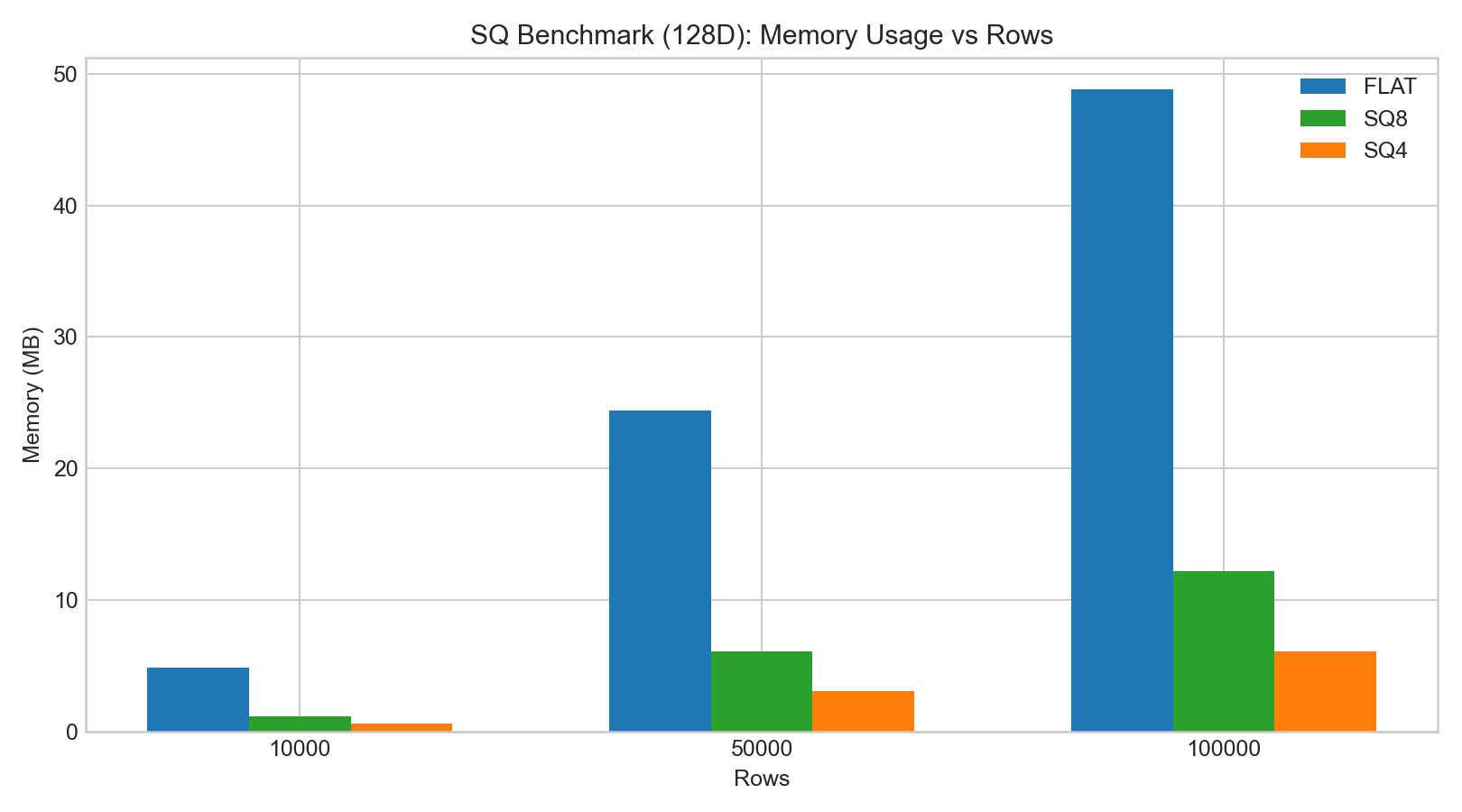
In internal 128D/256D HNSW tests:
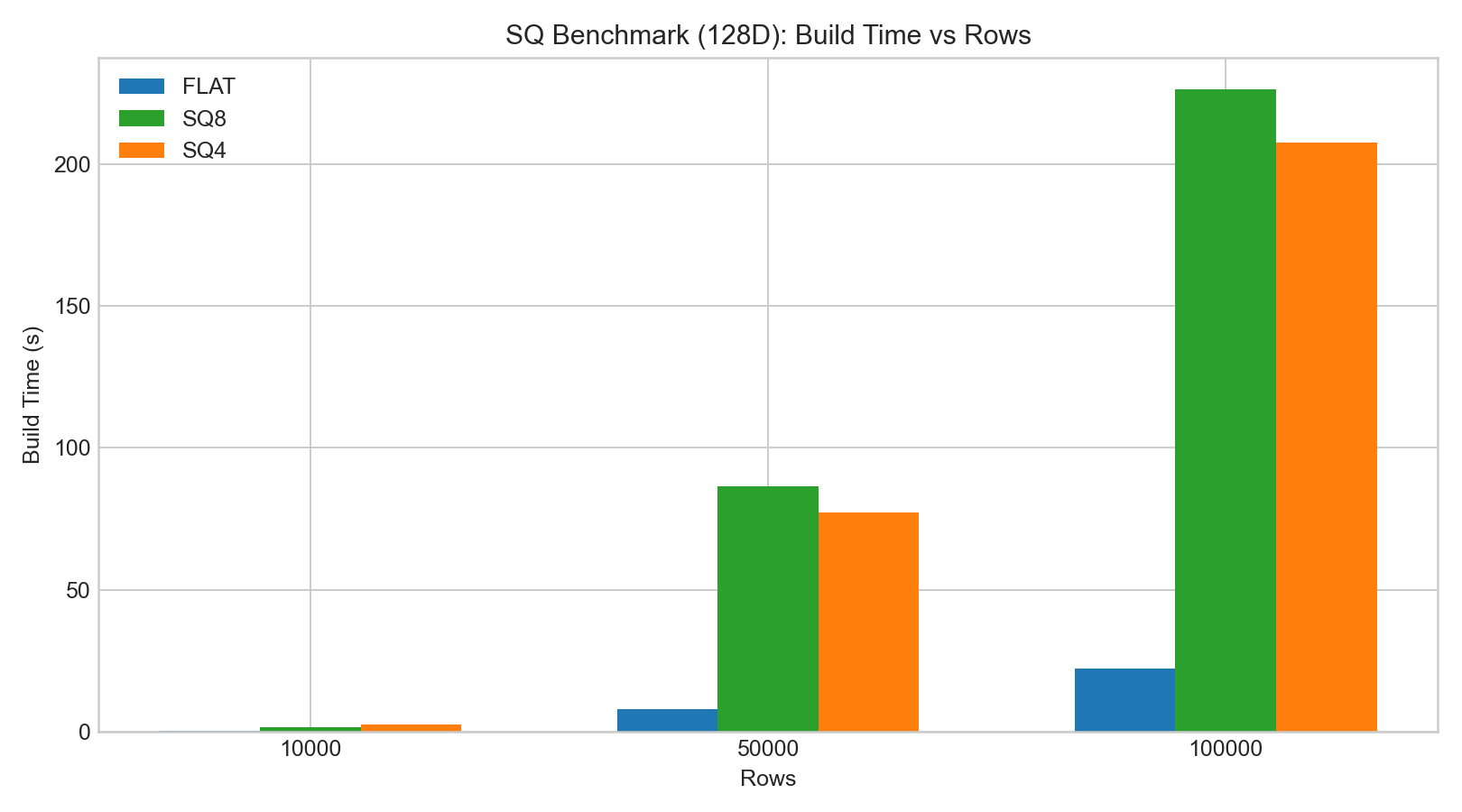
sq8recall is usually noticeably better thansq4.- SQ build/encoding time is significantly higher than FLAT.
sq8query latency typically does not change much, whilesq4shows more obvious recall degradation.
The bar charts below are based on example benchmark data:
Product Quantization (PQ)
Principle
PQ splits a D-dimensional vector into M sub-vectors (each sub-vector is D/M-dimensional) and applies k-means quantization in each sub-space.
Key parameters:
| Parameter | Meaning | Tuning direction |
|---|---|---|
pq_m | Number of sub-quantizers | Larger values improve precision but increase training and encoding cost |
pq_nbits | Number of encoding bits per sub-vector | Determines the codebook size of each sub-space (2^pq_nbits) |
Why PQ Queries Can Be Faster
PQ can use a LUT (lookup table) for distance approximation:
- Pre-compute distances from each query sub-vector to the centroids of each sub-space.
- Estimate the overall distance at query time by table lookup and accumulation.
This avoids full reconstruction and reduces CPU cost during the search stage in many scenarios.
Faiss Source Code Highlights (PQ)
Within the same implementation path, the Faiss ProductQuantizer trains a codebook over each sub-space and stores the centroids in contiguous memory. The simplified form is as follows:
void ProductQuantizer::train(size_t n, const float* x) {
    Clustering clus(dsub, ksub, cp);
    IndexFlatL2 index(dsub);
    clus.train(n * M, x, index);
    for (int m = 0; m < M; m++) {
        set_params(clus.centroids.data(), m);
    }
}
The centroid layout can be understood as (M, ksub, dsub):
M: Number of sub-quantizers.ksub: Codebook size of each sub-space (2^pq_nbits).dsub: Sub-vector dimension (D / M).
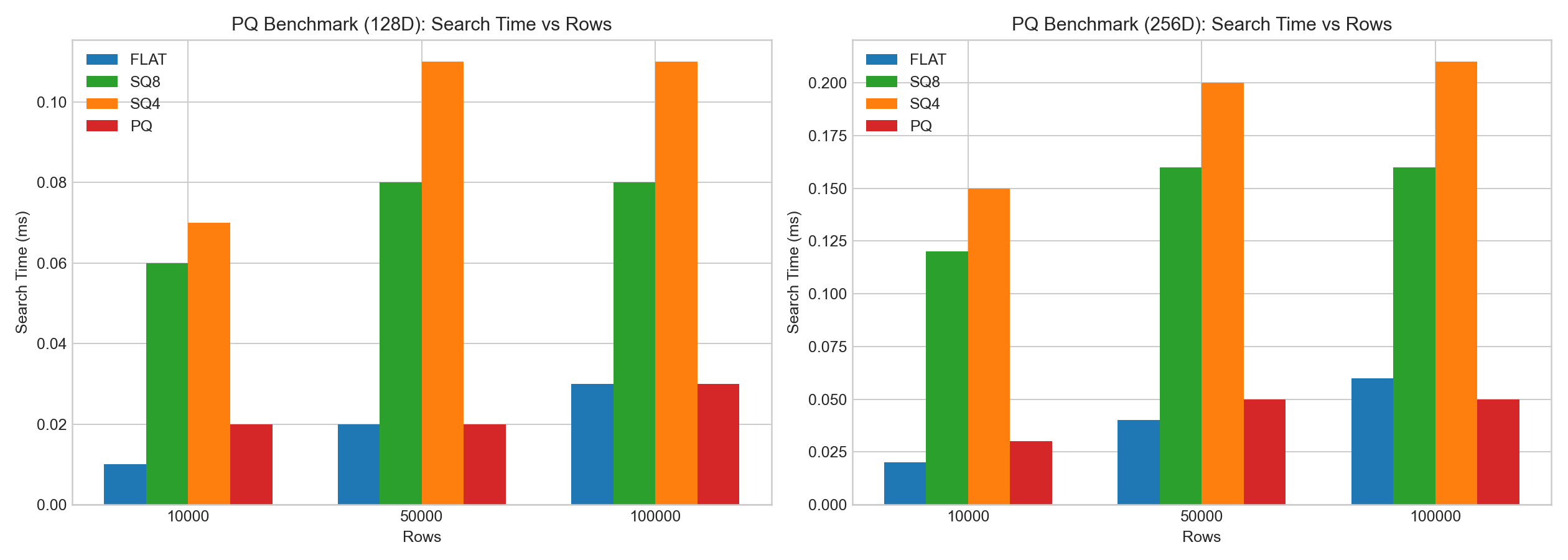
Practical Observations
In the same internal tests:
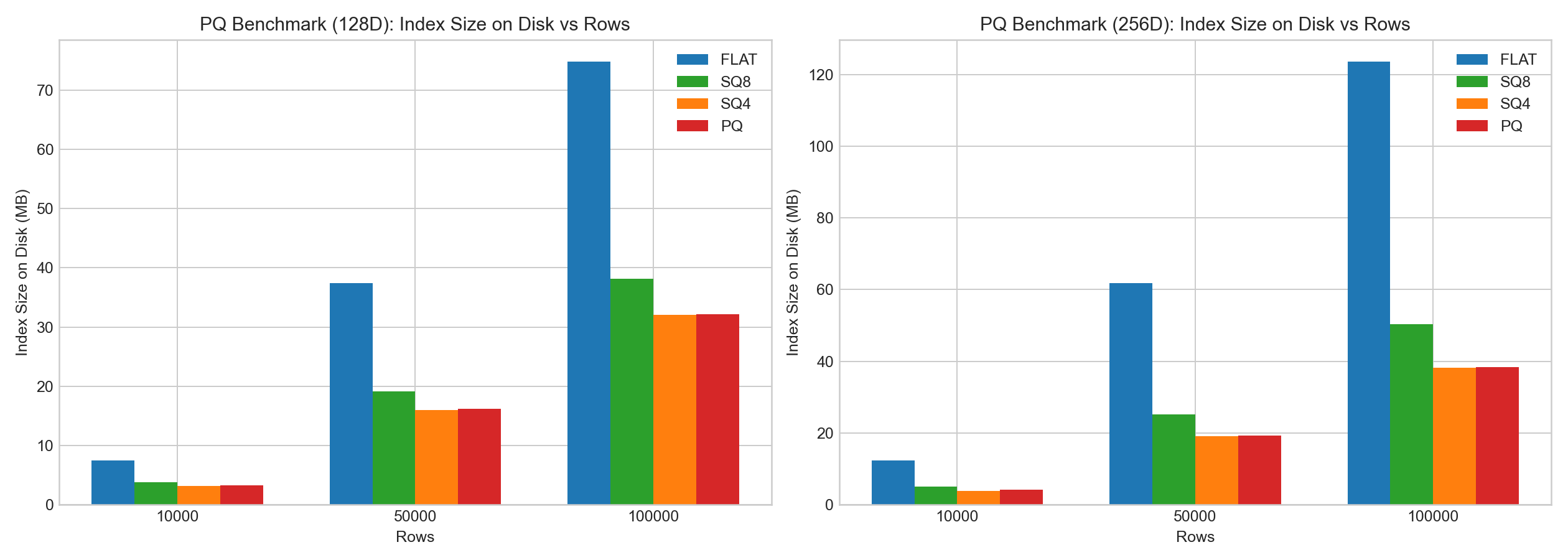
- PQ delivers clear positive gains on compression.
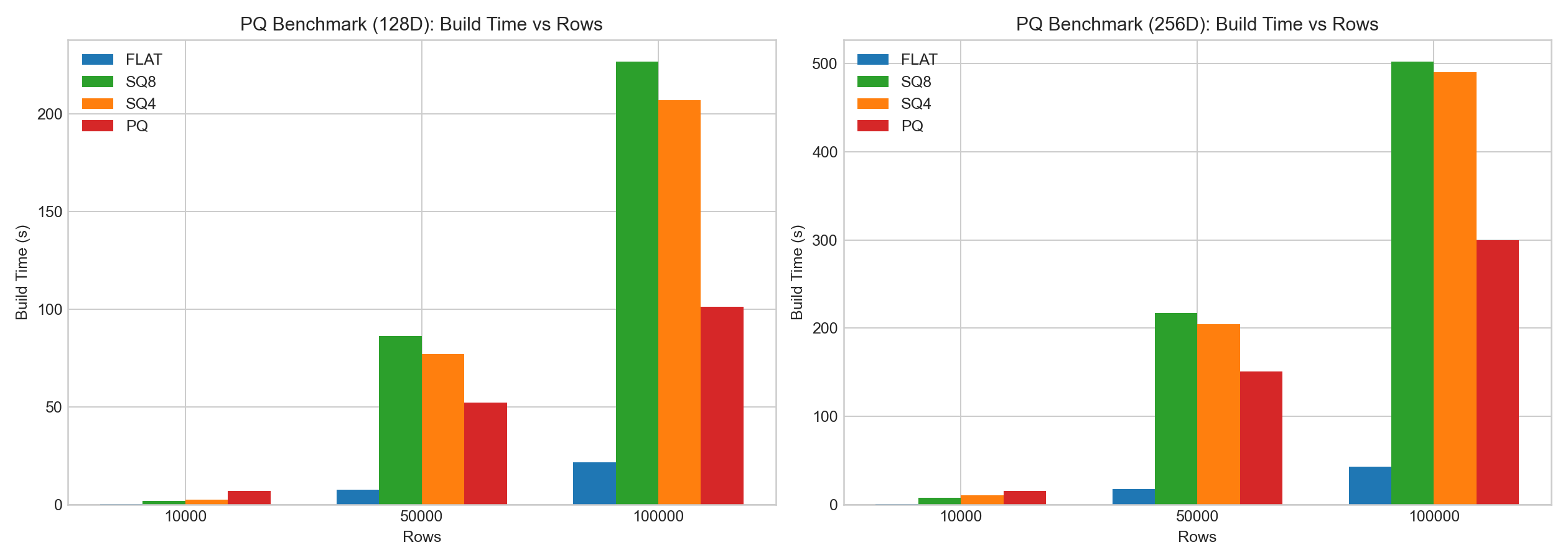
- PQ has higher training/encoding cost.
- Compared with SQ, PQ can often achieve better query-stage speed by leveraging the LUT, but recall and build cost still depend on the data distribution and parameter combination.
The bar charts below are based on example benchmark data:
Doris Selection Guidance
Selection by Scenario
| Scenario | Recommended quantizer | Rationale |
|---|---|---|
| Sufficient memory and recall is the priority | flat | No precision loss, highest quality ceiling |
| Want to reduce memory at low risk with more stable quality | sq8 | Compression of about 4x, controllable recall drop |
| Severe memory pressure and lower recall is acceptable | sq4 | Compression of about 8x, but recall drops more noticeably |
| Pursue a balance of compression and performance and accept tuning | pq | LUT accelerates queries, requires parameter tuning |
Recommended Validation Process
- First build a baseline with
flatand record Recall@K and query latency. - Test
sq8first and compare Recall against P95/P99 latency. - If memory is still insufficient, test
pq(you can start frompq_m = D/2). - Consider
sq4only when memory has higher priority than recall.
Benchmarking Considerations
Absolute latency is strongly correlated with hardware, thread count, and dataset. When running side-by-side comparisons, fix the following variables to ensure conclusions are comparable:
| Category | Variables to fix |
|---|---|
| Data | Vector dimension, dataset distribution, row count |
| Index | Index parameters, segment size |
| Query | Query set and ground-truth set |
Evaluation metrics should cover all of the following at the same time:
- Recall@K
- Index size
- Build time
- Query latency (P50/P95/P99)
FAQ
Q1: How to choose between sq8 and sq4?
Prefer sq8. sq8 compresses by about 4x with a controllable recall drop. sq4 compresses by about 8x but the recall drop is more noticeable, so use it only when memory is extremely tight.
Q2: When should you choose PQ over SQ?
Choose PQ when you need a higher compression ratio or want to use the LUT to achieve better query-stage speed. The trade-off is higher training/encoding cost, and pq_m and pq_nbits need tuning based on the data distribution.
Q3: Does quantization affect build time?
Yes. The build/encoding time of every quantizer is significantly higher than flat, and the training stage of PQ has the highest cost. Record build time separately during evaluation.
Q4: Is non-uniform SQ always better than uniform SQ?
Not necessarily. When numeric scales differ noticeably across dimensions (for example, when some dimensions are inherently larger in magnitude), non-uniform has smaller reconstruction error. If scales are similar across dimensions, the gap between the two is limited.
Q5: How to set the starting value of pq_m?
You can start from pq_m = D/2, then adjust on either side based on Recall@K and query latency. A larger pq_m improves precision but increases training and encoding cost.