Resource Group: Physical Isolation and Resource Group Management for BE Nodes
Resource Group is the mechanism for achieving physical isolation between different workloads under the integrated storage-compute architecture. It tags BE nodes, divides the cluster nodes into multiple resource groups, and distributes table replicas across resource groups, so that different users or business lines access their own dedicated compute and storage resources without interfering with each other.
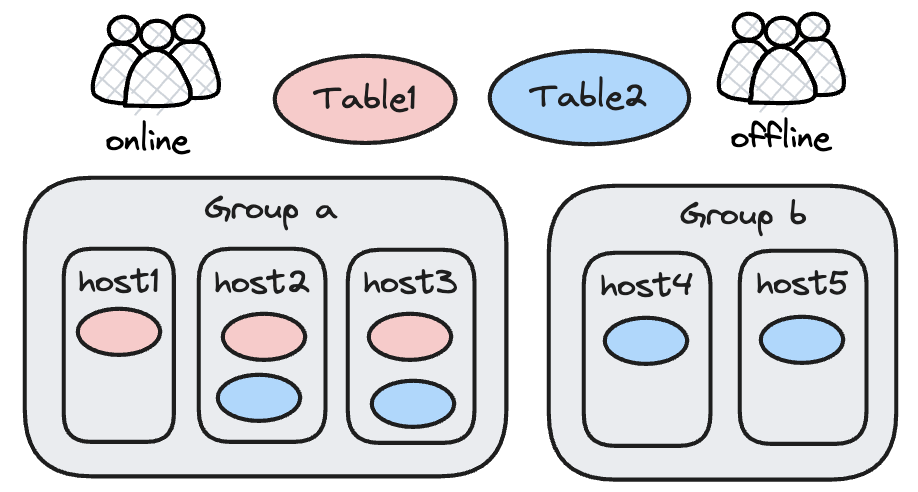
How It Works
Resource Group is essentially a table replica placement policy. The core mechanism is as follows:
- Tags divide BE nodes into different groups, with each group identified by a tag name (such as
group_a,group_b). - Different replicas of a table are placed into different resource groups (for example, all 3 replicas of table1 are in group_a, while 2 of the 4 replicas of table2 are in group_a and the other 2 are in group_b).
- At query time, the resource group bound to the user limits the user to accessing only the replicas and compute resources on nodes within that group.
Strengths and limitations:
| Dimension | Description |
|---|---|
| Fault isolation | Different resource groups use independent BEs. A BE outage in one group does not affect queries in other groups |
| Load constraints | A load requires successful writes to multiple replicas. If the remaining replicas do not meet the Quorum requirement, the load still fails |
| Storage overhead | Each resource group needs at least one replica of the table. The more resource groups there are, the more replicas are stored |
Typical Use Cases
| Scenario | Description |
|---|---|
| Read/write isolation | Divide the cluster into two resource groups: Online and Offline. Online handles high-concurrency, low-latency queries, while Offline handles ETL jobs. Data is stored in 3 replicas, with 2 in the Online group and 1 in the Offline group |
| Multi-business isolation | Multiple business lines share no data with each other. Assign an independent resource group to each business line, which is equivalent to merging multiple physical clusters into one large cluster for unified management |
| Multi-user isolation | Multiple users share the same business table but are given independent resource groups to avoid resource contention. Create multiple replicas of the table, place each into its corresponding resource group, and bind each user to their own resource group |
Configuring a Resource Group
Prerequisites
- A Doris cluster deployed in integrated storage-compute mode with multiple BE nodes.
- The
ALTER SYSTEMprivilege (typically held by the admin user).
Procedure Overview
- Set tags on BE nodes to divide them into resource groups.
- Specify the replica distribution policy across resource groups when creating or altering a table.
- Bind users to resource groups to restrict their query scope.
Step 1: Set Tags on BE Nodes
Assume the current cluster has 6 BE nodes (host1 to host6). In the initial state, all nodes belong to the default resource group (Default).
Divide the 6 nodes into 3 resource groups:
alter system modify backend "host1:9050" set ("tag.location" = "group_a");
alter system modify backend "host2:9050" set ("tag.location" = "group_a");
alter system modify backend "host3:9050" set ("tag.location" = "group_b");
alter system modify backend "host4:9050" set ("tag.location" = "group_b");
alter system modify backend "host5:9050" set ("tag.location" = "group_c");
alter system modify backend "host6:9050" set ("tag.location" = "group_c");
After execution, host[1-2] belong to group_a, host[3-4] belong to group_b, and host[5-6] belong to group_c.
Note: A BE can belong to only one resource group.
Step 2: Distribute Replicas by Resource Group
Once the resource groups are defined, specify how many replicas each resource group stores by setting the replication_allocation property when creating the table.
Example: Place the 3 replicas of UserTable in 3 different resource groups:
create table UserTable
(k1 int, k2 int)
distributed by hash(k1) buckets 1
properties(
    "replication_allocation"="tag.location.group_a:1, tag.location.group_b:1, tag.location.group_c:1"
)
After execution, the data of UserTable is stored as 3 replicas on the nodes in group_a, group_b, and group_c respectively.
The current node partitioning and data distribution are as follows:
┌────────────────────────────────────────────────────┐
│                                                    │
│         ┌──────────────────┐  ┌──────────────────┐ │
│         │ host1            │  │ host2            │ │
│         │  ┌─────────────┐ │  │                  │ │
│ group_a │  │   replica1  │ │  │                  │ │
│         │  └─────────────┘ │  │                  │ │
│         │                  │  │                  │ │
│         └──────────────────┘  └──────────────────┘ │
│                                                    │
├────────────────────────────────────────────────────┤
├────────────────────────────────────────────────────┤
│                                                    │
│         ┌──────────────────┐  ┌──────────────────┐ │
│         │ host3            │  │ host4            │ │
│         │                  │  │  ┌─────────────┐ │ │
│ group_b │                  │  │  │   replica2  │ │ │
│         │                  │  │  └─────────────┘ │ │
│         │                  │  │                  │ │
│         └──────────────────┘  └──────────────────┘ │
│                                                    │
├────────────────────────────────────────────────────┤
├────────────────────────────────────────────────────┤
│                                                    │
│         ┌──────────────────┐  ┌──────────────────┐ │
│         │ host5            │  │ host6            │ │
│         │                  │  │  ┌─────────────┐ │ │
│ group_c │                  │  │  │   replica3  │ │ │
│         │                  │  │  └─────────────┘ │ │
│         │                  │  │                  │ │
│         └──────────────────┘  └──────────────────┘ │
│                                                    │
└────────────────────────────────────────────────────┘
Setting a unified replica policy at the Database level
When a Database contains a large number of Tables, modifying the replica policy table by table is tedious. Doris supports setting a unified replica distribution policy at the Database level. Table-level settings take priority over Database-level settings.
Example: db1 contains 4 tables, where table1 needs a dedicated replica policy and the other 3 tables use the Database default policy.
Create db1 with the default replica policy group_c:1, group_b:2:
CREATE DATABASE db1 PROPERTIES (
    "replication_allocation" = "tag.location.group_c:1, tag.location.group_b:2"
)
Create table1 and override the policy with group_a:1, group_b:2:
CREATE TABLE table1
(k1 int, k2 int)
distributed by hash(k1) buckets 1
properties(
    "replication_allocation"="tag.location.group_a:1, tag.location.group_b:2"
)
The CREATE TABLE statements for table2, table3, and table4 do not need to specify replication_allocation and automatically inherit the policy of db1.
Changing the replica distribution policy of a Database does not affect existing Tables.
Step 3: Bind Users to Resource Groups
Use the set property statement to restrict a user to running queries only on nodes within the specified resource groups:
set property for 'user1' 'resource_tags.location' = 'group_a';
set property for 'user2' 'resource_tags.location' = 'group_b';
set property for 'user3' 'resource_tags.location' = 'group_a, group_b, group_c';
After these settings, user1 querying UserTable accesses only the replicas on nodes in group_a and uses only the compute resources of group_a; user3 can use the replicas and compute resources of any resource group.
Version differences:
| Version | Default behavior |
|---|---|
| 2.0.2 and earlier | When a user's resource_tags.location is empty, the user is not restricted by tags and can use any resource group |
| 2.0.3 and later | Regular users can only use the default resource group by default; the root and admin users can use any resource group |
After modifying the resource_tags.location property, a user must reconnect for the change to take effect.
Resource Group Assignment for Load Jobs
Resource usage for load jobs (including INSERT, Broker Load, Routine Load, Stream Load, and so on) is split into two parts:
| Resource type | Responsibility | Restricted by resource group |
|---|---|---|
| Compute resources | Read data sources, transform and distribute data | Yes. Resource Group limits the scope of compute resource usage |
| Write resources | Encode, compress, and write data to disk | No. Write resources are determined by the nodes where the replicas reside and cannot be restricted |
Because write resources must execute on the nodes where the data replicas reside, while compute resources can be chosen from any node, Resource Group can only restrict the compute portion of a load job.
