Columnar Storage
TL;DR Every Apache Doris OLAP table writes its data in column-oriented Segment files. Each column gets its own encoding (PLAIN, dictionary, RLE, bit-shuffle, frame-of-reference), and each page is compressed independently (LZ4 by default, ZSTD optional). Per-page zone maps and bloom filters let queries skip pages without decoding them, and the V3 footer added in 4.1 cuts segment-open latency on wide tables by 16x.
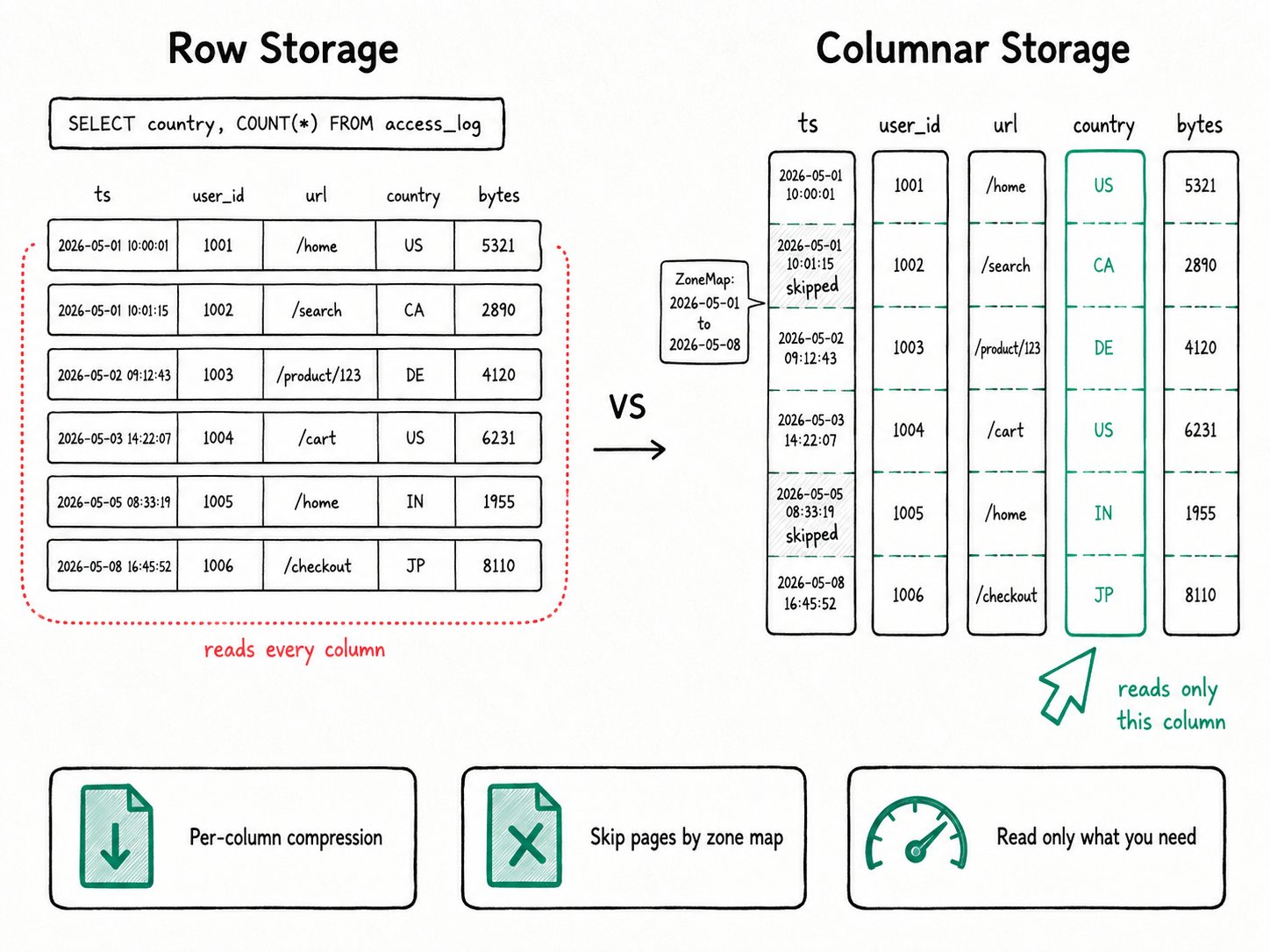
Why use columnar storage in Apache Doris?
Apache Doris stores every OLAP table in column-oriented Segment files because the columnar layout cuts I/O to the columns a query touches, lets each column pick its strongest codec, and gives skip indexes a natural home. Three problems show up the moment you put analytics on a row-oriented store.
- A
GROUP BY countryover a 50-column table still reads bytes for the other 49 columns. I/O cost scales with row width, not query width. - Compression is weak. Adjacent rows mix unrelated types, so dictionary, run-length, and delta codecs have nothing to chew on.
- Skipping is hard. To know "this 64 KB block has no rows where
ts >= '2026-05-01'," you need column-local statistics, and a row layout doesn't give you anywhere natural to keep them.
A column-oriented layout fixes all three. Values from the same column sit together on disk, so the codec can pick a transform that fits the type. And the page indexes give the reader something to test predicates against before it decompresses anything.
What is Apache Doris columnar storage?
Apache Doris columnar storage is the on-disk segment file format that every OLAP table (Duplicate, Unique, Aggregate) shares. Each load produces one or more Segment files. Inside a segment, the writer handles each column on its own: it streams values into ~64 KB pages, encodes and compresses each page, and writes the skip indexes alongside. A footer at the end of the file points to everything.
Key terms
Segment: the unit of immutable on-disk data, identified by the magic bytesD0R1. Defaults: page 64 KB, dictionary page 256 KB, segment cap 256 MB. Defined inbe/src/storage/segment/segment.h.Page: a slice of one column's values. The granularity for both compression and zone-map statistics.Encoding: per-column transform applied before compression. PLAIN for general numerics, DICT for low-cardinality strings, RLE for booleans, BIT_SHUFFLE for integer columns, FOR (frame-of-reference) for dates, BINARY_PLAIN_V2 for strings on V3.Page indexes: ordinal index, short key index, zone map (per-page min/max plus has-null), and bloom filter. All written into the segment alongside the data.Footer: protobuf record at the end of the file describing every column, every encoding, every page pointer, and every index location. V3 (4.1+) externalizes column metadata so opening a wide segment doesn't have to read all of it.
How does Apache Doris columnar storage work?
Apache Doris writes each column independently inside a segment: encode, page into ~64 KB chunks, compress, index, and footer. The lifecycle of one column on disk:
- Encode. The writer picks an encoding from the column's type and value distribution. An
INTcolumn with low cardinality gets bit-shuffle; a string column with few distinct values gets a dictionary built into a separate dict page. - Page and compress. Encoded values stream into pages of about 64 KB each. Each page goes through LZ4F by default, or ZSTD / Snappy / Zlib if the table sets
compression. Compression is skipped if the saving falls below 10%. - Index. As pages are written, the segment also writes an ordinal index (binary search by row number), a zone map per page (min, max, has-null), and a bloom filter for any column listed in
bloom_filter_columns. The short key index summarizes the prefix of the table's sort key. - Footer. The writer appends a
SegmentFooterPBdescribing every column, every page pointer, and every index. V3 splits this in two: a slim footer plus acolumn_meta_entriesregion loaded only for columns the query actually touches. - Read. A scan opens the footer, narrows down by ordinal / short key / zone map / bloom, decompresses only the surviving pages, decodes them, and hands columnar batches straight to the vectorized engine.
The hierarchy above the segment is Tablet → Rowset → Segment → Column → Page. Compaction merges rowsets but never rewrites at a finer grain; the column-and-page layout below is what every query reads from.
Quick start
CREATE TABLE access_log (
  ts DATETIME,
  user_id BIGINT,
  url VARCHAR(512),
  country CHAR(2)
)
DUPLICATE KEY(ts, user_id)
DISTRIBUTED BY HASH(user_id) BUCKETS 4
PROPERTIES (
  "compression" = "zstd",
  "bloom_filter_columns" = "url",
  "storage_format" = "V3"
);

SELECT country, COUNT(*) AS hits
FROM access_log
WHERE ts >= '2026-05-01'
GROUP BY country
ORDER BY hits DESC;
Expected result
+---------+--------+
| country | hits   |
+---------+--------+
| US      | 184320 |
| DE      |  62018 |
| ...     |        |
+---------+--------+
The query reads only the ts and country columns. The reader skips pages whose zone map says max(ts) < 2026-05-01 before any decompression runs. ZSTD typically shrinks the table 5x to 10x, and the V3 footer keeps segment-open cost flat as the column count grows.
When should you use Apache Doris columnar storage?
Apache Doris columnar storage is the default and only OLAP format, so every analytic table uses it; the trade-offs come up only at the edges (high-QPS point lookups, codec tuning).
Good fit
- Every analytic table you run through Apache Doris. Columnar storage isn't optional; it's the default and only OLAP format.
- Wide tables and dashboard queries. The wider the table and the narrower the column projection, the bigger the savings over a row store.
- Tables you load into frequently. Per-column compression and per-page zone maps both improve as more rows pile up under the same schema.
- Wide tables with thousands of columns. Set
"storage_format" = "V3"(4.1+) to keep segment-open latency and memory bounded.
Not a good fit
SELECT *lookups by primary key at thousands of QPS. Each column is a separate read, so a wide-row point query pays N times the I/O. Reach for the High-Concurrency Point Query path, which adds a row-cached column with"store_row_column" = "true"on top of a Unique-Key Merge-on-Write table.- Tweaking
compressionorstorage_page_sizewithout a profile. The defaults (LZ4F, 64 KB) fit most workloads. Move to ZSTD only when storage cost matters more than CPU; shrink the page size only when small columns are wasting decompression work. - Disabling encodings to "see the raw column." There is no raw mode. The codec is part of the file format, not a layer you peel off.
- Treating columnar storage as a fix for narrow point lookups on a row-oriented schema. If every query is
WHERE id = ?and returns one row, you want a different system or the row-store extension, not a different compression codec.
Performance / numbers
- Wide-table V3 footer: a 7,000-column table with 10,000 segments saw segment-open time drop from 65s to 4s (16x faster) and open-time memory from 60 GB to under 1 GB (60x lower). Source: Storage Format V3.
- ZSTD vs. the prior default on a 25 GB / 110-million-line text-log dataset: nearly 10x compression ratio, 53% better than the previous default, and 30% faster end-to-end read+decompress. Source: Apache Doris 1.1.0 release notes.
Further reading
- Storage Format V3: the wide-table footer optimization and per-column metadata externalization.
- Data Pruning: how ZoneMap, BloomFilter, and the per-page indexes that live inside a segment turn into skip work at scan time.
- Vectorized Execution: the engine the column reader hands its decoded batches to.
- VARIANT Data Type: how JSON paths get promoted into the same per-column encoded, paged, indexed subcolumns described here.
- Apache Doris 1.1.0 release notes: the original ZSTD compression benchmark and rollout notes.