MCP Server
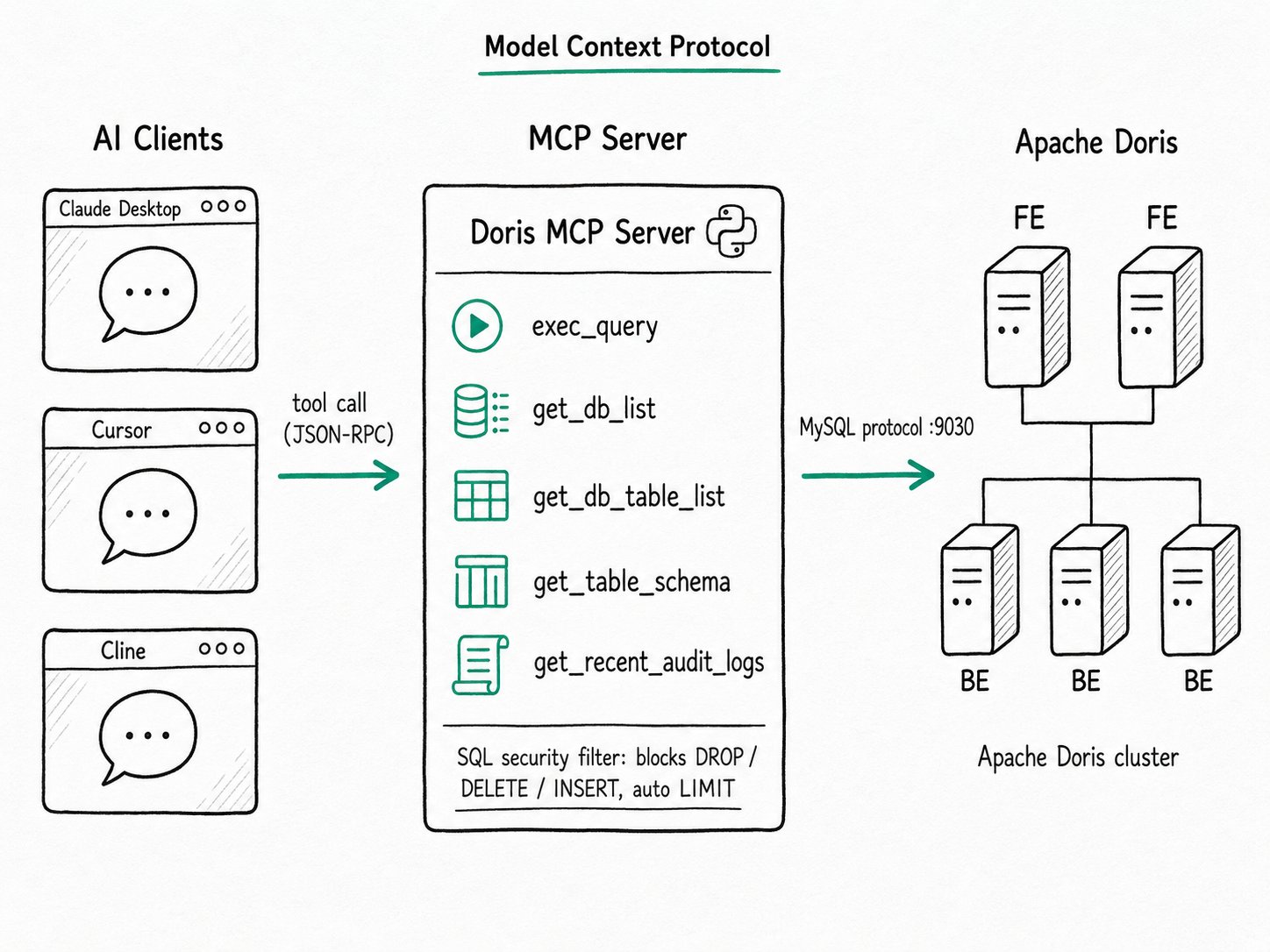
TL;DR The Apache Doris MCP Server is a Python service that speaks the Model Context Protocol. The server exposes Apache Doris as a set of tools an AI assistant can call, including listing tables, running SQL, fetching schemas, and reading audit logs. Point Claude Desktop, Cursor, or any MCP client at the server and the model can work against a real cluster without a custom integration.
Why use the Apache Doris MCP Server?
The Apache Doris MCP Server replaces the same chat-assistant-to-database integration that every company would otherwise build from scratch. You would otherwise stand up a small Python service, wrap a few SQL helpers, handle credentials, timeouts, result truncation, and read-only enforcement, and then rewrite client-specific glue for Claude Desktop, Cursor, and whatever shows up next month. The work is mostly boilerplate, but the bug surface is large: an over-eager DELETE from an LLM is a real outage. The in-database AI surface, LLM SQL functions and embeddings, complements this card from the SQL side.
Anthropic released MCP in November 2024 to standardize that work. Servers expose tools with typed inputs and outputs; clients (Claude Desktop, Cursor, Cline, Continue, Zed, and others) speak the same protocol; the model decides when to call. Database vendors have followed: ClickHouse, Snowflake, MotherDuck, BigQuery, and Supabase all ship official servers.
The Apache Doris MCP Server is the equivalent for Apache Doris. It lives in a separate repo (apache/doris-mcp-server), it ships under Apache 2.0, and you launch it from any MCP client config in a few lines.
What is the Apache Doris MCP Server?
The Apache Doris MCP Server is a Python 3.12 service built on FastAPI. It connects to Apache Doris over the MySQL protocol, registers a fixed set of MCP tools, and serves them over stdio, Server-Sent Events, or the streamable HTTP transport. AI assistants treat each tool as a function call. The server logs every call, applies a SQL security filter, and returns JSON.
Key terms
- MCP (Model Context Protocol): an open JSON-RPC 2.0 protocol for connecting LLM clients to external tools and data. Tools are typed functions; resources are read-only data; prompts are reusable templates.
- Tool: one Python function decorated with
@mcp.tool(). The Apache Doris server ships eight:exec_query,get_db_list,get_db_table_list,get_table_schema,get_table_comment,get_table_column_comments,get_table_indexes, andget_recent_audit_logs. - Transport: how the client and server talk.
stdioruns the server as a subprocess (the default for Claude Desktop). SSE and Streamable HTTP are for remote deployments. - SQL security filter: a server-side guard, on by default, that blocks
DROP,DELETE,INSERT,UPDATE,ALTER, andCREATE, and adds an automaticLIMITto bareSELECTstatements.
How does the Apache Doris MCP Server work?
The Apache Doris MCP Server runs through a five-step loop: the client launches the server, the server connects to the cluster, the model picks a tool, the server filters and runs the SQL, and results return as JSON.
- The client launches the server. In
stdiomode, Claude Desktop or Cursor spawns the server as a subprocess and communicates over stdin/stdout. In SSE or HTTP mode, you run the server long-lived and the client connects over the network. - The server connects to Apache Doris. It reads
DB_HOST,DB_PORT,DB_USER,DB_PASSWORD, andDB_DATABASEfrom environment variables, then opens a MySQL-protocol connection on port 9030. No JDBC URL, no driver setup. - The model calls a tool. The assistant decides, given the user's prompt, which tool to invoke. For "what tables hold order data?", that is
get_db_table_list. For "summarize yesterday's slow queries," that isget_recent_audit_logs. The user typically approves each call before it runs. - The server filters and runs the query.
exec_queryparses the statement, rejects anything that mutates data whenENABLE_SQL_SECURITY_CHECK=true, and appends aLIMITif the query has none. A 30-second timeout (configurable per call) caps runtime. - Results return as JSON. The client renders them inline in the chat. Large result sets are truncated by
max_rows, default 100, so a carelessSELECT *does not blow up the model's context window.
Quick start
{
  "mcpServers": {
    "doris": {
      "command": "uv",
      "args": ["--project", "/path/to/doris-mcp-server", "run", "doris-mcp"],
      "env": {
        "DB_HOST":     "127.0.0.1",
        "DB_PORT":     "9030",
        "DB_USER":     "root",
        "DB_PASSWORD": "your_password",
        "DB_DATABASE": "your_db"
      }
    }
  }
}
Expected result
Save the snippet as ~/Library/Application Support/Claude/claude_desktop_config.json (macOS), restart Claude Desktop, and the doris server appears in the tools menu. Ask "what databases do we have?" and the assistant calls get_db_list, returning something like:
information_schema, mysql, ssb, tpch_100
The assistant can now compose follow-up calls: get_db_table_list('ssb'), then get_table_schema('lineorder', 'ssb'), then a plain exec_query once it has the column names.
When should you use the Apache Doris MCP Server?
The Apache Doris MCP Server fits read-mostly AI assistant scenarios, especially schema discovery, ad-hoc analysis, and on-call investigation against a real cluster.
Good fit
- AI-assisted SQL authoring inside Cursor or Claude Code, where the assistant inspects the schema and drafts a query against your real cluster instead of guessing column names.
- Ad-hoc "ask your data" sessions in Claude Desktop, especially for engineers who would otherwise paste schemas into the chat by hand.
- On-call assistants that read audit logs (
get_recent_audit_logs) to find the slow query that broke a dashboard. - Schema discovery and BI prototyping, where the assistant chains
get_db_list→get_db_table_list→get_table_schemato sketch a model before anyone writes a query.
Not a good fit
- Production write paths. The server is preview-grade, the SQL filter is an allowlist, and an LLM in the loop is not the right place for
INSERTorUPDATE. Use a real application for writes. - Untrusted data. An attacker who can put text into a row your assistant later reads can attempt prompt injection. The community has documented real incidents on Postgres MCP servers; treat anything the model fetches as data, not instructions, and review tool calls before running them. See MCP security best practices.
- Browsing multi-million-row tables. Tool results land in the model's context window, and the per-token bill scales accordingly. Cap
max_rows, ask the model to write aggregations, and reach for a notebook for anything beyond a sample. - Multi-tenant clusters with no row-level scoping. The server connects with one MySQL account; whatever that account can see, the model can see. Create a dedicated read-only user, restrict its database grants, and never reuse a power-user account.
- Workloads that need fine-grained, programmable tool access. The eight tools cover schema and read paths well, but anything beyond that (custom workflows, batch jobs, NL2SQL with user-defined prompts) belongs in a custom integration that calls Apache Doris directly.
Further reading
- AI on Doris: how the MCP server fits alongside
AI_*SQL functions, embeddings, and vector search. - LLM SQL Functions: the in-database side of the AI story, for batch enrichment of text columns.
- Doris MCP Server repository: source, install instructions, and the full property list for each tool.
- Model Context Protocol specification: the protocol Apache Doris speaks, including transport details and security guidance.
- Anthropic's MCP announcement: the original problem statement and the design choices behind tools, resources, and prompts.
