Multi Catalog
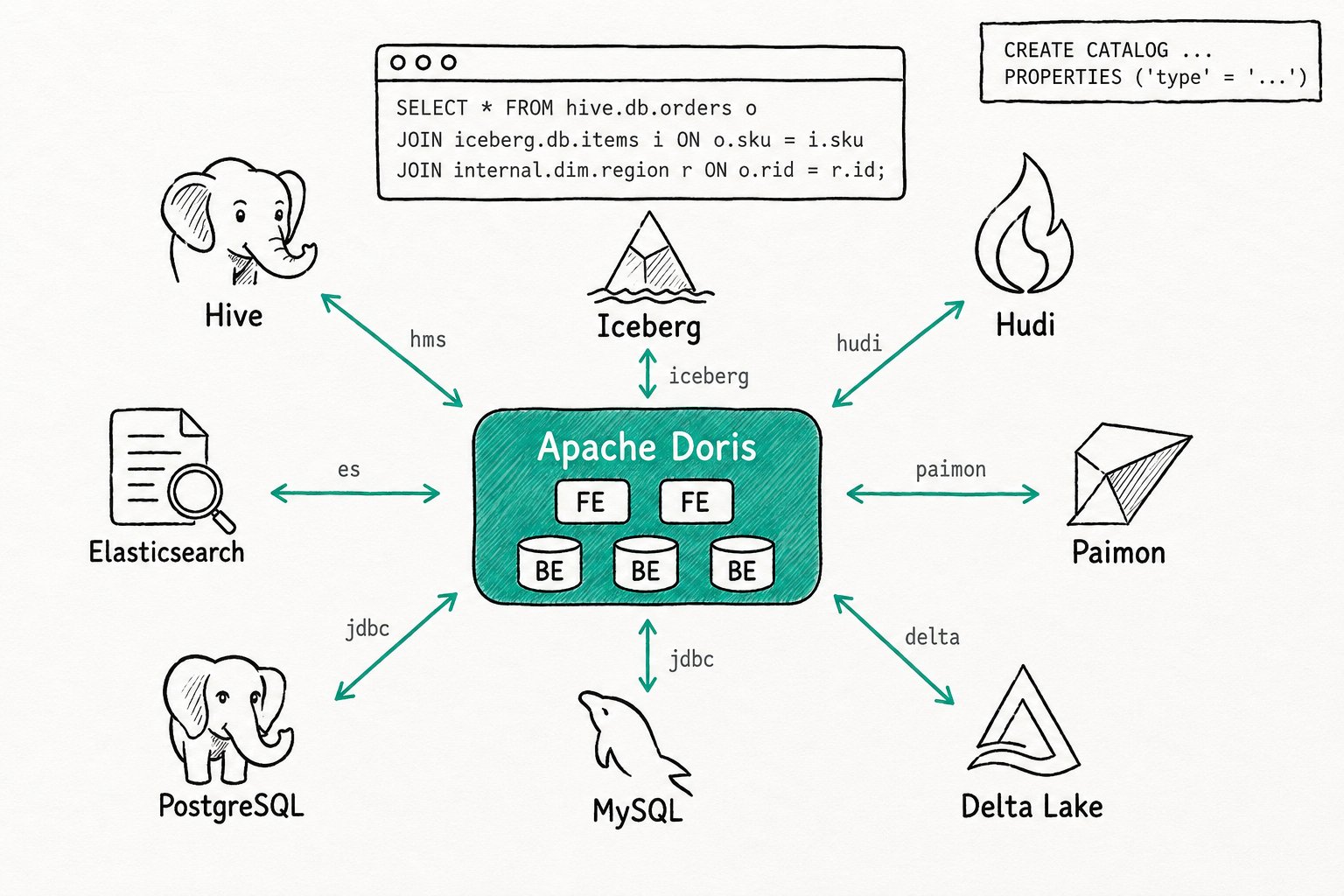
TL;DR Apache Doris Multi Catalog turns one cluster into a federation that registers external systems (Hive, Iceberg, Hudi, Paimon, Delta Lake, MySQL, PostgreSQL, Oracle, Elasticsearch, BigQuery, MaxCompute, and more) as named catalogs. Every table is addressed as
<catalog>.<db>.<table>and joined across catalogs in a single SQL statement. The internal warehouse is just another catalog calledinternal, so one permission model covers all sources with no copy job and no second query engine.
Why use Apache Doris Multi Catalog?
Apache Doris Multi Catalog removes the copy job, CDC pipeline, or second query engine that teams usually stand up to query across more than one storage system. Most analytics teams already run more than one storage system. Fact tables sit in Hive or Iceberg on object storage. Dimensions and operational state live in MySQL or PostgreSQL. Text-heavy workloads land in Elasticsearch. The warehouse holds the curated marts. Asking a question that crosses two of these usually costs you freshness or money, often both. Plugging in a new system through catalog integrations keeps the metadata cache warm and lets you manage lake tables without leaving SQL.
Apache Doris connects to each system once, learns its catalog of databases and tables, and exposes them under a name you choose. From then on, the table lives at <catalog>.<db>.<table> and behaves like any other table in your queries.
- Joining a fact table on Iceberg with a dimension table on MySQL is one SELECT, not a pipeline.
- The warehouse and the lake share one SQL surface, one user, one privilege model.
- Adding a new source means a
CREATE CATALOG, not a deploy.
What is the Apache Doris Multi Catalog?
The Apache Doris Multi Catalog is a federation layer at the top of the metadata stack that organizes everything in a three-level namespace: catalog, database, table. The built-in catalog internal holds Apache Doris's own tables. Every other catalog is an external catalog backed by a connector that knows how to talk to one kind of source. The connector handles metadata discovery, type mapping, partition pruning, and read (and increasingly write) operations. The query optimizer plans across all of them at once, so a join between an Iceberg table and an Apache Doris table runs through the same MPP engine as a join between two internal tables.
Key terms
internal: the built-in catalog that holds Apache Doris's native tables. Cannot be created, renamed, or dropped.- External catalog: any catalog created with
CREATE CATALOG ... PROPERTIES ("type" = "..."). Apache Doris ships connectors forhms(Hive and Hive-compatible metastores),iceberg,hudi,paimon,jdbc,es,max_compute,bigquery,kafka,trino-connector, and more. - Three-part name:
catalog.db.table. Always resolves the same way, whether referenced inside a single catalog session or across catalogs. SWITCHandUSE:SWITCH iceberg_ctlflips the session's current catalog (similar toUSEfor databases).USE iceberg_ctl.iceberg_dbswitches catalog and database in one statement.- Metadata cache: the FE-side cache that holds schemas, partition lists, and file listings for external catalogs so planning stays fast. Refreshed by TTL, by source-side events, or by
REFRESH CATALOG.
How does the Apache Doris Multi Catalog work?
The Apache Doris Multi Catalog records each external source as a named connector on the FE, then resolves every table reference as a three-part name that the optimizer plans across in one MPP query.
- Register a catalog.
CREATE CATALOG <name> PROPERTIES ("type" = "<type>", ...)records the connection details on the FE. The properties are persisted in the FE edit log; nothing else moves. Apache Doris does not copy schemas or data. - Discover lazily. The first time a session touches the catalog, the connector lists its databases and tables, fetches schemas, and populates the metadata cache. See Metadata Cache for what gets cached and for how long.
- Resolve three-part names. Every table reference is parsed as
catalog.db.table. Unqualified names use the session's current catalog and database.SWITCH,USE, and the user propertydefault_init_catalogcontrol where unqualified names land. - Plan one query. The optimizer pulls statistics from each catalog's connector, picks join order and predicate pushdown, and produces a single distributed plan. The plan can mix scans against
internalApache Doris tablets, Iceberg manifests, MySQL JDBC fetches, and ES queries inside the same fragment graph. - Stay current. TTLs and source-side events (Hive Metastore events, Iceberg snapshot pointers, Paimon snapshot reloads) keep the cache aligned with the source.
REFRESH CATALOG,REFRESH DATABASE, andREFRESH TABLEcover the rest.
Quick start
-- Register a Hive catalog
CREATE CATALOG hive_ctl PROPERTIES (
  "type" = "hms",
  "hive.metastore.uris" = "thrift://hms:9083"
);

-- Register a MySQL catalog for dimension tables
CREATE CATALOG mysql_ctl PROPERTIES (
  "type" = "jdbc",
  "user" = "doris", "password" = "xxx",
  "jdbc_url" = "jdbc:mysql://mysql:3306/dim",
  "driver_url" = "mysql-connector-j-8.4.0.jar",
  "driver_class" = "com.mysql.cj.jdbc.Driver"
);

-- One federated query, three catalogs
SELECT o.region, SUM(f.amount), d.name
FROM hive_ctl.sales.orders f
JOIN internal.curated.region o ON f.region_id = o.id
JOIN mysql_ctl.dim.product   d ON f.sku       = d.sku
WHERE f.dt = CURRENT_DATE() GROUP BY 1, 3;
Expected result
+--------+-------------+----------+
| region | SUM(amount) | name     |
+--------+-------------+----------+
| EMEA   |     112_490 | Widget A |
| APAC   |      87_310 | Widget B |
+--------+-------------+----------+
SHOW CATALOGS lists internal, hive_ctl, and mysql_ctl. The query plans and runs as one MPP job; no staging table needed.
When should you use the Apache Doris Multi Catalog?
Use the Apache Doris Multi Catalog whenever a query needs to touch the warehouse and one or more external sources without an intermediate ETL stage.
Good fit
- Federated analytics across a lake (Hive, Iceberg, Hudi, Paimon, Delta Lake) and the Apache Doris warehouse, without ETL into Apache Doris first.
- Joining warehouse facts with operational dimensions in MySQL, PostgreSQL, Oracle, SQL Server, or other JDBC sources.
- Pulling text matches from Elasticsearch into a SQL pipeline alongside structured filters.
- Migrations and dual-running. Point Doris at the existing Hive or external warehouse, query through Doris, and move workloads over piece by piece.
- ZeroETL data integration.
INSERT INTO internal.x SELECT ... FROM hive_ctl.yingests into Apache Doris without a separate loader.
Not a good fit
- Treating an external catalog as a write-heavy OLTP target. Write-back exists for Hive, Iceberg, and JDBC catalogs, but throughput is bound by the source and is not on par with writes into
internalApache Doris tables. Land hot writes ininternaland write back in batches. - Transactional updates against external sources. Apache Doris does not offer cross-catalog transactions, and most external catalogs do not support row-level updates the way the internal catalog does. Use the source's own DML for that.
- Cross-catalog DDL.
CREATE TABLE ... AS SELECTworks across catalogs as a copy, but creating the same table in two catalogs is your responsibility, not Apache Doris's. - Stitching two compute pools across a single query. Federation is about data sources, not compute. For compute isolation see Compute Group.
- Hand-tuning every connector here. For source-specific configuration (AWS Glue, Iceberg REST, individual JDBC dialects, S3-compatible storages, Kerberos, IAM), see the dedicated Catalog Integrations card and the per-catalog reference docs.
Further reading
- Catalog Integrations: the per-source connector reference (Glue, Iceberg REST, JDBC dialects, object storages, auth modes).
- Managing Lake Tables: write-back, schema evolution, and DML against Hive, Iceberg, and Paimon tables exposed via Multi Catalog.
- Metadata Cache: how the FE caches external schemas, partitions, and file listings, and how it stays fresh.
- Data Catalog Overview: the user guide for
CREATE,SWITCH,REFRESH, and the case-sensitivity properties shared by every catalog. - Lakehouse Overview: where Multi Catalog sits in Doris's lakehouse story.
- CREATE CATALOG reference: the full DDL syntax, supported types, and property reference.
- SWITCH CATALOG reference: session-level switching semantics.
- Iceberg: the deepest first-class connector in Doris's federated catalog stack — full read and write engine, not just a reader.
