BloomFilter Index
The BloomFilter index is a skip index based on the BloomFilter algorithm. It quickly determines whether a query value may exist in a data block, skips data blocks that do not satisfy the equality query condition, and thereby reduces I/O overhead and accelerates queries.
BloomFilter Algorithm Principles
BloomFilter is a fast lookup algorithm based on multi-hash function mapping, proposed by Bloom in 1970. Its core characteristics are as follows:
- High space efficiency: A set can be represented with a long binary bit array and a group of hash functions.
- Query results: For a query about whether an element exists in the set, BloomFilter returns only one of two results:
- Possibly exists (a hash collision may occur, so this can be a false positive)
- Definitely does not exist (the result is reliable)
The workflow is as follows:
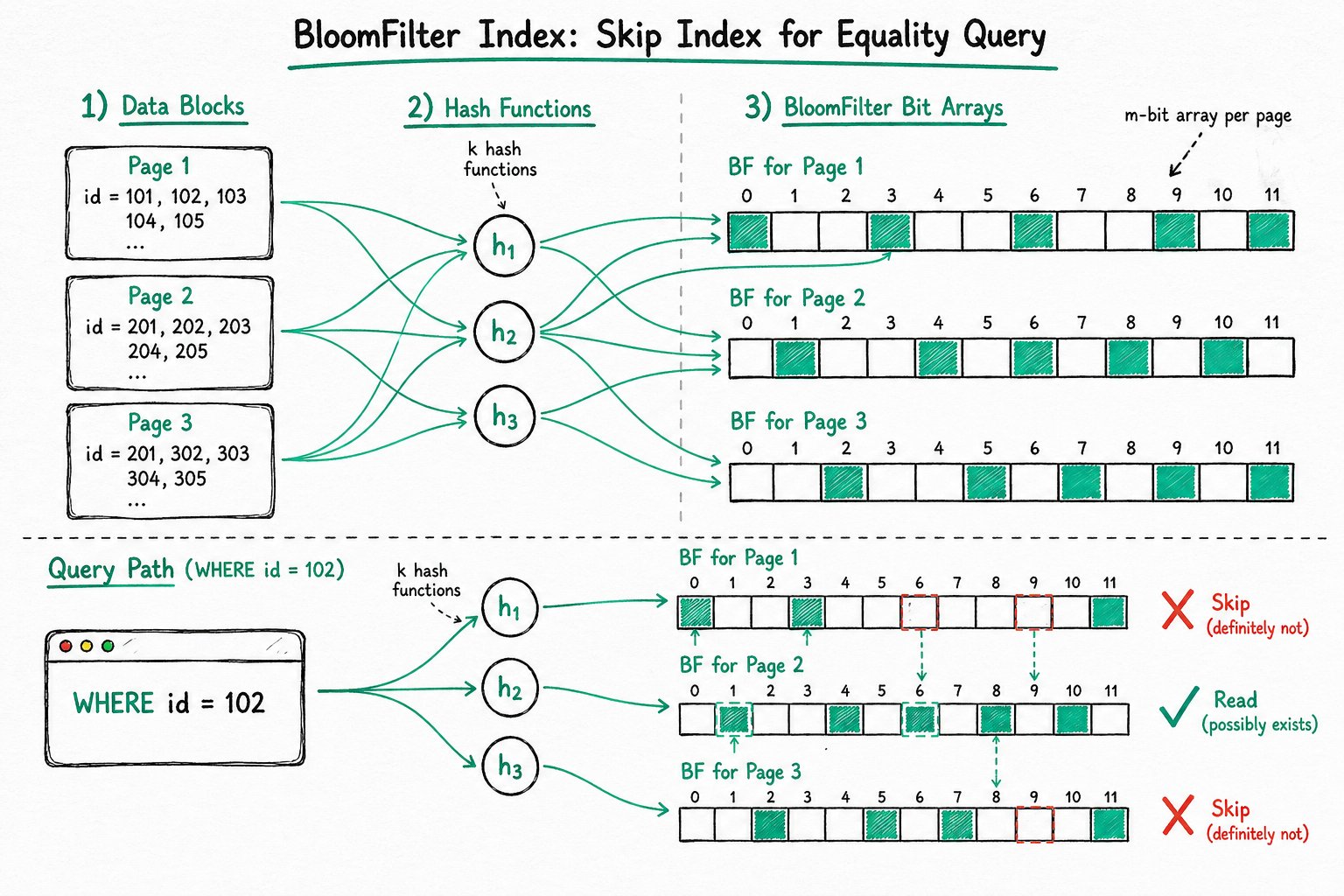
- The binary bit array is initialized to all zeros.
- When inserting an element, the element is hashed by a series of hash functions to compute multiple offsets, and the corresponding positions in the bit array are set to 1.
- When querying an element, the offsets are computed in the same way. If any of the corresponding positions is 0, the element definitely does not exist. If all positions are 1, the element possibly exists.
The following figure shows a BloomFilter example with m=18 and k=3 (m is the size of the bit array, and k is the number of hash functions). The three elements x, y, and z in the set are hashed into the bit array by 3 different hash functions. When querying element w, since at least one of its corresponding bits is 0, w is definitely not in the set.
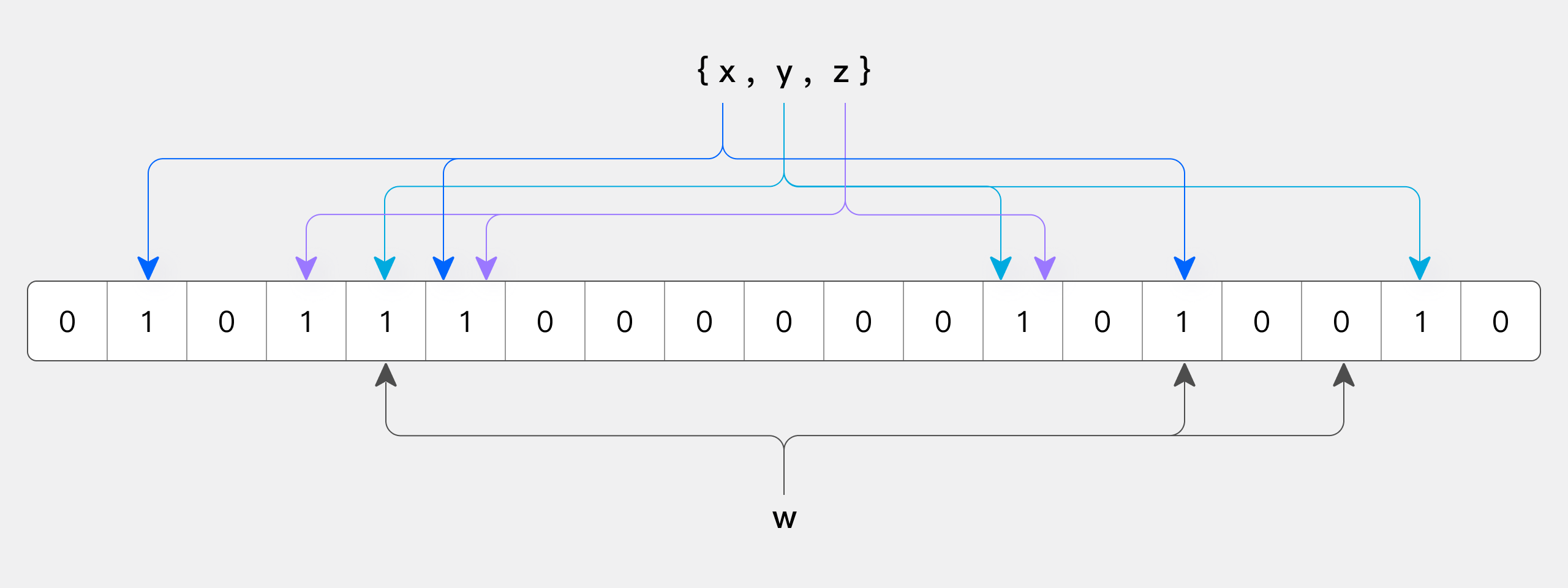
Because hash collisions can occur, BloomFilter has a "false positive" issue. Therefore, a BloomFilter-based index can only skip data that definitely does not satisfy the condition; it cannot precisely locate data that satisfies the condition.
Implementation in Doris
The Doris BloomFilter index is built per data block (page), with one BloomFilter for each data block:
- On write: Each value in the data block is hashed and stored in the BloomFilter of the corresponding data block.
- On query: Based on the value in the equality condition, Doris checks whether the BloomFilter of each data block contains the value. If it does not, that data block is skipped, which reduces I/O and accelerates the query.
Use Cases
The BloomFilter index can accelerate equality queries (including = and IN), and is especially suitable for high-cardinality columns (such as unique ID columns like userid).
Applicable Scenarios
| Scenario | Description |
|---|---|
| Equality query | WHERE column = value |
| IN query | WHERE column IN (v1, v2, ...) |
| High-cardinality column | A column with many distinct values and a low repetition rate, such as user ID or order number |
Limitations
- Query type limitation: Only effective for
=andINqueries. Not effective for queries such as!=,NOT IN,>, or<. - Data type limitation: Building a BloomFilter index on columns of types
Tinyint,Float, orDoubleis not supported. - Cardinality limitation: The acceleration effect on low-cardinality columns is limited. For example, a "gender" column has only two values, so almost every data block contains all values. The BloomFilter cannot filter data, and the index becomes meaningless.
- Version limitation: Starting from version 4.1.2, BloomFilter indexes on
CHARtype columns no longer take effect.
Managing Indexes
Creating a BloomFilter Index When Creating a Table
For historical reasons, the syntax for defining a BloomFilter index differs from the general INDEX syntax used for indexes such as inverted indexes. The BloomFilter index is specified through the table's PROPERTIES attribute bloom_filter_columns, and one or more columns can be specified at the same time:
PROPERTIES (
    "bloom_filter_columns" = "column_name1,column_name2"
);
Viewing a BloomFilter Index
Use SHOW CREATE TABLE to view the BloomFilter indexes that have been created on a table:
SHOW CREATE TABLE table_name;
Modifying a BloomFilter Index
Use ALTER TABLE to modify the table's bloom_filter_columns property to add or remove BloomFilter index columns.
Add a BloomFilter index on column_name3:
ALTER TABLE table_name SET ("bloom_filter_columns" = "column_name1,column_name2,column_name3");
Remove the BloomFilter index on column_name1:
ALTER TABLE table_name SET ("bloom_filter_columns" = "column_name2,column_name3");
Using the Index
The BloomFilter index is used to accelerate equality queries in WHERE conditions. It takes effect automatically when the conditions are met, with no special syntax required.
Analyzing Index Effectiveness with Query Profile
You can analyze the acceleration effect of the BloomFilter index using the following metrics in the Query Profile:
| Metric | Meaning |
|---|---|
RowsBloomFilterFiltered | The number of rows filtered out by the BloomFilter index. Compare it with other Rows metrics to analyze the filtering effect. |
BlockConditionsFilteredBloomFilterTime | The time consumed by BloomFilter index filtering. |
Usage Example
The following example shows how to create a BloomFilter index in Doris.
In the PROPERTIES of the CREATE TABLE statement, specify the column names on which to build BloomFilter indexes via "bloom_filter_columns" = "k1,k2,k3". For example, the following example creates BloomFilter indexes on the saler_id and category_id columns:
CREATE TABLE IF NOT EXISTS sale_detail_bloom (
    sale_date date NOT NULL COMMENT "Sale time",
    customer_id int NOT NULL COMMENT "Customer ID",
    saler_id int NOT NULL COMMENT "Salesperson",
    sku_id int NOT NULL COMMENT "Product ID",
    category_id int NOT NULL COMMENT "Product category",
    sale_count int NOT NULL COMMENT "Sales quantity",
    sale_price DECIMAL(12,2) NOT NULL COMMENT "Unit price",
    sale_amt DECIMAL(20,2) COMMENT "Total sales amount"
)
DUPLICATE KEY(sale_date, customer_id, saler_id, sku_id, category_id)
DISTRIBUTED BY HASH(saler_id) BUCKETS 10
PROPERTIES (
    "replication_num" = "1",
    "bloom_filter_columns" = "saler_id,category_id"
);