Doris と Hudi の使用方法
新しいオープンなデータ管理アーキテクチャであるデータレイクハウスは、データウェアハウスの高性能とリアルタイム処理能力に、データレイクの低コストと柔軟性を組み合わせます。これにより、さまざまなデータ処理・分析のニーズに、より容易に対応できます。企業のビッグデータシステムでの採用も増えています。
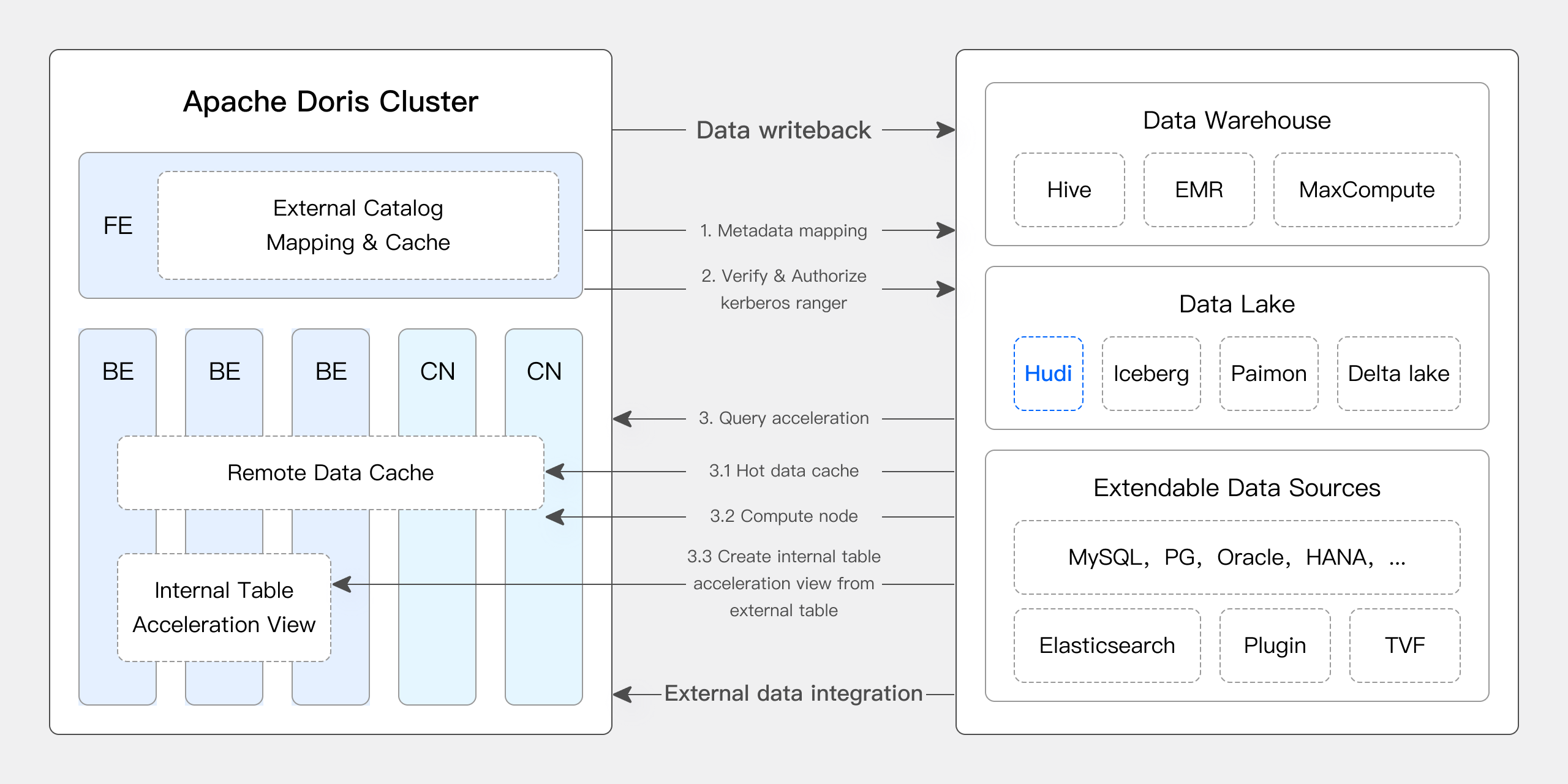
近年のバージョンで、Apache Doris はデータレイクとの連携を深め、成熟したデータレイクハウスソリューションへと発展してきました。
- バージョン 0.15 から、Apache Doris は Hive と Iceberg の外部テーブルを導入し、データレイクにおける Apache Iceberg との連携を模索してきました。
- バージョン 1.2 から、Apache Doris は Multi-Catalog 機能を正式に導入しました。これにより、さまざまなデータソースのメタデータを自動的にマッピングしてデータにアクセスできるようになり、外部データの読み取りやクエリ実行にも多くの性能改善が加わりました。高速で使いやすいレイクハウスアーキテクチャを構築できるようになっています。
- バージョン 2.1 では、Apache Doris のデータレイクハウスアーキテクチャが大幅に強化されました。主要なデータレイク形式(Hudi、Iceberg、Paimon など)の読み書き能力が向上し、複数の SQL 方言との互換性が導入され、既存システムから Apache Doris への移行が容易になりました。また、データサイエンスや大規模なデータ読み取りのために、Doris は高速読み取りインターフェースの Arrow Flight を統合し、データ転送効率を 100 倍に高めました。
Apache Doris と Hudi
Apache Hudi は、現在広く利用されているオープンなデータレイク形式の一つであり、トランザクションに対応したデータレイク管理プラットフォームです。Apache Doris を含む、主要なクエリエンジンをサポートしています。
Apache Doris は、Apache Hudi のデータテーブルを読み取る機能も強化しています。
- Copy on Write テーブル:スナップショットクエリをサポート
- Merge on Read テーブル:スナップショットクエリと読み取り最適化クエリをサポート
- タイムトラベルをサポート
- 増分読み取りをサポート
Apache Doris の高性能なクエリ実行と Apache Hudi のリアルタイムデータ管理を組み合わせることで、効率的かつ柔軟に、低コストでデータを照会・分析できます。データリネージ、監査、増分処理の機能も利用できます。Apache Doris と Apache Hudi の組み合わせは、複数のコミュニティユーザーの実際の業務で検証・活用されています。
- リアルタイムのデータ分析と処理:金融、広告、EC などでは、リアルタイムのデータ更新とクエリ分析が必要になることがよくあります。Hudi はデータの一貫性と信頼性を確保しながら、リアルタイムの更新と管理を可能にします。Doris は大規模なデータに対するクエリ要求をリアルタイムで効率的に処理し、両者の組み合わせでリアルタイム分析・処理の要件に対応します。
- データリネージと監査:金融や医療など、データの安全性と正確性が強く求められる業界では、データリネージと監査が重要です。Hudi のタイムトラベル機能で過去のデータ状態を確認し、Apache Doris の効率的なクエリと組み合わせることで、任意の時点のデータを迅速に分析し、正確な追跡と監査に役立てられます。
- 増分データの読み取りと分析:大規模データの分析では、データ量の多さや頻繁な更新が課題になります。Hudi は増分読み取りをサポートしており、データ全体を更新せずに変更分だけを処理できます。Apache Doris の増分読み取り機能もこの処理を強化し、データ処理と分析の効率を大幅に向上させます。
- データソースをまたぐ連合クエリ:多くの企業では、複雑なデータが異なるデータベースに保存されています。Doris の Multi-Catalog 機能は、さまざまなデータソースの自動マッピングと同期をサポートし、データソースをまたぐ連合クエリを可能にします。複数のデータソースからデータを取得・統合して分析する企業では、データの移動経路を大幅に短縮し、作業効率を高められます。
この記事では、Docker 環境で Apache Doris と Apache Hudi のテスト・デモ環境をすばやく構築する方法と、基本操作を紹介します。
詳細については、Hudi Catalog を参照してください。
ユーザーガイド
この記事で使用するすべてのスクリプトとコードは、https://github.com/apache/doris/tree/master/samples/datalake/hudi から入手できます。
01 環境の準備
この記事では、Docker Compose を使用して、次のコンポーネントとバージョンをデプロイします。
| コンポーネント | バージョン |
|---|---|
| Apache Doris | デフォルトは 2.1.4。変更可能 |
| Apache Hudi | 0.14 |
| Apache Spark | 3.4.2 |
| Apache Hive | 2.1.3 |
| MinIO | 2022-05-26T05-48-41Z |
02 環境のデプロイ
-
Docker ネットワークを作成します。
sudo docker network create -d bridge hudi-net -
すべてのコンポーネントを起動します。
sudo ./start-hudi-compose.sh注:起動前に、
DORIS_PACKAGEとDORIS_DOWNLOAD_URLをstart-hudi-compose.sh内で変更して、使用する Doris のバージョンを指定できます。バージョン 2.1.4 以降を推奨します。 -
起動後、次のスクリプトを使用して Spark または Doris のコマンドラインにログインできます。
-- Spark
sudo ./login-spark.sh

-- Doris
sudo ./login-doris.sh
03 データの準備
次に、Spark を使用して Hudi データを生成します。以下のコードに示すように、クラスターには customer という Hive テーブルがすでに存在します。この Hive テーブルを使用して Hudi テーブルを作成できます。
-- ./login-spark.sh
spark-sql> use default;

-- create a COW table
spark-sql> CREATE TABLE customer_cow
USING hudi
TBLPROPERTIES (
  type = 'cow',
  primaryKey = 'c_custkey',
  preCombineField = 'c_name'
)
PARTITIONED BY (c_nationkey)
AS SELECT * FROM customer;

-- create a MOR table
spark-sql> CREATE TABLE customer_mor
USING hudi
TBLPROPERTIES (
  type = 'mor',
  primaryKey = 'c_custkey',
  preCombineField = 'c_name'
)
PARTITIONED BY (c_nationkey)
AS SELECT * FROM customer;
04 データのクエリ
以下のように、Doris クラスターには hudi という Catalog が作成済みです(SHOW CATALOGS で確認できます)。この Catalog の作成文は次のとおりです。
-- Already created, no need to execute again
CREATE CATALOG `hudi` PROPERTIES (
    "type"="hms",
    'hive.metastore.uris' = 'thrift://hive-metastore:9083',
    "s3.access_key" = "minio",
    "s3.secret_key" = "minio123",
    "s3.endpoint" = "http://minio:9000",
    "s3.region" = "us-east-1",
    "use_path_style" = "true"
);
-
作成した Hudi テーブルを同期するために、この Catalog を手動で更新します。
-- ./login-doris.sh
doris> REFRESH CATALOG hudi; -
Spark を使用した Hudi データへの操作は、Catalog を更新しなくても Doris にすぐに反映されます。Spark を使用して、COW テーブルと MOR テーブルの両方に一行ずつデータを挿入します。
spark-sql> insert into customer_cow values (100, "Customer#000000100", "jD2xZzi", "25-430-914-2194", 3471.59, "BUILDING", "cial ideas. final, furious requests", 25);
spark-sql> insert into customer_mor values (100, "Customer#000000100", "jD2xZzi", "25-430-914-2194", 3471.59, "BUILDING", "cial ideas. final, furious requests", 25); -
Doris から、新しく挿入したデータを直接クエリできます。
doris> use hudi.default;
doris> select * from customer_cow where c_custkey = 100;
doris> select * from customer_mor where c_custkey = 100; -
Spark を使用して、既存の c_custkey=32 のデータを挿入し、既存のデータを上書きします。
spark-sql> insert into customer_cow values (32, "Customer#000000032_update", "jD2xZzi", "25-430-914-2194", 3471.59, "BUILDING", "cial ideas. final, furious requests", 15);
spark-sql> insert into customer_mor values (32, "Customer#000000032_update", "jD2xZzi", "25-430-914-2194", 3471.59, "BUILDING", "cial ideas. final, furious requests", 15); -
Doris で更新後のデータをクエリできます。
doris> select * from customer_cow where c_custkey = 32;
+-----------+---------------------------+-----------+-----------------+-----------+--------------+-------------------------------------+-------------+
| c_custkey | c_name                    | c_address | c_phone         | c_acctbal | c_mktsegment | c_comment                           | c_nationkey |
+-----------+---------------------------+-----------+-----------------+-----------+--------------+-------------------------------------+-------------+
|        32 | Customer#000000032_update | jD2xZzi   | 25-430-914-2194 |   3471.59 | BUILDING     | cial ideas. final, furious requests |          15 |
+-----------+---------------------------+-----------+-----------------+-----------+--------------+-------------------------------------+-------------+
doris> select * from customer_mor where c_custkey = 32;
+-----------+---------------------------+-----------+-----------------+-----------+--------------+-------------------------------------+-------------+
| c_custkey | c_name                    | c_address | c_phone         | c_acctbal | c_mktsegment | c_comment                           | c_nationkey |
+-----------+---------------------------+-----------+-----------------+-----------+--------------+-------------------------------------+-------------+
|        32 | Customer#000000032_update | jD2xZzi   | 25-430-914-2194 |   3471.59 | BUILDING     | cial ideas. final, furious requests |          15 |
+-----------+---------------------------+-----------+-----------------+-----------+--------------+-------------------------------------+-------------+
05 増分読み取り
増分読み取りは、Hudi が提供する機能の一つです。指定した期間内の増分データを取得し、データを増分処理できます。ここでは、c_custkey=100 を挿入した後の変更データを Doris でクエリできます。以下に示すように、c_custkey=32 のデータを挿入しました。
doris> select * from customer_cow@incr('beginTime'='20240603015018572');
+-----------+---------------------------+-----------+-----------------+-----------+--------------+-------------------------------------+-------------+
| c_custkey | c_name                    | c_address | c_phone         | c_acctbal | c_mktsegment | c_comment                           | c_nationkey |
+-----------+---------------------------+-----------+-----------------+-----------+--------------+-------------------------------------+-------------+
|        32 | Customer#000000032_update | jD2xZzi   | 25-430-914-2194 |   3471.59 | BUILDING     | cial ideas. final, furious requests |          15 |
+-----------+---------------------------+-----------+-----------------+-----------+--------------+-------------------------------------+-------------+
spark-sql> select * from hudi_table_changes('customer_cow', 'latest_state', '20240603015018572');

doris> select * from customer_mor@incr('beginTime'='20240603015058442');
+-----------+---------------------------+-----------+-----------------+-----------+--------------+-------------------------------------+-------------+
| c_custkey | c_name                    | c_address | c_phone         | c_acctbal | c_mktsegment | c_comment                           | c_nationkey |
+-----------+---------------------------+-----------+-----------------+-----------+--------------+-------------------------------------+-------------+
|        32 | Customer#000000032_update | jD2xZzi   | 25-430-914-2194 |   3471.59 | BUILDING     | cial ideas. final, furious requests |          15 |
+-----------+---------------------------+-----------+-----------------+-----------+--------------+-------------------------------------+-------------+
spark-sql> select * from hudi_table_changes('customer_mor', 'latest_state', '20240603015058442');
06 タイムトラベル
Doris は、Hudi データの特定のスナップショットバージョンをクエリでき、タイムトラベル機能を利用できます。まず、Spark を使用して二つの Hudi テーブルのコミット履歴を確認します。
spark-sql> call show_commits(table => 'customer_cow', limit => 10);
20240603033556094        20240603033558249        commit        448833        0        1        1        183        0        0
20240603015444737        20240603015446588        commit        450238        0        1        1        202        1        0
20240603015018572        20240603015020503        commit        436692        1        0        1        1        0        0
20240603013858098        20240603013907467        commit        44902033        100        0        25        18751        0        0

spark-sql> call show_commits(table => 'customer_mor', limit => 10);
20240603033745977        20240603033748021        deltacommit        1240        0        1        1        0        0        0
20240603015451860        20240603015453539        deltacommit        1434        0        1        1        1        1        0
20240603015058442        20240603015100120        deltacommit        436691        1        0        1        1        0        0
20240603013918515        20240603013922961        deltacommit        44904040        100        0        25        18751        0        0
次に、Doris で c_custkey=32 を条件にして、既存のデータを上書きする前のスナップショットをクエリします。以下のように、c_custkey=32 のデータはまだ更新されていません。
注:現在、新しいオプティマイザーはタイムトラベル構文をサポートしていません。先に
set enable_nereids_planner=false;を実行して新しいオプティマイザーを無効にする必要があります。この問題は将来のバージョンで修正される予定です。
doris> select * from customer_cow for time as of '20240603015018572' where c_custkey = 32 or c_custkey = 100;
+-----------+--------------------+---------------------------------------+-----------------+-----------+--------------+--------------------------------------------------+-------------+
| c_custkey | c_name             | c_address                             | c_phone         | c_acctbal | c_mktsegment | c_comment                                        | c_nationkey |
+-----------+--------------------+---------------------------------------+-----------------+-----------+--------------+--------------------------------------------------+-------------+
|        32 | Customer#000000032 | jD2xZzi UmId,DCtNBLXKj9q0Tlp2iQ6ZcO3J | 25-430-914-2194 |   3471.53 | BUILDING     | cial ideas. final, furious requests across the e |          15 |
|       100 | Customer#000000100 | jD2xZzi                               | 25-430-914-2194 |   3471.59 | BUILDING     | cial ideas. final, furious requests              |          25 |
+-----------+--------------------+---------------------------------------+-----------------+-----------+--------------+--------------------------------------------------+-------------+
-- compare with spark-sql
spark-sql> select * from customer_mor timestamp as of '20240603015018572' where c_custkey = 32 or c_custkey = 100;

doris> select * from customer_mor for time as of '20240603015058442' where c_custkey = 32 or c_custkey = 100;
+-----------+--------------------+---------------------------------------+-----------------+-----------+--------------+--------------------------------------------------+-------------+
| c_custkey | c_name             | c_address                             | c_phone         | c_acctbal | c_mktsegment | c_comment                                        | c_nationkey |
+-----------+--------------------+---------------------------------------+-----------------+-----------+--------------+--------------------------------------------------+-------------+
|       100 | Customer#000000100 | jD2xZzi                               | 25-430-914-2194 |   3471.59 | BUILDING     | cial ideas. final, furious requests              |          25 |
|        32 | Customer#000000032 | jD2xZzi UmId,DCtNBLXKj9q0Tlp2iQ6ZcO3J | 25-430-914-2194 |   3471.53 | BUILDING     | cial ideas. final, furious requests across the e |          15 |
+-----------+--------------------+---------------------------------------+-----------------+-----------+--------------+--------------------------------------------------+-------------+
spark-sql> select * from customer_mor timestamp as of '20240603015058442' where c_custkey = 32 or c_custkey = 100;
クエリの最適化
Apache Hudi のデータは、大きくベースデータと増分データの二種類に分けられます。ベースデータは通常、マージ済みの Parquet ファイルです。増分データは、INSERT、UPDATE、DELETE 操作によって生成された変更分を指します。ベースデータは直接読み取れますが、増分データの読み取りには Merge on Read が必要です。
Hudi の COW テーブルへのクエリや MOR テーブルへの読み取り最適化クエリでは、対象はベースデータであり、Doris のネイティブ Parquet Reader で直接読み取ることで、すばやく応答できます。増分データについては、Doris は JNI 呼び出しを介して Hudi の Java SDK にアクセスする必要があります。Apache Doris はクエリ対象のデータをベースデータと増分データに分け、それぞれに前述の読み取り方法を適用してクエリ性能を最適化します。
この最適化を確認するには、以下の例で EXPLAIN 文を使用し、クエリに含まれるベースデータと増分データの割合を確認します。COW テーブルでは、101 個のデータ分割がすべてベースデータ(hudiNativeReadSplits=101/101)のため、Doris の Parquet Reader でテーブル全体を直接読み取ることができ、最も高いクエリ性能が得られます。MOR テーブルでは、ほとんどのデータ分割がベースデータ(hudiNativeReadSplits=100/101)で、一つが増分データです。この場合も良好なクエリ性能が得られます。
-- COW table is read natively
doris> explain select * from customer_cow where c_custkey = 32;
|   0:VHUDI_SCAN_NODE(68)                                        |
|      table: customer_cow                                       |
|      predicates: (c_custkey[#5] = 32)                          |
|      inputSplitNum=101, totalFileSize=45338886, scanRanges=101 |
|      partition=26/26                                           |
|      cardinality=1, numNodes=1                                 |
|      pushdown agg=NONE                                         |
|      hudiNativeReadSplits=101/101                              |

-- MOR table: because only the base file contains `c_custkey = 32` that is updated, 100 splits are read natively, while the split with log file is read by JNI.
doris> explain select * from customer_mor where c_custkey = 32;
|   0:VHUDI_SCAN_NODE(68)                                        |
|      table: customer_mor                                       |
|      predicates: (c_custkey[#5] = 32)                          |
|      inputSplitNum=101, totalFileSize=45340731, scanRanges=101 |
|      partition=26/26                                           |
|      cardinality=1, numNodes=1                                 |
|      pushdown agg=NONE                                         |
|      hudiNativeReadSplits=100/101                              |
さらに、Spark で削除操作を実行すると、Hudi のベースデータと増分データの変化を確認できます。
-- Use delete statement to see more differences
spark-sql> delete from customer_cow where c_custkey = 64;
doris> explain select * from customer_cow where c_custkey = 64;

spark-sql> delete from customer_mor where c_custkey = 64;
doris> explain select * from customer_mor where c_custkey = 64;
また、パーティション条件によるパーティションプルーニングで読み取るデータ量を減らし、クエリを高速化できます。以下の例では、パーティション条件 c_nationkey=15 を使用してパーティションプルーニングを行い、クエリが一つのパーティション(partition=1/26)のデータだけにアクセスするようにします。
-- customer_xxx is partitioned by c_nationkey, we can use the partition column to prune data
doris> explain select * from customer_mor where c_custkey = 64 and c_nationkey = 15;
|   0:VHUDI_SCAN_NODE(68)                                        |
|      table: customer_mor                                       |
|      predicates: (c_custkey[#5] = 64), (c_nationkey[#12] = 15) |
|      inputSplitNum=4, totalFileSize=1798186, scanRanges=4      |
|      partition=1/26                                            |
|      cardinality=1, numNodes=1                                 |
|      pushdown agg=NONE                                         |
|      hudiNativeReadSplits=3/4                                  |