Doris と Iceberg の活用
新しいオープンなデータ管理アーキテクチャであるデータレイクハウスは、データウェアハウスの高性能とリアルタイム処理能力に、データレイクの低コストと柔軟性を組み合わせます。これにより、さまざまなデータ処理や分析のニーズに対応しやすくなります。企業のビッグデータシステムでも採用が進んでいます。
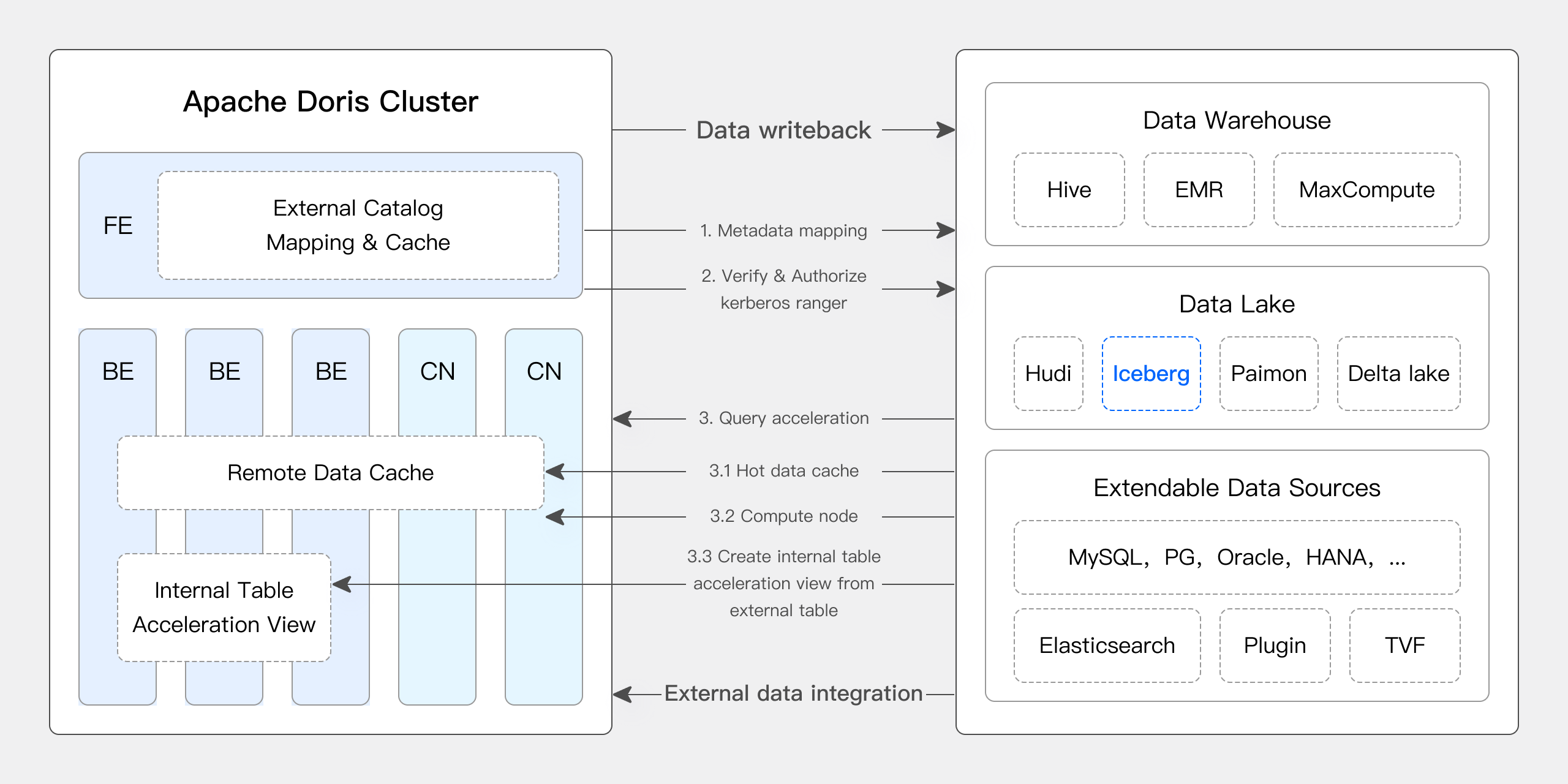
近年のバージョンでは、Apache Doris とデータレイクの連携が強化され、成熟したデータレイクハウスソリューションが提供されています。
- バージョン 0.15 以降、Apache Doris は Hive と Iceberg の外部テーブルを導入し、データレイクにおける Apache Iceberg との連携を模索してきました。
- バージョン 1.2 から、Apache Doris は Multi-Catalog 機能を正式に導入しました。さまざまなデータソースのメタデータの自動マッピングとデータアクセスが可能になり、外部データの読み取りやクエリ実行についても多くの性能最適化が行われました。これにより、高速で使いやすいレイクハウスアーキテクチャを構築できます。
- バージョン 2.1 では、Apache Doris はデータレイクハウスアーキテクチャをさらに強化しました。主要なデータレイク形式(Hudi、Iceberg、Paimon など)の読み書き能力を高め、複数の SQL 方言との互換性を導入し、既存システムから Apache Doris へのシームレスな移行を可能にしました。データサイエンスや大規模なデータ読み取りの用途向けには、高速な Arrow Flight 読み取りインターフェースを統合し、データ転送効率を 100 倍に向上させました。
Apache Doris & Iceberg
Apache Iceberg は、オープンソースで高性能かつ信頼性の高いデータレイクのテーブル形式であり、大規模データの分析と管理を可能にします。Apache Doris を含む主要なクエリエンジンをサポートし、HDFS や各種オブジェクトストレージに対応しています。また、ACID 準拠、スキーマ進化、高度なフィルタリング、隠しパーティション、パーティションレイアウトの進化などの機能により、高性能なクエリ、データの信頼性と一貫性、タイムトラベルやバージョンのロールバックといった柔軟性を実現します。
Apache Doris は、Iceberg の主要な機能をネイティブにサポートしています。
- Hive Metastore、Hadoop、REST、Glue、Google Dataproc Metastore、DLF など、複数の種類の Iceberg Catalog をサポートします。
- Iceberg V1/V2 テーブル形式と、Position Delete および Equality Delete ファイルの読み取りをネイティブにサポートします。
- テーブル関数を使用して、Iceberg テーブルのスナップショット履歴を照会できます。
- タイムトラベル機能をサポートします。
- Iceberg テーブルエンジンをネイティブにサポートします。Apache Doris から Iceberg テーブルを直接作成・管理し、データを書き込めます。多様なパーティション Transform 関数に対応し、隠しパーティションやパーティションレイアウトの進化などを利用できます。
- Iceberg V2 テーブルで、
UPDATE、DELETE、MERGE INTOを含む行レベルの DML をサポートします。
Apache Doris と Apache Iceberg を組み合わせることで、効率的なデータレイクハウスをすばやく構築し、さまざまなリアルタイムデータ分析・処理のニーズに柔軟に対応できます。
- Doris の高性能なクエリエンジンを使い、Iceberg テーブルのデータをほかのデータソースと結合して分析することで、統合されたフェデレーションデータ分析プラットフォームを構築できます。
- Doris から Iceberg テーブルを直接管理・構築し、データのクレンジング、処理、Iceberg テーブルへの書き込みを Doris 上で完結させることで、データレイク向けの統合データ処理プラットフォームを構築できます。
- Iceberg テーブルエンジンを介して Doris のデータをほかの上流・下流システムと共有し、さらに処理することで、統合されたオープンデータストレージプラットフォームを構築できます。
今後、Apache Iceberg は Apache Doris のネイティブなテーブルエンジンの一つとして、データレイク形式のデータに対して、より包括的な分析・管理機能を提供していきます。Apache Doris はすでに INSERT、UPDATE、DELETE、MERGE INTO など、Iceberg の主要な行レベル DML をサポートしています。書き込み時のソート、増分データの読み取り、メタデータ管理などの機能も引き続き改善し、統合された高性能なリアルタイムデータレイクプラットフォームを構築していきます。
詳細については、Iceberg Catalog を参照してください。
ユーザーガイド
このドキュメントでは、Docker 環境で Apache Doris と Apache Iceberg のテスト・デモ環境をすばやく構築し、各機能を使用する方法を説明します。
このドキュメントで使用するスクリプトとコードは、https://github.com/apache/doris/tree/master/samples/datalake/iceberg_and_paimon から入手できます。
01 環境の準備
このドキュメントでは Docker Compose を使用して、次のコンポーネントとバージョンをデプロイします。
| コンポーネント | バージョン |
|---|---|
| Apache Doris | デフォルトは 2.1.5、変更可能 |
| Apache Iceberg | 1.4.3 |
| MinIO | RELEASE.2024-04-29T09-56-05Z |
02 環境のデプロイ
-
すべてのコンポーネントを起動します。
bash ./start_all.sh -
起動後、次のスクリプトを使用して Doris のコマンドラインにログインできます。
-- login doris
bash ./start_doris_client.sh
03 Iceberg テーブルの作成
Doris のコマンドラインにログインすると、Doris クラスターには Iceberg という名前の Iceberg Catalog がすでに作成されています(SHOW CATALOGS または SHOW CREATE CATALOG iceberg で確認できます)。この Catalog の作成文は次のとおりです。
-- Already created
CREATE CATALOG `iceberg` PROPERTIES (
    "type" = "iceberg",
    "iceberg.catalog.type" = "rest",
    "warehouse" = "s3://warehouse/",
    "uri" = "http://rest:8181",
    "s3.access_key" = "admin",
    "s3.secret_key" = "password",
    "s3.endpoint" = "http://minio:9000"
);
Iceberg Catalog にデータベースと Iceberg テーブルを作成します。
mysql> SWITCH iceberg;
Query OK, 0 rows affected (0.00 sec)

mysql> CREATE DATABASE nyc;
Query OK, 0 rows affected (0.12 sec)

mysql> CREATE TABLE iceberg.nyc.taxis
       (
           vendor_id BIGINT,
           trip_id BIGINT,
           trip_distance FLOAT,
           fare_amount DOUBLE,
           store_and_fwd_flag STRING,
           ts DATETIME
       )
       PARTITION BY LIST (vendor_id, DAY(ts)) ()
       PROPERTIES (
           "compression-codec" = "zstd",
           "write-format" = "parquet"
       );
Query OK, 0 rows affected (0.15 sec)
04 データの挿入
Iceberg テーブルにデータを挿入します。
mysql> INSERT INTO iceberg.nyc.taxis
       VALUES
        (1, 1000371, 1.8, 15.32, 'N', '2024-01-01 9:15:23'),
        (2, 1000372, 2.5, 22.15, 'N', '2024-01-02 12:10:11'),
        (2, 1000373, 0.9, 9.01, 'N', '2024-01-01 3:25:15'),
        (1, 1000374, 8.4, 42.13, 'Y', '2024-01-03 7:12:33');
Query OK, 4 rows affected (1.61 sec)
{'status':'COMMITTED', 'txnId':'10085'}
CREATE TABLE AS SELECT を使用して Iceberg テーブルを作成します。
mysql> CREATE TABLE iceberg.nyc.taxis2 AS SELECT * FROM iceberg.nyc.taxis;
Query OK, 4 rows affected (0.25 sec)
{'status':'COMMITTED', 'txnId':'10088'}
05 データのクエリ
-
単純なクエリ
mysql> SELECT * FROM iceberg.nyc.taxis;
+-----------+---------+---------------+-------------+--------------------+----------------------------+
| vendor_id | trip_id | trip_distance | fare_amount | store_and_fwd_flag | ts                         |
+-----------+---------+---------------+-------------+--------------------+----------------------------+
|         1 | 1000374 |           8.4 |       42.13 | Y                  | 2024-01-03 07:12:33.000000 |
|         1 | 1000371 |           1.8 |       15.32 | N                  | 2024-01-01 09:15:23.000000 |
|         2 | 1000373 |           0.9 |        9.01 | N                  | 2024-01-01 03:25:15.000000 |
|         2 | 1000372 |           2.5 |       22.15 | N                  | 2024-01-02 12:10:11.000000 |
+-----------+---------+---------------+-------------+--------------------+----------------------------+
4 rows in set (0.37 sec)

mysql> SELECT * FROM iceberg.nyc.taxis2;
+-----------+---------+---------------+-------------+--------------------+----------------------------+
| vendor_id | trip_id | trip_distance | fare_amount | store_and_fwd_flag | ts                         |
+-----------+---------+---------------+-------------+--------------------+----------------------------+
|         1 | 1000374 |           8.4 |       42.13 | Y                  | 2024-01-03 07:12:33.000000 |
|         1 | 1000371 |           1.8 |       15.32 | N                  | 2024-01-01 09:15:23.000000 |
|         2 | 1000373 |           0.9 |        9.01 | N                  | 2024-01-01 03:25:15.000000 |
|         2 | 1000372 |           2.5 |       22.15 | N                  | 2024-01-02 12:10:11.000000 |
+-----------+---------+---------------+-------------+--------------------+----------------------------+
4 rows in set (0.35 sec) -
パーティションプルーニング
mysql> SELECT * FROM iceberg.nyc.taxis where vendor_id = 2 and ts >= '2024-01-01' and ts < '2024-01-02';
+-----------+---------+---------------+-------------+--------------------+----------------------------+
| vendor_id | trip_id | trip_distance | fare_amount | store_and_fwd_flag | ts                         |
+-----------+---------+---------------+-------------+--------------------+----------------------------+
|         2 | 1000373 |           0.9 |        9.01 | N                  | 2024-01-01 03:25:15.000000 |
+-----------+---------+---------------+-------------+--------------------+----------------------------+
1 row in set (0.06 sec)

mysql> EXPLAIN VERBOSE SELECT * FROM iceberg.nyc.taxis where vendor_id = 2 and ts >= '2024-01-01' and ts < '2024-01-02';

....
|   0:VICEBERG_SCAN_NODE(71)
|      table: taxis
|      predicates: (ts[#5] < '2024-01-02 00:00:00'), (vendor_id[#0] = 2), (ts[#5] >= '2024-01-01 00:00:00')
|      inputSplitNum=1, totalFileSize=3539, scanRanges=1
|      partition=1/0
|      backends:
|        10002
|          s3://warehouse/wh/nyc/taxis/data/vendor_id=2/ts_day=2024-01-01/40e6ca404efa4a44-b888f23546d3a69c_5708e229-2f3d-4b68-a66b-44298a9d9815-0.zstd.parquet start: 0 length: 3539
|      cardinality=6, numNodes=1
|      pushdown agg=NONE
|      icebergPredicatePushdown=
|           ref(name="ts") < 1704153600000000
|           ref(name="vendor_id") == 2
|           ref(name="ts") >= 1704067200000000
....
EXPLAIN VERBOSE文の結果を見ると、述語条件vendor_id = 2 and ts >= '2024-01-01' and ts < '2024-01-02'が最終的に一つのパーティション(partition=1/0)だけに一致していることがわかります。また、テーブル作成時にパーティション Transform 関数
DAY(ts)を指定したため、データ中の元の値2024-01-01 03:25:15.000000が、ファイルディレクトリ内のパーティション情報ts_day=2024-01-01に変換されていることも確認できます。
06 タイムトラベル
さらに数行のデータを挿入します。
INSERT INTO iceberg.nyc.taxis VALUES (1, 1000375, 8.8, 55.55, 'Y', '2024-01-01 8:10:22'), (3, 1000376, 7.4, 32.35, 'N', '2024-01-02  1:14:45');
Query OK, 2 rows affected (0.17 sec)
{'status':'COMMITTED', 'txnId':'10086'}

mysql> SELECT * FROM iceberg.nyc.taxis;
+-----------+---------+---------------+-------------+--------------------+----------------------------+
| vendor_id | trip_id | trip_distance | fare_amount | store_and_fwd_flag | ts                         |
+-----------+---------+---------------+-------------+--------------------+----------------------------+
|         3 | 1000376 |           7.4 |       32.35 | N                  | 2024-01-02 01:14:45.000000 |
|         2 | 1000372 |           2.5 |       22.15 | N                  | 2024-01-02 12:10:11.000000 |
|         1 | 1000374 |           8.4 |       42.13 | Y                  | 2024-01-03 07:12:33.000000 |
|         1 | 1000371 |           1.8 |       15.32 | N                  | 2024-01-01 09:15:23.000000 |
|         1 | 1000375 |           8.8 |       55.55 | Y                  | 2024-01-01 08:10:22.000000 |
|         2 | 1000373 |           0.9 |        9.01 | N                  | 2024-01-01 03:25:15.000000 |
+-----------+---------+---------------+-------------+--------------------+----------------------------+
6 rows in set (0.11 sec)
$snapshots システムテーブルを使用して、テーブルのスナップショット情報を照会します(バージョン 4.1.4 より前は iceberg_meta() テーブル関数も使用できましたが、バージョン 4.1.4 以降は削除されています)。
mysql> select * from iceberg.nyc.taxis$snapshots;
+---------------------+---------------------+---------------------+-----------+-----------------------------------------------------------------------------------------------------------+----------------------------------------------------------------------------------------------------------------------------------------------------------------------------------------------------------------------------------------------------------------+
| committed_at        | snapshot_id         | parent_id           | operation | manifest_list                                                                                             | summary                                                                                                                                                                                                                                                        |
+---------------------+---------------------+---------------------+-----------+-----------------------------------------------------------------------------------------------------------+----------------------------------------------------------------------------------------------------------------------------------------------------------------------------------------------------------------------------------------------------------------+
| 2024-07-29 03:38:22 | 8483933166442433486 |                  -1 | append    | s3://warehouse/wh/nyc/taxis/metadata/snap-8483933166442433486-1-5f7b7736-8022-4ba1-9db2-51ae7553be4d.avro | {"added-data-files":"4","added-records":"4","added-files-size":"14156","changed-partition-count":"4","total-records":"4","total-files-size":"14156","total-data-files":"4","total-delete-files":"0","total-position-deletes":"0","total-equality-deletes":"0"} |
| 2024-07-29 03:40:23 | 4726331391239920914 | 8483933166442433486 | append    | s3://warehouse/wh/nyc/taxis/metadata/snap-4726331391239920914-1-6aa3d142-6c9c-4553-9c04-08ad4d49a4ea.avro | {"added-data-files":"2","added-records":"2","added-files-size":"7078","changed-partition-count":"2","total-records":"6","total-files-size":"21234","total-data-files":"6","total-delete-files":"0","total-position-deletes":"0","total-equality-deletes":"0"}  |
+---------------------+---------------------+---------------------+-----------+-----------------------------------------------------------------------------------------------------------+----------------------------------------------------------------------------------------------------------------------------------------------------------------------------------------------------------------------------------------------------------------+
2 rows in set (0.07 sec)
FOR VERSION AS OF 文を使用して、指定したスナップショットを照会します。
mysql> SELECT * FROM iceberg.nyc.taxis FOR VERSION AS OF 8483933166442433486;
+-----------+---------+---------------+-------------+--------------------+----------------------------+
| vendor_id | trip_id | trip_distance | fare_amount | store_and_fwd_flag | ts                         |
+-----------+---------+---------------+-------------+--------------------+----------------------------+
|         1 | 1000371 |           1.8 |       15.32 | N                  | 2024-01-01 09:15:23.000000 |
|         1 | 1000374 |           8.4 |       42.13 | Y                  | 2024-01-03 07:12:33.000000 |
|         2 | 1000372 |           2.5 |       22.15 | N                  | 2024-01-02 12:10:11.000000 |
|         2 | 1000373 |           0.9 |        9.01 | N                  | 2024-01-01 03:25:15.000000 |
+-----------+---------+---------------+-------------+--------------------+----------------------------+
4 rows in set (0.05 sec)

mysql> SELECT * FROM iceberg.nyc.taxis FOR VERSION AS OF 4726331391239920914;
+-----------+---------+---------------+-------------+--------------------+----------------------------+
| vendor_id | trip_id | trip_distance | fare_amount | store_and_fwd_flag | ts                         |
+-----------+---------+---------------+-------------+--------------------+----------------------------+
|         1 | 1000374 |           8.4 |       42.13 | Y                  | 2024-01-03 07:12:33.000000 |
|         1 | 1000375 |           8.8 |       55.55 | Y                  | 2024-01-01 08:10:22.000000 |
|         3 | 1000376 |           7.4 |       32.35 | N                  | 2024-01-02 01:14:45.000000 |
|         2 | 1000372 |           2.5 |       22.15 | N                  | 2024-01-02 12:10:11.000000 |
|         2 | 1000373 |           0.9 |        9.01 | N                  | 2024-01-01 03:25:15.000000 |
|         1 | 1000371 |           1.8 |       15.32 | N                  | 2024-01-01 09:15:23.000000 |
+-----------+---------+---------------+-------------+--------------------+----------------------------+
6 rows in set (0.04 sec)
FOR TIME AS OF 文を使用して、指定したスナップショットを照会します。
mysql> SELECT * FROM iceberg.nyc.taxis FOR TIME AS OF "2024-07-29 03:38:23";
+-----------+---------+---------------+-------------+--------------------+----------------------------+
| vendor_id | trip_id | trip_distance | fare_amount | store_and_fwd_flag | ts                         |
+-----------+---------+---------------+-------------+--------------------+----------------------------+
|         1 | 1000374 |           8.4 |       42.13 | Y                  | 2024-01-03 07:12:33.000000 |
|         1 | 1000371 |           1.8 |       15.32 | N                  | 2024-01-01 09:15:23.000000 |
|         2 | 1000372 |           2.5 |       22.15 | N                  | 2024-01-02 12:10:11.000000 |
|         2 | 1000373 |           0.9 |        9.01 | N                  | 2024-01-01 03:25:15.000000 |
+-----------+---------+---------------+-------------+--------------------+----------------------------+
4 rows in set (0.04 sec)

mysql> SELECT * FROM iceberg.nyc.taxis FOR TIME AS OF "2024-07-29 03:40:22";
+-----------+---------+---------------+-------------+--------------------+----------------------------+
| vendor_id | trip_id | trip_distance | fare_amount | store_and_fwd_flag | ts                         |
+-----------+---------+---------------+-------------+--------------------+----------------------------+
|         2 | 1000373 |           0.9 |        9.01 | N                  | 2024-01-01 03:25:15.000000 |
|         1 | 1000374 |           8.4 |       42.13 | Y                  | 2024-01-03 07:12:33.000000 |
|         2 | 1000372 |           2.5 |       22.15 | N                  | 2024-01-02 12:10:11.000000 |
|         1 | 1000371 |           1.8 |       15.32 | N                  | 2024-01-01 09:15:23.000000 |
+-----------+---------+---------------+-------------+--------------------+----------------------------+
4 rows in set (0.05 sec)
07 Iceberg の行レベル DML
行レベル DML(UPDATE、DELETE、MERGE INTO)を使用するには、対象テーブルが Iceberg V2 である必要があります。タイムトラベルのセクションで使用した iceberg.nyc.taxis の状態を変えないように、次の例では iceberg.nyc.taxis2 から専用のテーブルを初期化します。
mysql> CREATE TABLE iceberg.nyc.taxis_dml
       (
           vendor_id BIGINT,
           trip_id BIGINT,
           trip_distance FLOAT,
           fare_amount DOUBLE,
           store_and_fwd_flag STRING,
           ts DATETIME
       )
       PARTITION BY LIST (vendor_id, DAY(ts)) ()
       PROPERTIES (
           "format-version" = "2",
           "compression-codec" = "zstd",
           "write-format" = "parquet"
       );
Query OK, 0 rows affected (0.18 sec)

mysql> INSERT INTO iceberg.nyc.taxis_dml SELECT * FROM iceberg.nyc.taxis2;
Query OK, 4 rows affected (0.32 sec)
{'status':'COMMITTED', 'txnId':'10089'}
Iceberg テーブルの行を更新します。
mysql> UPDATE iceberg.nyc.taxis_dml
       SET fare_amount = fare_amount + 3,
           store_and_fwd_flag = 'Y'
       WHERE trip_id = 1000371;
Query OK, 1 row affected (0.44 sec)
{'status':'COMMITTED', 'txnId':'10090'}

mysql> SELECT trip_id, fare_amount, store_and_fwd_flag
       FROM iceberg.nyc.taxis_dml
       WHERE trip_id = 1000371;
+---------+-------------+--------------------+
| trip_id | fare_amount | store_and_fwd_flag |
+---------+-------------+--------------------+
| 1000371 |       18.32 | Y                  |
+---------+-------------+--------------------+
1 row in set (0.07 sec)
Iceberg テーブルから行を削除します。
mysql> DELETE FROM iceberg.nyc.taxis_dml
       WHERE trip_id = 1000373;
Query OK, 1 row affected (0.31 sec)
{'status':'COMMITTED', 'txnId':'10091'}

mysql> SELECT trip_id
       FROM iceberg.nyc.taxis_dml
       ORDER BY trip_id;
+---------+
| trip_id |
+---------+
| 1000371 |
| 1000372 |
| 1000374 |
+---------+
3 rows in set (0.06 sec)
MERGE INTO を使用して、一つの文で既存の行を更新し、新しい行を挿入します。
mysql> MERGE INTO iceberg.nyc.taxis_dml t
       USING (
           SELECT 2 AS vendor_id, 1000372 AS trip_id, 2.5 AS trip_distance,
                  30.00 AS fare_amount, 'Y' AS store_and_fwd_flag,
                  CAST('2024-01-02 12:10:11' AS DATETIME) AS ts
           UNION ALL
           SELECT 3, 1000380, 6.7, 28.50, 'N', CAST('2024-01-04 10:20:00' AS DATETIME)
       ) s
       ON t.trip_id = s.trip_id
       WHEN MATCHED THEN UPDATE SET
           fare_amount = s.fare_amount,
           store_and_fwd_flag = s.store_and_fwd_flag
       WHEN NOT MATCHED THEN INSERT
           (vendor_id, trip_id, trip_distance, fare_amount, store_and_fwd_flag, ts)
       VALUES
           (s.vendor_id, s.trip_id, s.trip_distance, s.fare_amount, s.store_and_fwd_flag, s.ts);
Query OK, 2 rows affected (0.53 sec)
{'status':'COMMITTED', 'txnId':'10092'}

mysql> SELECT vendor_id, trip_id, fare_amount, store_and_fwd_flag
       FROM iceberg.nyc.taxis_dml
       ORDER BY trip_id;
+-----------+---------+-------------+--------------------+
| vendor_id | trip_id | fare_amount | store_and_fwd_flag |
+-----------+---------+-------------+--------------------+
|         1 | 1000371 |       18.32 | Y                  |
|         2 | 1000372 |       30.00 | Y                  |
|         1 | 1000374 |       42.13 | Y                  |
|         3 | 1000380 |       28.50 | N                  |
+-----------+---------+-------------+--------------------+
4 rows in set (0.09 sec)
08 PyIceberg との連携
Doris 2.1.8/3.0.4 以降を使用してください。
前の例の状態を変えないように、以下の例では nyc.taxis2 を使用します。
Iceberg テーブルを読み込みます。
from pyiceberg.catalog import load_catalog

catalog = load_catalog(
	"iceberg",
	**{
		"warehouse" = "warehouse",
		"uri" = "http://rest:8181",
		"s3.access-key-id" = "admin",
		"s3.secret-access-key" = "password",
		"s3.endpoint" = "http://minio:9000"
	},
)
table = catalog.load_table("nyc.taxis2")
テーブルを Arrow Table として読み取ります。
print(table.scan().to_arrow())

pyarrow.Table
vendor_id: int64
trip_id: int64
trip_distance: float
fare_amount: double
store_and_fwd_flag: large_string
ts: timestamp[us]
----
vendor_id: [[1],[1],[2],[2]]
trip_id: [[1000371],[1000374],[1000373],[1000372]]
trip_distance: [[1.8],[8.4],[0.9],[2.5]]
fare_amount: [[15.32],[42.13],[9.01],[22.15]]
store_and_fwd_flag: [["N"],["Y"],["N"],["N"]]
ts: [[2024-01-01 09:15:23.000000],[2024-01-03 07:12:33.000000],[2024-01-01 03:25:15.000000],[2024-01-02 12:10:11.000000]]
テーブルを Pandas DataFrame として読み取ります。
print(table.scan().to_pandas())

vendor_id  trip_id  trip_distance  fare_amount store_and_fwd_flag                    ts
0          1  1000371            1.8        15.32                  N   2024-01-01 09:15:23
1          1  1000374            8.4        42.13                  Y   2024-01-03 07:12:33
2          2  1000373            0.9         9.01                  N   2024-01-01 03:25:15
3          2  1000372            2.5        22.15                  N   2024-01-02 12:10:11
テーブルを Polars DataFrame として読み取ります。
import polars as pl

print(pl.scan_iceberg(table).collect())

shape: (4, 6)
┌───────────┬─────────┬───────────────┬─────────────┬────────────────────┬─────────────────────┐
│ vendor_id ┆ trip_id ┆ trip_distance ┆ fare_amount ┆ store_and_fwd_flag ┆ ts                  │
│ ---       ┆ ---     ┆ ---           ┆ ---         ┆ ---                ┆ ---                 │
│ i64       ┆ i64     ┆ f32           ┆ f64         ┆ str                ┆ datetime[μs]        │
╞═══════════╪═════════╪═══════════════╪═════════════╪════════════════════╪═════════════════════╡
│ 1         ┆ 1000371 ┆ 1.8           ┆ 15.32       ┆ N                  ┆ 2024-01-01 09:15:23 │
│ 1         ┆ 1000374 ┆ 8.4           ┆ 42.13       ┆ Y                  ┆ 2024-01-03 07:12:33 │
│ 2         ┆ 1000373 ┆ 0.9           ┆ 9.01        ┆ N                  ┆ 2024-01-01 03:25:15 │
│ 2         ┆ 1000372 ┆ 2.5           ┆ 22.15       ┆ N                  ┆ 2024-01-02 12:10:11 │
└───────────┴─────────┴───────────────┴─────────────┴────────────────────┴─────────────────────┘
PyIceberg で Iceberg テーブルに書き込む方法については、手順を参照してください。
09 付録
PyIceberg による Iceberg テーブルへの書き込み
Iceberg テーブルを読み込みます。
from pyiceberg.catalog import load_catalog

catalog = load_catalog(
	"iceberg",
	**{
		"warehouse" = "warehouse",
		"uri" = "http://rest:8181",
		"s3.access-key-id" = "admin",
		"s3.secret-access-key" = "password",
		"s3.endpoint" = "http://minio:9000"
	},
)
table = catalog.load_table("nyc.taxis2")
Arrow Table を使用してテーブルに書き込みます。
import pyarrow as pa

df = pa.Table.from_pydict(
	{
		"vendor_id": pa.array([1, 2, 2, 1], pa.int64()),
		"trip_id": pa.array([1000371, 1000372, 1000373, 1000374], pa.int64()),
		"trip_distance": pa.array([1.8, 2.5, 0.9, 8.4], pa.float32()),
		"fare_amount": pa.array([15.32, 22.15, 9.01, 42.13], pa.float64()),
		"store_and_fwd_flag": pa.array(["N", "N", "N", "Y"], pa.string()),
		"ts": pa.compute.strptime(
			["2024-01-01 9:15:23", "2024-01-02 12:10:11", "2024-01-01 3:25:15", "2024-01-03 7:12:33"],
			"%Y-%m-%d %H:%M:%S",
			"us",
		),
	}
)
table.append(df)
Pandas DataFrame を使用してテーブルに書き込みます。
import pyarrow as pa
import pandas as pd

df = pd.DataFrame(
	{
		"vendor_id": pd.Series([1, 2, 2, 1]).astype("int64[pyarrow]"),
		"trip_id": pd.Series([1000371, 1000372, 1000373, 1000374]).astype("int64[pyarrow]"),
		"trip_distance": pd.Series([1.8, 2.5, 0.9, 8.4]).astype("float32[pyarrow]"),
		"fare_amount": pd.Series([15.32, 22.15, 9.01, 42.13]).astype("float64[pyarrow]"),
		"store_and_fwd_flag": pd.Series(["N", "N", "N", "Y"]).astype("string[pyarrow]"),
		"ts": pd.Series(["2024-01-01 9:15:23", "2024-01-02 12:10:11", "2024-01-01 3:25:15", "2024-01-03 7:12:33"]).astype("timestamp[us][pyarrow]"),
	}
)
table.append(pa.Table.from_pandas(df))
Polars DataFrame を使用してテーブルに書き込みます。
import polars as pl

df = pl.DataFrame(
	{
		"vendor_id": [1, 2, 2, 1],
		"trip_id": [1000371, 1000372, 1000373, 1000374],
		"trip_distance": [1.8, 2.5, 0.9, 8.4],
		"fare_amount": [15.32, 22.15, 9.01, 42.13],
		"store_and_fwd_flag": ["N", "N", "N", "Y"],
		"ts": ["2024-01-01 9:15:23", "2024-01-02 12:10:11", "2024-01-01 3:25:15", "2024-01-03 7:12:33"],
	},
	{
		"vendor_id": pl.Int64,
		"trip_id": pl.Int64,
		"trip_distance": pl.Float32,
		"fare_amount": pl.Float64,
		"store_and_fwd_flag": pl.String,
		"ts": pl.String,
	},
).with_columns(pl.col("ts").str.strptime(pl.Datetime, "%Y-%m-%d %H:%M:%S"))
table.append(df.to_arrow())