Doris와 Hudi 사용하기
새로운 개방형 데이터 관리 아키텍처인 Data Lakehouse는 데이터 웨어하우스의 고성능 및 실시간 처리 기능과 데이터 레이크의 낮은 비용 및 유연성을 결합하여, 사용자가 다양한 데이터 처리 및 분석 요구 사항을 더 편리하게 충족할 수 있도록 돕습니다. 기업의 빅데이터 시스템에서 활용이 점점 늘고 있습니다.
Apache Doris는 최근 버전에서 데이터 레이크와의 통합을 강화하며 성숙한 Data Lakehouse 솔루션으로 발전해 왔습니다.
- Apache Doris는 0.15 버전부터 Hive와 Iceberg 외부 테이블을 도입하여 데이터 레이크에서 Apache Iceberg와 결합할 수 있는 가능성을 탐색해 왔습니다.
- Apache Doris는 1.2 버전부터 Multi-Catalog 기능을 정식으로 도입하여 다양한 데이터 소스의 메타데이터 자동 매핑과 데이터 접근을 지원하고, 외부 데이터 읽기와 쿼리 실행 성능을 대폭 최적화했습니다. 이를 통해 빠르고 사용하기 편리한 Lakehouse 아키텍처를 구축하는 데 필요한 역량을 갖추었습니다.
- Apache Doris의 Data Lakehouse 아키텍처는 2.1 버전에서 크게 강화되었습니다. 주요 데이터 레이크 형식(Hudi, Iceberg, Paimon 등)의 읽기 및 쓰기 기능을 개선하고, 여러 SQL 방언과의 호환성을 도입하여 기존 시스템에서 Apache Doris로 원활하게 마이그레이션할 수 있도록 했습니다. 데이터 과학 및 대규모 데이터 읽기 시나리오를 위해 Doris는 Arrow Flight 고속 읽기 인터페이스를 통합하여 데이터 전송 효율을 100배 높였습니다.
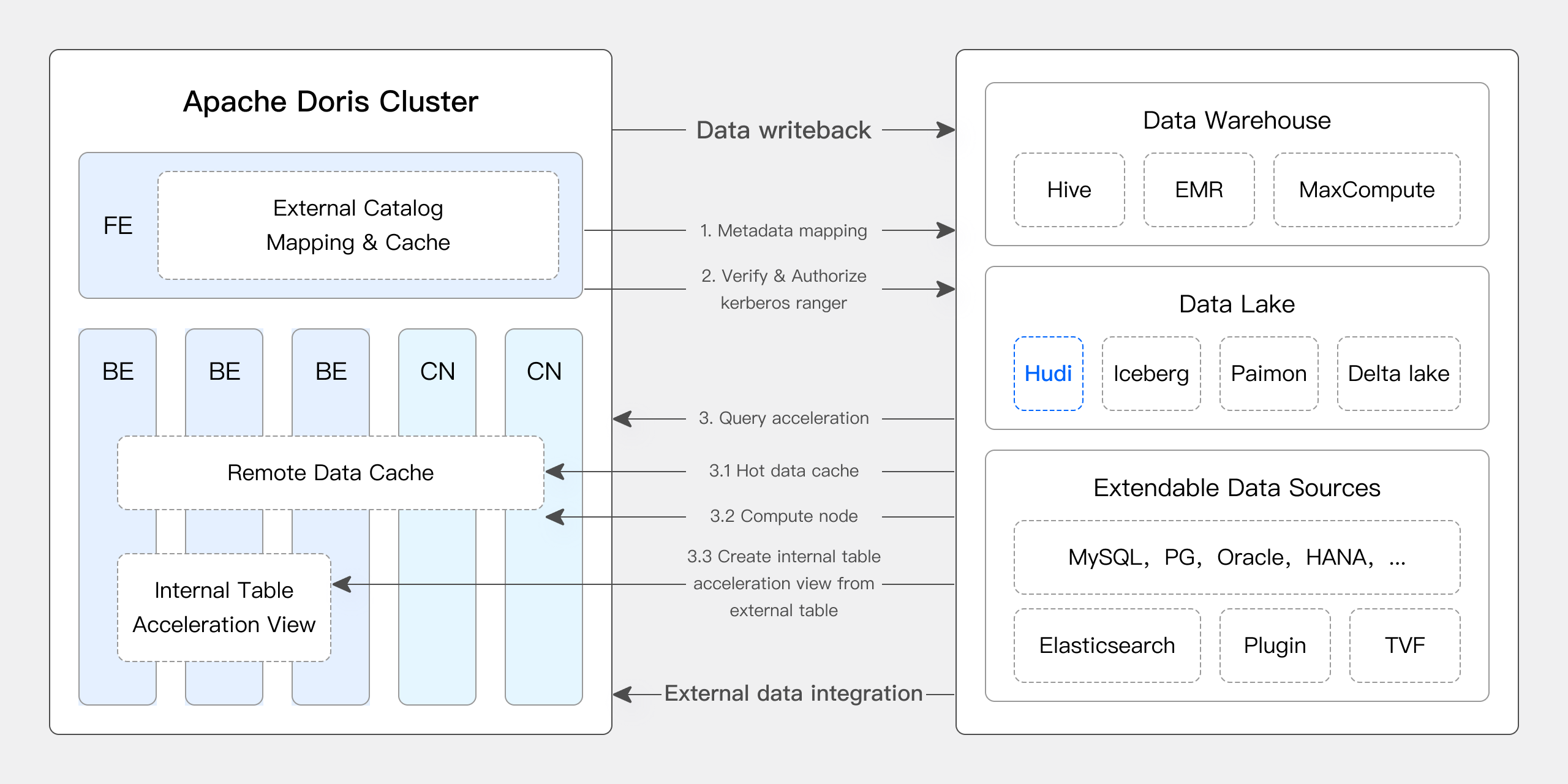
Apache Doris & Hudi
Apache Hudi는 현재 가장 널리 사용되는 개방형 데이터 레이크 형식 중 하나이자 트랜잭션을 지원하는 데이터 레이크 관리 플랫폼으로, Apache Doris를 비롯한 다양한 주요 쿼리 엔진을 지원합니다.
Apache Doris도 Apache Hudi 데이터 테이블을 읽는 기능을 강화했습니다.
- Copy on Write 테이블 지원: Snapshot Query
- Merge on Read 테이블 지원: Snapshot Queries, Read Optimized Queries
- Time Travel 지원
- Incremental Read 지원
Apache Doris의 고성능 쿼리 실행 기능과 Apache Hudi의 실시간 데이터 관리 기능을 활용하면 효율적이고 유연하며 비용 효율적인 데이터 쿼리와 분석이 가능합니다. 또한 강력한 데이터 계보 추적, 감사 및 증분 처리 기능도 제공합니다. 여러 커뮤니티 사용자가 실제 비즈니스 환경에서 Apache Doris와 Apache Hudi의 조합을 검증하고 도입해 왔습니다.
- 실시간 데이터 분석 및 처리: 금융, 광고, 전자상거래 등의 산업에서 실시간 데이터 업데이트와 쿼리 분석 같은 일반적인 시나리오에는 실시간 데이터 처리가 필요합니다. Hudi는 데이터 일관성과 신뢰성을 보장하면서 실시간 데이터 업데이트 및 관리를 지원합니다. Doris는 대규모 데이터 쿼리 요청을 실시간으로 효율적으로 처리하므로, 둘을 함께 사용하면 실시간 데이터 분석 및 처리 요구 사항을 효과적으로 충족할 수 있습니다.
- 데이터 계보 추적 및 감사: 금융과 의료처럼 데이터 보안 및 정확성에 대한 요구 수준이 높은 산업에서는 데이터 계보 추적과 감사가 핵심 기능입니다. Hudi는 과거 데이터 상태를 확인할 수 있는 Time Travel 기능을 제공합니다. 이를 Apache Doris의 효율적인 쿼리 기능과 결합하면 원하는 시점의 데이터를 빠르게 분석하여 정확한 계보 추적과 감사를 수행할 수 있습니다.
- 증분 데이터 읽기 및 분석: 대규모 데이터 분석에서는 방대한 데이터 양과 잦은 업데이트가 어려움이 되는 경우가 많습니다. Hudi는 증분 데이터 읽기를 지원하므로 전체 데이터를 업데이트하지 않고 변경된 데이터만 처리할 수 있습니다. 또한 Apache Doris의 Incremental Read 기능은 이 과정을 개선하여 데이터 처리 및 분석 효율을 크게 높입니다.
- 데이터 소스 간 통합 쿼리: 많은 기업은 다양한 데이터베이스에 저장된 복잡한 데이터 소스를 보유하고 있습니다. Doris의 Multi-Catalog 기능은 다양한 데이터 소스의 자동 매핑과 동기화를 지원하여 데이터 소스 간 통합 쿼리를 가능하게 합니다. 따라서 분석을 위해 여러 소스의 데이터를 조회하고 통합해야 하는 기업은 데이터 흐름 경로를 크게 단축하고 업무 효율을 높일 수 있습니다.
이 문서에서는 Docker 환경에서 Apache Doris + Apache Hudi 테스트 및 시연 환경을 빠르게 구축하는 방법을 소개하고, 빠르게 시작할 수 있도록 다양한 작업을 시연합니다.
자세한 내용은 Hudi Catalog를 참고하세요.
사용자 가이드
이 문서에서 언급하는 모든 스크립트와 코드는 다음 주소에서 확인할 수 있습니다: https://github.com/apache/doris/tree/master/samples/datalake/hudi
01 환경 준비
이 문서에서는 Docker Compose를 사용하여 배포하며, 구성 요소와 버전은 다음과 같습니다.
| 구성 요소 | 버전 |
|---|---|
| Apache Doris | 기본값 2.1.4, 변경 가능 |
| Apache Hudi | 0.14 |
| Apache Spark | 3.4.2 |
| Apache Hive | 2.1.3 |
| MinIO | 2022-05-26T05-48-41Z |
02 환경 배포
-
Docker 네트워크 생성
sudo docker network create -d bridge hudi-net -
모든 구성 요소 시작
sudo ./start-hudi-compose.sh참고: 시작하기 전에
DORIS_PACKAGE와DORIS_DOWNLOAD_URL의 값을start-hudi-compose.sh에서 원하는 Doris 버전에 맞게 수정할 수 있습니다. 2.1.4 이상 버전을 사용하는 것이 좋습니다. -
시작한 후 다음 스크립트를 사용하여 Spark 명령줄이나 Doris 명령줄에 로그인할 수 있습니다.
-- Spark
sudo ./login-spark.sh

-- Doris
sudo ./login-doris.sh
03 데이터 준비
다음으로 Spark를 통해 Hudi 데이터를 생성합니다. 아래 코드에 나와 있듯이 클러스터에는 이미 customer라는 Hive 테이블이 있습니다. 이 Hive 테이블을 사용하여 Hudi 테이블을 생성할 수 있습니다.
-- ./login-spark.sh
spark-sql> use default;

-- create a COW table
spark-sql> CREATE TABLE customer_cow
USING hudi
TBLPROPERTIES (
  type = 'cow',
  primaryKey = 'c_custkey',
  preCombineField = 'c_name'
)
PARTITIONED BY (c_nationkey)
AS SELECT * FROM customer;

-- create a MOR table
spark-sql> CREATE TABLE customer_mor
USING hudi
TBLPROPERTIES (
  type = 'mor',
  primaryKey = 'c_custkey',
  preCombineField = 'c_name'
)
PARTITIONED BY (c_nationkey)
AS SELECT * FROM customer;
04 데이터 쿼리
아래와 같이 Doris 클러스터에는 hudi라는 Catalog가 생성되어 있습니다(SHOW CATALOGS로 확인 가능). 다음은 이 Catalog의 생성 구문입니다.
-- Already created, no need to execute again
CREATE CATALOG `hudi` PROPERTIES (
    "type"="hms",
    'hive.metastore.uris' = 'thrift://hive-metastore:9083',
    "s3.access_key" = "minio",
    "s3.secret_key" = "minio123",
    "s3.endpoint" = "http://minio:9000",
    "s3.region" = "us-east-1",
    "use_path_style" = "true"
);
-
이 Catalog를 수동으로 새로 고쳐 생성한 Hudi 테이블을 동기화합니다.
-- ./login-doris.sh
doris> REFRESH CATALOG hudi; -
Spark를 사용한 Hudi 데이터 작업은 Catalog를 새로 고치지 않아도 Doris에 즉시 반영됩니다. Spark를 사용하여 COW 테이블과 MOR 테이블에 각각 데이터 행 하나를 삽입합니다.
spark-sql> insert into customer_cow values (100, "Customer#000000100", "jD2xZzi", "25-430-914-2194", 3471.59, "BUILDING", "cial ideas. final, furious requests", 25);
spark-sql> insert into customer_mor values (100, "Customer#000000100", "jD2xZzi", "25-430-914-2194", 3471.59, "BUILDING", "cial ideas. final, furious requests", 25); -
Doris에서 방금 삽입한 데이터를 직접 쿼리할 수 있습니다.
doris> use hudi.default;
doris> select * from customer_cow where c_custkey = 100;
doris> select * from customer_mor where c_custkey = 100; -
Spark를 사용하여 이미 존재하는 c_custkey=32 데이터를 삽입하면 기존 데이터를 덮어씁니다.
spark-sql> insert into customer_cow values (32, "Customer#000000032_update", "jD2xZzi", "25-430-914-2194", 3471.59, "BUILDING", "cial ideas. final, furious requests", 15);
spark-sql> insert into customer_mor values (32, "Customer#000000032_update", "jD2xZzi", "25-430-914-2194", 3471.59, "BUILDING", "cial ideas. final, furious requests", 15); -
Doris에서 업데이트된 데이터를 쿼리할 수 있습니다.
doris> select * from customer_cow where c_custkey = 32;
+-----------+---------------------------+-----------+-----------------+-----------+--------------+-------------------------------------+-------------+
| c_custkey | c_name                    | c_address | c_phone         | c_acctbal | c_mktsegment | c_comment                           | c_nationkey |
+-----------+---------------------------+-----------+-----------------+-----------+--------------+-------------------------------------+-------------+
|        32 | Customer#000000032_update | jD2xZzi   | 25-430-914-2194 |   3471.59 | BUILDING     | cial ideas. final, furious requests |          15 |
+-----------+---------------------------+-----------+-----------------+-----------+--------------+-------------------------------------+-------------+
doris> select * from customer_mor where c_custkey = 32;
+-----------+---------------------------+-----------+-----------------+-----------+--------------+-------------------------------------+-------------+
| c_custkey | c_name                    | c_address | c_phone         | c_acctbal | c_mktsegment | c_comment                           | c_nationkey |
+-----------+---------------------------+-----------+-----------------+-----------+--------------+-------------------------------------+-------------+
|        32 | Customer#000000032_update | jD2xZzi   | 25-430-914-2194 |   3471.59 | BUILDING     | cial ideas. final, furious requests |          15 |
+-----------+---------------------------+-----------+-----------------+-----------+--------------+-------------------------------------+-------------+
05 Incremental Read
Incremental Read는 Hudi가 제공하는 기능 중 하나입니다. Incremental Read를 사용하면 지정한 시간 범위 내의 증분 데이터를 가져와 증분 처리를 수행할 수 있습니다. 이 예제에서 Doris는 c_custkey=100을 삽입한 이후 변경된 데이터를 쿼리할 수 있습니다. 아래에 표시된 데이터는 c_custkey=32로 삽입한 데이터입니다.
doris> select * from customer_cow@incr('beginTime'='20240603015018572');
+-----------+---------------------------+-----------+-----------------+-----------+--------------+-------------------------------------+-------------+
| c_custkey | c_name                    | c_address | c_phone         | c_acctbal | c_mktsegment | c_comment                           | c_nationkey |
+-----------+---------------------------+-----------+-----------------+-----------+--------------+-------------------------------------+-------------+
|        32 | Customer#000000032_update | jD2xZzi   | 25-430-914-2194 |   3471.59 | BUILDING     | cial ideas. final, furious requests |          15 |
+-----------+---------------------------+-----------+-----------------+-----------+--------------+-------------------------------------+-------------+
spark-sql> select * from hudi_table_changes('customer_cow', 'latest_state', '20240603015018572');

doris> select * from customer_mor@incr('beginTime'='20240603015058442');
+-----------+---------------------------+-----------+-----------------+-----------+--------------+-------------------------------------+-------------+
| c_custkey | c_name                    | c_address | c_phone         | c_acctbal | c_mktsegment | c_comment                           | c_nationkey |
+-----------+---------------------------+-----------+-----------------+-----------+--------------+-------------------------------------+-------------+
|        32 | Customer#000000032_update | jD2xZzi   | 25-430-914-2194 |   3471.59 | BUILDING     | cial ideas. final, furious requests |          15 |
+-----------+---------------------------+-----------+-----------------+-----------+--------------+-------------------------------------+-------------+
spark-sql> select * from hudi_table_changes('customer_mor', 'latest_state', '20240603015058442');
06 TimeTravel
Doris는 Hudi 데이터의 특정 스냅샷 버전을 쿼리할 수 있으므로 데이터에 대한 Time Travel 기능을 사용할 수 있습니다. 먼저 Spark를 사용하여 두 Hudi 테이블의 커밋 이력을 쿼리할 수 있습니다.
spark-sql> call show_commits(table => 'customer_cow', limit => 10);
20240603033556094        20240603033558249        commit        448833        0        1        1        183        0        0
20240603015444737        20240603015446588        commit        450238        0        1        1        202        1        0
20240603015018572        20240603015020503        commit        436692        1        0        1        1        0        0
20240603013858098        20240603013907467        commit        44902033        100        0        25        18751        0        0

spark-sql> call show_commits(table => 'customer_mor', limit => 10);
20240603033745977        20240603033748021        deltacommit        1240        0        1        1        0        0        0
20240603015451860        20240603015453539        deltacommit        1434        0        1        1        1        1        0
20240603015058442        20240603015100120        deltacommit        436691        1        0        1        1        0        0
20240603013918515        20240603013922961        deltacommit        44904040        100        0        25        18751        0        0
이어서 Doris에서 c_custkey=32를 조건으로 사용하여 데이터 삽입 전의 스냅샷을 쿼리할 수 있습니다. 아래와 같이 c_custkey=32인 데이터는 아직 업데이트되지 않은 상태입니다.
참고: 현재 새 옵티마이저는 Time Travel 구문을 지원하지 않습니다. 먼저
set enable_nereids_planner=false;를 실행하여 새 옵티마이저를 비활성화해야 합니다. 이 문제는 향후 버전에서 수정될 예정입니다.
doris> select * from customer_cow for time as of '20240603015018572' where c_custkey = 32 or c_custkey = 100;
+-----------+--------------------+---------------------------------------+-----------------+-----------+--------------+--------------------------------------------------+-------------+
| c_custkey | c_name             | c_address                             | c_phone         | c_acctbal | c_mktsegment | c_comment                                        | c_nationkey |
+-----------+--------------------+---------------------------------------+-----------------+-----------+--------------+--------------------------------------------------+-------------+
|        32 | Customer#000000032 | jD2xZzi UmId,DCtNBLXKj9q0Tlp2iQ6ZcO3J | 25-430-914-2194 |   3471.53 | BUILDING     | cial ideas. final, furious requests across the e |          15 |
|       100 | Customer#000000100 | jD2xZzi                               | 25-430-914-2194 |   3471.59 | BUILDING     | cial ideas. final, furious requests              |          25 |
+-----------+--------------------+---------------------------------------+-----------------+-----------+--------------+--------------------------------------------------+-------------+
-- compare with spark-sql
spark-sql> select * from customer_mor timestamp as of '20240603015018572' where c_custkey = 32 or c_custkey = 100;

doris> select * from customer_mor for time as of '20240603015058442' where c_custkey = 32 or c_custkey = 100;
+-----------+--------------------+---------------------------------------+-----------------+-----------+--------------+--------------------------------------------------+-------------+
| c_custkey | c_name             | c_address                             | c_phone         | c_acctbal | c_mktsegment | c_comment                                        | c_nationkey |
+-----------+--------------------+---------------------------------------+-----------------+-----------+--------------+--------------------------------------------------+-------------+
|       100 | Customer#000000100 | jD2xZzi                               | 25-430-914-2194 |   3471.59 | BUILDING     | cial ideas. final, furious requests              |          25 |
|        32 | Customer#000000032 | jD2xZzi UmId,DCtNBLXKj9q0Tlp2iQ6ZcO3J | 25-430-914-2194 |   3471.53 | BUILDING     | cial ideas. final, furious requests across the e |          15 |
+-----------+--------------------+---------------------------------------+-----------------+-----------+--------------+--------------------------------------------------+-------------+
spark-sql> select * from customer_mor timestamp as of '20240603015058442' where c_custkey = 32 or c_custkey = 100;
쿼리 최적화
Apache Hudi의 데이터는 크게 기준 데이터와 증분 데이터로 나눌 수 있습니다. 기준 데이터는 일반적으로 병합된 Parquet 파일이며, 증분 데이터는 INSERT, UPDATE 또는 DELETE 작업으로 생성된 데이터 변경분을 말합니다. 기준 데이터는 직접 읽을 수 있지만, 증분 데이터는 Merge on Read를 통해 읽어야 합니다.
Hudi COW 테이블을 쿼리하거나 MOR 테이블에서 Read Optimized 쿼리를 실행할 때 읽는 데이터는 기준 데이터이므로, Doris의 네이티브 Parquet Reader로 직접 읽을 수 있어 쿼리 응답이 빠릅니다. 증분 데이터의 경우 Doris는 JNI 호출을 통해 Hudi의 Java SDK에 접근해야 합니다. 최적의 쿼리 성능을 달성하기 위해 Apache Doris는 쿼리 대상 데이터를 기준 데이터와 증분 데이터로 나누고, 앞서 설명한 방식으로 각각 읽습니다.
이 최적화 방식을 검증하기 위해 아래 쿼리 예제에서 기준 데이터와 증분 데이터가 각각 얼마나 포함되어 있는지 EXPLAIN 문으로 확인할 수 있습니다. COW 테이블의 경우 데이터 샤드 101개가 모두 기준 데이터이므로(hudiNativeReadSplits=101/101), Doris의 Parquet Reader로 테이블 전체를 직접 읽을 수 있어 최상의 쿼리 성능을 제공합니다. ROW 테이블의 경우 대부분의 데이터 샤드가 기준 데이터이고(hudiNativeReadSplits=100/101) 샤드 하나만 증분 데이터이므로, 이 경우에도 우수한 쿼리 성능을 제공합니다.
-- COW table is read natively
doris> explain select * from customer_cow where c_custkey = 32;
|   0:VHUDI_SCAN_NODE(68)                                        |
|      table: customer_cow                                       |
|      predicates: (c_custkey[#5] = 32)                          |
|      inputSplitNum=101, totalFileSize=45338886, scanRanges=101 |
|      partition=26/26                                           |
|      cardinality=1, numNodes=1                                 |
|      pushdown agg=NONE                                         |
|      hudiNativeReadSplits=101/101                              |

-- MOR table: because only the base file contains `c_custkey = 32` that is updated, 100 splits are read natively, while the split with log file is read by JNI.
doris> explain select * from customer_mor where c_custkey = 32;
|   0:VHUDI_SCAN_NODE(68)                                        |
|      table: customer_mor                                       |
|      predicates: (c_custkey[#5] = 32)                          |
|      inputSplitNum=101, totalFileSize=45340731, scanRanges=101 |
|      partition=26/26                                           |
|      cardinality=1, numNodes=1                                 |
|      pushdown agg=NONE                                         |
|      hudiNativeReadSplits=100/101                              |
Spark를 사용하여 삭제 작업을 수행하면 Hudi의 기준 데이터와 증분 데이터의 변화를 더 자세히 관찰할 수 있습니다.
-- Use delete statement to see more differences
spark-sql> delete from customer_cow where c_custkey = 64;
doris> explain select * from customer_cow where c_custkey = 64;

spark-sql> delete from customer_mor where c_custkey = 64;
doris> explain select * from customer_mor where c_custkey = 64;
또한 파티션 조건을 사용하여 파티션 프루닝을 수행하면 읽을 데이터 양을 더 줄여 쿼리 속도를 높일 수 있습니다. 아래 예제에서는 파티션 조건 c_nationkey=15를 사용하여 파티션 프루닝을 수행하므로 쿼리 요청은 파티션 하나의 데이터에만 접근합니다(partition=1/26).
-- customer_xxx is partitioned by c_nationkey, we can use the partition column to prune data
doris> explain select * from customer_mor where c_custkey = 64 and c_nationkey = 15;
|   0:VHUDI_SCAN_NODE(68)                                        |
|      table: customer_mor                                       |
|      predicates: (c_custkey[#5] = 64), (c_nationkey[#12] = 15) |
|      inputSplitNum=4, totalFileSize=1798186, scanRanges=4      |
|      partition=1/26                                            |
|      cardinality=1, numNodes=1                                 |
|      pushdown agg=NONE                                         |
|      hudiNativeReadSplits=3/4                                  |