How Partitioning and Bucketing Work
This page explains how Doris distributes data across partitions, buckets, and tablets. It also covers the advanced partition and bucket modes, design recommendations, and operational commands. For a recommended starting configuration and a decision guide, start with Partitioning and Bucketing, then read this page when you want to understand the underlying model.
1. Overview
Doris distributes a table's data across the cluster in two tiers, partitions and buckets:
- Partition: horizontally divides the table into smaller subsets by column values (such as time or region), making it easier to perform query pruning and data lifecycle management.
- Bucket: further evenly distributes data within each partition into multiple data shards (Tablets), fully utilizing the parallelism of the cluster.
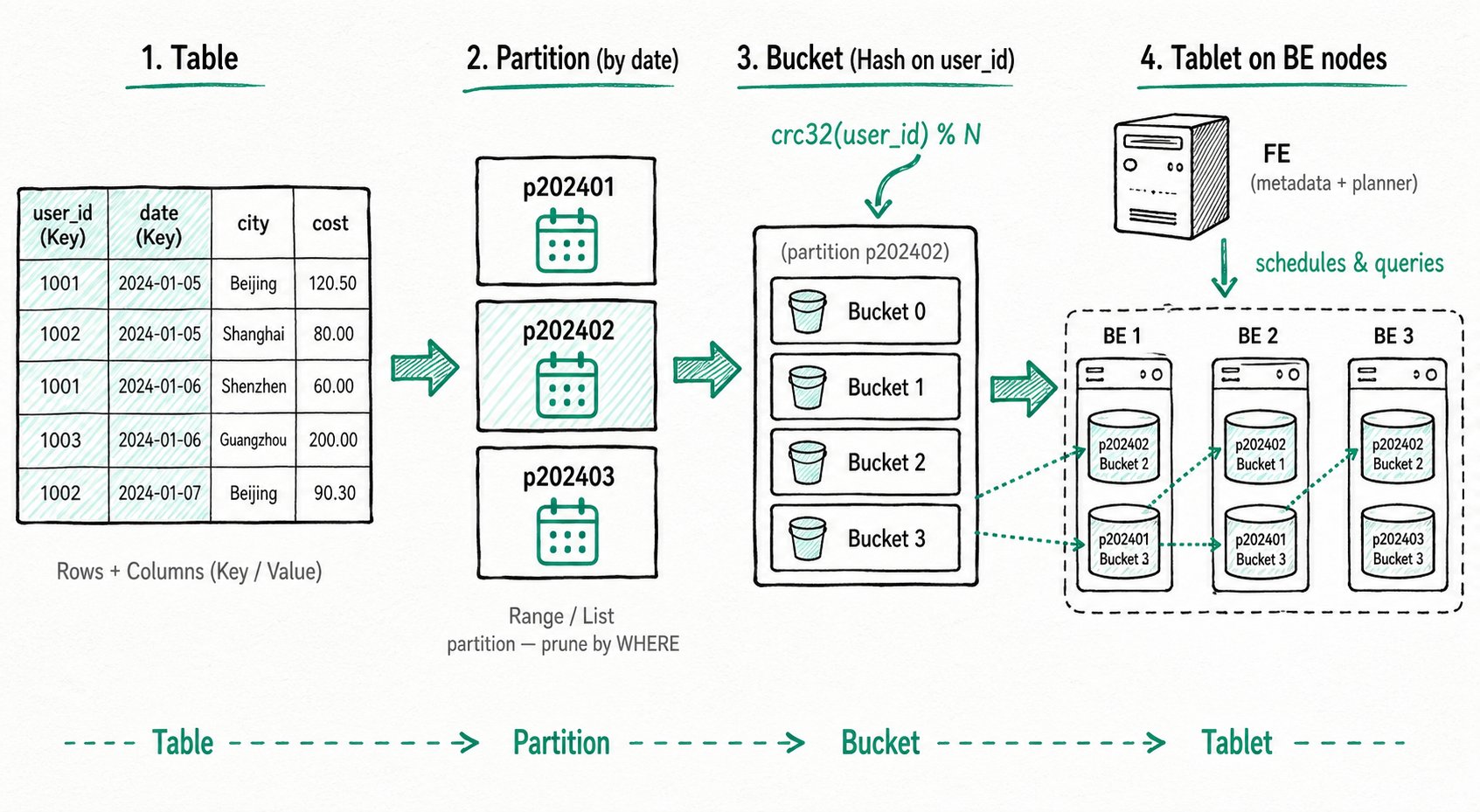
The data flow can be summarized as:
Table ──► Partition ──► Bucket ──► Tablet (data shard, stored on BE nodes)
Good partitioning and bucketing give you three things at once: faster queries (partition pruning and parallel scans), easier management (archive or clean up by time), and more even writes (reduced hotspot risk).
2. Core Concepts
2.1 Table Structure: Rows and Columns
In Doris, data is logically described in the form of tables. A table consists of rows (Row) and columns (Column):
| Concept | Description |
|---|---|
| Row | A row of user data |
| Column | Describes different fields in a row of data |
Columns can be further divided into two categories:
| Column Type | Business Mapping | Description |
|---|---|---|
| Key column | Dimension column | Columns specified after the unique key, aggregate key, or duplicate key keyword in the CREATE TABLE statement |
| Value column | Metric column | Columns other than the Key columns; the aggregation method is specified at table creation time |
In the Aggregate model, rows with identical Key columns are aggregated into one row, and the aggregation method for Value columns is specified by the user at table creation time. For more information about the Aggregate model, see Doris Data Model.
2.2 Partition
A partition divides data into smaller, mutually disjoint subsets based on the values of specific columns in the table. Each row of data belongs to exactly one specific partition, and the partition is the smallest logical management unit.
Doris supports two partition types:
- Range partition: divides by numeric or time range, commonly used for time-series data.
- List partition: divides by sets of enumerated values, commonly used to split by discrete dimensions such as region or category.
If no partition is specified at table creation time, Doris generates a default partition that is transparent to the user, containing all the data in the table.
Good partition design provides:
- Faster queries: partition pruning skips partitions that can't match the query, so Doris scans less data and does less I/O. This matters most on large datasets.
- Easier management: splitting by time or region makes archiving, cleanup, and backup simpler. For example, partitioning by time lets you manage historical and incoming data separately.
2.3 Bucket
Bucketing further divides the data within a partition into smaller, mutually disjoint data units according to certain rules. Each row of data belongs to exactly one specific bucket.
Partitions divide data by ranges or lists of column values. Bucketing aims to spread data evenly across the buckets in a partition, reducing skew and supporting parallel scans. The result depends on the bucketing method and key distribution.
Doris supports two bucketing methods:
- Hash bucketing: computes the
crc32hash of the bucketing column values and takes the modulo with the number of buckets to evenly distribute the data. - Random bucketing: randomly assigns data to buckets. When using Random bucketing, you can combine the
load_to_single_tabletparameter to optimize fast writes for small-scale data.
Good bucketing provides:
- More even data distribution: a suitable bucket key reduces the risk of skew and uneven load on nodes or disks.
- Fewer hotspots: distributing work across buckets can reduce overload and improve stability.
- Better concurrency: Doris reads different buckets in the same partition in parallel, which improves throughput.
2.4 Tablet and Node Architecture
A bucket physically corresponds to a Tablet (data shard). The Tablet is the smallest unit of data management in Doris, and is also the basic physical unit for operations such as data movement and replication.
A Doris cluster consists of two types of nodes:
- FE node (Frontend): manages cluster metadata (such as table and tablet information), and is responsible for SQL parsing and execution planning.
- BE node (Backend): stores Tablet data and is responsible for executing computation tasks. The results from BEs are aggregated and returned to the user by the FE.
When data is written and queried, partitions and buckets work together as follows:
- Data writing: data rows are first assigned to the corresponding partition according to the partitioning strategy, and then mapped to a specific Tablet within the partition according to the bucketing strategy.
- Query execution: the FE optimizer prunes irrelevant partitions and buckets based on query conditions, minimizing the scan range. When JOIN or aggregation queries are involved, cross-node Shuffle may occur. A reasonable partitioning and bucketing design (combined with Colocate when necessary) can significantly reduce Shuffle costs.
3. The First CREATE TABLE Example
Creating a table in Doris is a synchronous command. The result is returned upon completion of the SQL statement, and successful return indicates the table is created. For the complete CREATE TABLE syntax, see CREATE TABLE, or use HELP CREATE TABLE for more help information.
The following is a minimal CREATE TABLE example using Range partitioning + Hash bucketing:
-- Range Partition
CREATE TABLE example_range_tbl
(
    `user_id` LARGEINT NOT NULL COMMENT "User ID",
    `date` DATE NOT NULL COMMENT "Data ingestion date",
    `timestamp` DATETIME NOT NULL COMMENT "Data ingestion timestamp",
    `city` VARCHAR(20) COMMENT "User's city",
    `age` SMALLINT COMMENT "User age",
    `sex` TINYINT COMMENT "User gender",
    `last_visit_date` DATETIME REPLACE DEFAULT "1970-01-01 00:00:00" COMMENT "User's last visit time",
    `cost` BIGINT SUM DEFAULT "0" COMMENT "Total user spending",
    `max_dwell_time` INT MAX DEFAULT "0" COMMENT "Maximum user dwell time",
    `min_dwell_time` INT MIN DEFAULT "99999" COMMENT "Minimum user dwell time"
)
PARTITION BY RANGE(`date`)
(
    PARTITION `p201701` VALUES LESS THAN ("2017-02-01"),
    PARTITION `p201702` VALUES LESS THAN ("2017-03-01"),
    PARTITION `p201703` VALUES LESS THAN ("2017-04-01"),
    PARTITION `p2018` VALUES [("2018-01-01"), ("2019-01-01"))
)
DISTRIBUTED BY HASH(`user_id`) BUCKETS 16
PROPERTIES
(
    "replication_num" = "1"
);
Understanding the write and query process with this example:
- During writes, each row of data first falls into the corresponding Range partition by
date(for example,2017-02-15falls intop201702), and is then mapped to one of the 16 Tablets under that partition by the hash value ofuser_id. - For a query with
WHERE date = '2017-02-15', the optimizer scans only thep201702partition. Ifuser_id = 123is also added, only one Tablet is hit.
4. Advanced: Partition Modes
Besides manually declaring partitions at table creation time, Doris also supports automatic partition creation based on time scheduling (Dynamic Partition) and on-demand partition creation based on incoming data (Auto Partition). The three modes are compared as follows:
| Partition Mode | When Partitions Are Created | Applicable Scenarios |
|---|---|---|
| Manual partition | Explicitly declared at table creation, or added via ALTER | Stable partition set, requiring fine-grained control |
| Dynamic partition | Automatically created/recycled by the system based on time scheduling rules | Time-series data, where you want to automatically maintain rolling partitions for the past N days/weeks/months |
| Auto partition | Created on demand when data is written | Partition values are unpredictable (such as multi-tenant or sparse time), where pre-creation should be avoided |
For ready-to-use CREATE TABLE examples of each mode, including combining auto with dynamic partitioning, see Auto Partitioning, Dynamic Partitioning, and Manual Partitioning.
5. Advanced: Bucketing
5.1 Auto Bucketing
When you are unsure how many buckets to use, set BUCKETS AUTO and let Doris size them from an estimated data volume (estimate_partition_size). This is not suitable for extremely large tables. For details, see Data Bucketing.
5.2 Colocate
For multiple large tables that frequently perform JOIN or aggregation queries, you can enable the Colocate strategy to place data with the same bucketing column values on the same physical node, avoiding cross-node Shuffle and significantly improving query performance. For detailed usage, see the Colocate Join documentation.
6. Design Recommendations
A reasonable partitioning and bucketing design needs to balance query performance, data management, and system stability. The following are some general guidelines:
6.1 Design Goals
- Even data distribution: choose high-cardinality columns as bucketing columns to avoid data skew that overloads some nodes.
- Optimized query performance: partition pruning can greatly reduce the amount of data scanned; a reasonable number of buckets improves computation parallelism; use Colocate when necessary to reduce Shuffle costs.
- Flexible data management: partitioning by time facilitates cold/hot tiering (HDD/SSD), and storage space can be reclaimed by deleting historical partitions.
6.2 Empirical Values and Limits
- Metadata scale: the metadata of each Tablet is stored in both FE and BE, so the scale needs to be controlled reasonably:
- For every 10 million Tablets, FE needs at least about 100 GB of memory.
- The number of Tablets carried by a single BE should be less than 20,000.
- Write throughput:
- The number of buckets per partition is recommended to be < 128. Too many buckets significantly affect write performance.
- Each write should be concentrated on a small number of partitions to avoid generating too many small files from scattered writes.
- Partition/bucketing column selection:
- For partition columns, prefer time or low-cardinality enumerations.
- For bucketing columns, choose high-cardinality columns (such as
user_id) to ensure even distribution. - The data volume of a single Tablet is recommended to be between 1-10 GB.
7. Viewing and Modifying Partitions
7.1 View the CREATE TABLE Statement via SHOW CREATE TABLE
SHOW CREATE TABLE lets you view the complete CREATE TABLE statement of a table, including the partition information:
> show create table  example_range_tbl
+-------------------+---------------------------------------------------------------------------------------------------------+
| Table             | Create Table                                                                                            |
+-------------------+---------------------------------------------------------------------------------------------------------+
| example_range_tbl | CREATE TABLE `example_range_tbl` (                                                                      |
|                   |   `user_id` largeint(40) NOT NULL COMMENT 'User ID',                                                     |
|                   |   `date` date NOT NULL COMMENT 'Data ingestion date',                                                      |
|                   |   `timestamp` datetime NOT NULL COMMENT 'Data ingestion timestamp',                                             |
|                   |   `city` varchar(20) NULL COMMENT 'User city',                                                       |
|                   |   `age` smallint(6) NULL COMMENT 'User age',                                                            |
|                   |   `sex` tinyint(4) NULL COMMENT 'User gender',                                                             |
|                   |   `last_visit_date` datetime REPLACE NULL DEFAULT "1970-01-01 00:00:00" COMMENT 'User last visit time', |
|                   |   `cost` bigint(20) SUM NULL DEFAULT "0" COMMENT 'Total user spending',                                          |
|                   |   `max_dwell_time` int(11) MAX NULL DEFAULT "0" COMMENT 'Maximum user dwell time',                             |
|                   |   `min_dwell_time` int(11) MIN NULL DEFAULT "99999" COMMENT 'Minimum user dwell time'                          |
|                   | )                                                                                                       |
|                   | PARTITION BY RANGE(`date`)                                                                              |
|                   | (PARTITION p201701 VALUES [('0000-01-01'), ('2017-02-01')),                                             |
|                   | PARTITION p201702 VALUES [('2017-02-01'), ('2017-03-01')),                                              |
|                   | PARTITION p201703 VALUES [('2017-03-01'), ('2017-04-01')))                                              |
|                   | DISTRIBUTED BY HASH(`user_id`) BUCKETS 16                                                               |
|                   | PROPERTIES (                                                                                            |
|                   | "replication_allocation" = "tag.location.default: 1",                                                   |
|                   | "storage_format" = "V2",                                                                                |
|                   | "light_schema_change" = "true",                                                                         |
|                   | "disable_auto_compaction" = "false"                                                                     |
|                   | );                                                                                                      |
+-------------------+---------------------------------------------------------------------------------------------------------+
7.2 View the Partition List via SHOW PARTITIONS
SHOW PARTITIONS FROM <table_name> lets you view the partition list and detailed information of a table:
> show partitions from example_range_tbl
+-------------+---------------+----------------+---------------------+--------+--------------+--------------------------------------------------------------------------------+-----------------+---------+----------------+---------------
+---------------------+---------------------+--------------------------+----------+------------+-------------------------+-----------+
| PartitionId | PartitionName | VisibleVersion | VisibleVersionTime  | State  | PartitionKey | Range                                                                          | DistributionKey | Buckets | ReplicationNum | StorageMedium
| CooldownTime        | RemoteStoragePolicy | LastConsistencyCheckTime | DataSize | IsInMemory | ReplicaAllocation       | IsMutable |
+-------------+---------------+----------------+---------------------+--------+--------------+--------------------------------------------------------------------------------+-----------------+---------+----------------+---------------
+---------------------+---------------------+--------------------------+----------+------------+-------------------------+-----------+
| 28731       | p201701       | 1              | 2024-01-25 10:50:51 | NORMAL | date         | [types: [DATEV2]; keys: [0000-01-01]; ..types: [DATEV2]; keys: [2017-02-01]; ) | user_id         | 16      | 1              | HDD
| 9999-12-31 23:59:59 |                     |                    | 0.000    | false      | tag.location.default: 1 | true      |
| 28732       | p201702       | 1              | 2024-01-25 10:50:51 | NORMAL | date         | [types: [DATEV2]; keys: [2017-02-01]; ..types: [DATEV2]; keys: [2017-03-01]; ) | user_id         | 16      | 1              | HDD
| 9999-12-31 23:59:59 |                     |                    | 0.000    | false      | tag.location.default: 1 | true      |
| 28733       | p201703       | 1              | 2024-01-25 10:50:51 | NORMAL | date         | [types: [DATEV2]; keys: [2017-03-01]; ..types: [DATEV2]; keys: [2017-04-01]; ) | user_id         | 16      | 1              | HDD
| 9999-12-31 23:59:59 |                     |                    | 0.000    | false      | tag.location.default: 1 | true      |
+-------------+---------------+----------------+---------------------+--------+--------------+--------------------------------------------------------------------------------+-----------------+---------+----------------+---------------
+---------------------+---------------------+--------------------------+----------+------------+-------------------------+-----------+
7.3 Modify Partitions
ALTER TABLE ADD PARTITION lets you add new partitions to a table:
ALTER TABLE example_range_tbl ADD PARTITION p201704 VALUES LESS THAN("2020-05-01") DISTRIBUTED BY HASH(`user_id`) BUCKETS 5;
For more partition modification operations, see the SQL manual ALTER-TABLE-PARTITION.
7.4 Partition Lookup
The partitions table function and the information_schema.partitions system table record the partition information of the cluster. When managing partitions automatically, you can use them to extract partition information.
Find the Partition That a Given Value Belongs To
Find the partition corresponding to a value in an Auto Partition table:
mysql> select * from partitions("catalog"="internal", "database"="optest", "table"="DAILY_TRADE_VALUE") where PartitionName = auto_partition_name('range', 'year', '2008-02-03');
+-------------+-----------------+----------------+---------------------+--------+--------------+--------------------------------------------------------------------------------+-----------------+---------+----------------+---------------+---------------------+---------------------+--------------------------+-----------+------------+-------------------------+-----------+--------------------+--------------+
| PartitionId | PartitionName   | VisibleVersion | VisibleVersionTime  | State  | PartitionKey | Range                                                                          | DistributionKey | Buckets | ReplicationNum | StorageMedium | CooldownTime        | RemoteStoragePolicy | LastConsistencyCheckTime | DataSize  | IsInMemory | ReplicaAllocation       | IsMutable | SyncWithBaseTables | UnsyncTables |
+-------------+-----------------+----------------+---------------------+--------+--------------+--------------------------------------------------------------------------------+-----------------+---------+----------------+---------------+---------------------+---------------------+--------------------------+-----------+------------+-------------------------+-----------+--------------------+--------------+
|      127095 | p20080101000000 |              2 | 2024-11-14 17:29:02 | NORMAL | TRADE_DATE   | [types: [DATEV2]; keys: [2008-01-01]; ..types: [DATEV2]; keys: [2009-01-01]; ) | TRADE_DATE      |      10 |              1 | HDD           | 9999-12-31 23:59:59 |                     | \N                       | 985.000 B |          0 | tag.location.default: 1 |         1 |                  1 | \N           |
+-------------+-----------------+----------------+---------------------+--------+--------------+--------------------------------------------------------------------------------+-----------------+---------+----------------+---------------+---------------------+---------------------+--------------------------+-----------+------------+-------------------------+-----------+--------------------+--------------+
1 row in set (0.30 sec)
Find the corresponding partition in a List partition table:
mysql> select * from information_schema.partitions where TABLE_SCHEMA='optest' and TABLE_NAME='list_table1' and PARTITION_NAME=auto_partition_name('list', null);
+---------------+--------------+-------------+----------------+-------------------+----------------------------+-------------------------------+------------------+---------------------+----------------------+-------------------------+-----------------------+------------+----------------+-------------+-----------------+--------------+-----------+-------------+---------------------+---------------------+----------+-------------------+-----------+-----------------+
| TABLE_CATALOG | TABLE_SCHEMA | TABLE_NAME  | PARTITION_NAME | SUBPARTITION_NAME | PARTITION_ORDINAL_POSITION | SUBPARTITION_ORDINAL_POSITION | PARTITION_METHOD | SUBPARTITION_METHOD | PARTITION_EXPRESSION | SUBPARTITION_EXPRESSION | PARTITION_DESCRIPTION | TABLE_ROWS | AVG_ROW_LENGTH | DATA_LENGTH | MAX_DATA_LENGTH | INDEX_LENGTH | DATA_FREE | CREATE_TIME | UPDATE_TIME         | CHECK_TIME          | CHECKSUM | PARTITION_COMMENT | NODEGROUP | TABLESPACE_NAME |
+---------------+--------------+-------------+----------------+-------------------+----------------------------+-------------------------------+------------------+---------------------+----------------------+-------------------------+-----------------------+------------+----------------+-------------+-----------------+--------------+-----------+-------------+---------------------+---------------------+----------+-------------------+-----------+-----------------+
| internal      | optest       | list_table1 | pX             | NULL              |                          0 |                             0 | LIST             | NULL                | str                  | NULL                    | (NULL)                |          1 |           1266 |        1266 |               0 |            0 |         0 |           0 | 2024-11-14 19:58:45 | 0000-00-00 00:00:00 |        0 |                   |           |                 |
+---------------+--------------+-------------+----------------+-------------------+----------------------------+-------------------------------+------------------+---------------------+----------------------+-------------------------+-----------------------+------------+----------------+-------------+-----------------+--------------+-----------+-------------+---------------------+---------------------+----------+-------------------+-----------+-----------------+
1 row in set (0.24 sec)
Find Partitions with a Given Starting Point
mysql> select * from information_schema.partitions where TABLE_NAME='DAILY_TRADE_VALUE' and PARTITION_DESCRIPTION like "[('2012-01-01'),%";
+---------------+--------------+-------------------+-----------------+-------------------+----------------------------+-------------------------------+------------------+---------------------+----------------------+-------------------------+----------------------------------+------------+----------------+-------------+-----------------+--------------+-----------+-------------+---------------------+---------------------+----------+-------------------+-----------+-----------------+
| TABLE_CATALOG | TABLE_SCHEMA | TABLE_NAME        | PARTITION_NAME  | SUBPARTITION_NAME | PARTITION_ORDINAL_POSITION | SUBPARTITION_ORDINAL_POSITION | PARTITION_METHOD | SUBPARTITION_METHOD | PARTITION_EXPRESSION | SUBPARTITION_EXPRESSION | PARTITION_DESCRIPTION            | TABLE_ROWS | AVG_ROW_LENGTH | DATA_LENGTH | MAX_DATA_LENGTH | INDEX_LENGTH | DATA_FREE | CREATE_TIME | UPDATE_TIME         | CHECK_TIME          | CHECKSUM | PARTITION_COMMENT | NODEGROUP | TABLESPACE_NAME |
+---------------+--------------+-------------------+-----------------+-------------------+----------------------------+-------------------------------+------------------+---------------------+----------------------+-------------------------+----------------------------------+------------+----------------+-------------+-----------------+--------------+-----------+-------------+---------------------+---------------------+----------+-------------------+-----------+-----------------+
| internal      | optest       | DAILY_TRADE_VALUE | p20120101000000 | NULL              |                          0 |                             0 | RANGE            | NULL                | TRADE_DATE           | NULL                    | [('2012-01-01'), ('2013-01-01')) |          1 |            985 |         985 |               0 |            0 |         0 |           0 | 2024-11-14 17:29:02 | 0000-00-00 00:00:00 |        0 |                   |           |                 |
+---------------+--------------+-------------------+-----------------+-------------------+----------------------------+-------------------------------+------------------+---------------------+----------------------+-------------------------+----------------------------------+------------+----------------+-------------+-----------------+--------------+-----------+-------------+---------------------+---------------------+----------+-------------------+-----------+-----------------+
1 row in set (0.65 sec)